
Wow, I'm moving to NH tomorrow. I think the reality of it is finally starting to sink in... uh... time to start packing!
2008
Fun uses of code
The International Obfuscated C Code Contest has some cool demonstrations of what the C programming language is capable of including a tiny web server (even though it was voted Best Abuse of the Guidelines), a BASIC interpreter, and some fun uses of code. Another site, 99 Bottles of Beer, holds a collection of the song "99 Bottles of Beer" written in 1,233 different programming languages, including some historic ones like Focal-8, plain crazy ones like Procmail and sed, and more current languages like Java and Python.
Rainbow over Kendall

I just bought gas for $2.59. T…
I just bought gas for $2.59. Three months ago people laughed at me when I suggested gas under $3.
My C Program Crashed the Terminal :(
As part of my homework assignment (due tonight!), I have to write two versions of the standard library function strncpy(), one using array's and one using pointers.
The strncpy() function basically takes two arguments, *src and *dest, and copies n number of bytes from *src to *dest.
#include

// Function declarations
char *mystrncpy(char *dest, const char *src, size_t n);

main()
{
    char a[] = "this is a string";
    char b[50];

    mystrncpy(b, a, 400); // here is the problem
    printf("%sn", b);

    return 0;
}

// My attempt to replicate the strncpy() function with pointers
char *mystrncpy(char *dest, const char *src, size_t n)
{
    int i = 0;
    while (i <= n) {
        *dest = *src;
        src++;
        dest++;
        i++;
    }
}
While testing this pointer version of the function, I passed a much larger size (400) to the function than had been allocated for the destination variable (b[50]).
eris:hw3 raam$ gcc problem8.c -o problem8
eris:hw3 raam$ ./problem8
this is a string
Segmentation fault
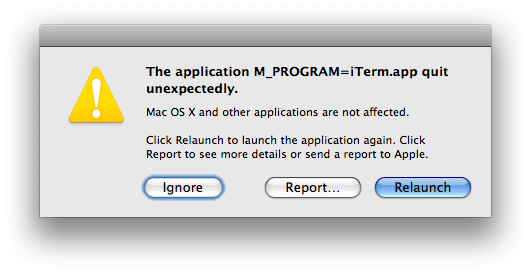
There is no better way to tell me my function needs more work than to stick a big "Application quit unexpectedly" message in my face! (And thankfully, my entire iTerm app did not crash.)
I wrote a post a few weeks ago about how eerily close C variables are to the machine, and the way this program crashed further confirms that point. I can't imagine the kinds of nasty things I will be able to do once I learn more advanced C functions. 😀
Apple Scoffs at Budget Laptops
I came across a news article on Reuters that quotes Steve Jobs as saying that Apple doesn't know how to "make a $500 computer that's not a piece of junk."
Some fear that Apple may be more susceptible to an economic downturn because it charges premium prices for its products. But Jobs said the company has no interest in going down-market, and he scoffed at so-called netbooks, which are stripped-down, budget laptops.
"There are some customers which we choose not to serve. We don't know how to make a $500 computer that's not a piece of junk," he said.
Jobs also gave clues to the company's approach as it enters what may be an extended period of economic uncertainty.
"We have almost $25 billion safely in the bank and zero debt. This provides us tremendous stability and the ability to invest our way through this downturn. This is what we did during the last downturn."
As much as I would love to see an inexpensive laptop from Apple, I'm glad they're sticking to their guns and to what made them who they are (a premium computer manufacturer). It takes a lot of guts to turn down the huge market that has become the budget netbook market.
I have pondered replacing my MacBook Pro with a netbook that gets 4x the battery life, but I realized that I could never use a netbook as my primary means of computing. I have 4 gigs of memory, a 320GB drive, and a dual core 2.4ghz CPU that I carry with me everywhere and spend a good 10 - 12 hours a day using it. I could never replace that with using a cheaper, slower netbook with a much smaller screen, keyboard, and hard drive.
After putting some serious thought into it, I'm not so sure I would even go for a cheap netbook if Apple came out with one. I would much rather have a better battery for my MacBook Pro. Can you imagine how useful (and popular) a MacBook Pro with a battery that lasted 24 hours would be? Come on Apple, fuel cell technology is ready!
Welcome StumbleUpon Visitors!
I'm a bit late to notice this, but I took a quick peek at the traffic to my blog and noticed a huge surge of traffic on the 12th:

So far this month there have been over 3,200 visitors to the Loituma Clock post that someone must have posted to StumbleUpon. I searched Google for "Loituma Clock" and was surprised to find my post was 4th in the results list.
It never ceases to amaze me how something as simple as having a URL posted to a popular place on the Internet can bring a huge surge of traffic to a website.
eBay Listing Removed for Search and Browse Manipulation
I just received this email for an auction I listed almost 24 hours ago:
The listing was removed because it violated the eBay Search and Browse Manipulation policy. The violation occurred when you included the following information in your listing:
Title...- LIKE NEW
Sellers are not permitted to include unrelated keywords in their listings in a manner that unfairly diverts attention to them. Using 'new' in a title to describe a pre-owned or used item is misleading information that confuses buyers when they are searcing for items that are actually new.
You'd think that eBay would be smart enough to make those checks BEFORE I publish my listing! I had over a dozen people already watching the item with several bids already in place and then eBay just spontaneously removes my listing. This is unacceptable!
Pirating files is simply logical!
![Steal this Comic [XKCD]](https://raamdev.com//wp-content/uploads/2008/10/steal_this_comic.png)
Selling my junk on eBay
I've finally started selling stuff on eBay that I don't need or don't use regularly. I have so much stuff that just sits around doing nothing and I keep it around because I feel like I might need it at some point in the future. Since I'm moving into a much smaller place at the end of this month (~150 sq ft), I figure now was as good a time as any to start getting rid of stuff.
HOWTO: Install md5sum & sha1sum on Mac OS X
I was a bit surprised to learn that my Mac didn't have the md5sum and sha1sum tools installed by default. A quick search and I found a site that provides the source. The sources compiled successfully on my Mac (OS X 10.5.5, xCode tools installed).
The only quirk appears in the last step:
$ ./configure
$ make
$ sudo make install
cp md5sum sha1sum ripemd160sum /usr/local/bin
chown bin:bin /usr/local/bin/md5sum /usr/local/bin/sha1sum
              /usr/local/bin/ripemd160sum
chown: bin: Invalid argument
make: *** [install] Error 1
The make install command tries to change the ownership of the files to the bin user. Since that user doesn't exist on my system, the command fails. This isn't a problem though, as both binaries work perfectly. By default, they are installed to /usr/local/bin/.
Using the OS X md5 instead of md5sum
As a commenter pointed out, the /sbin/md5 utility provided by OS X contains a hidden -r switch that causes it to output in a format identical to that of md5sum, making it compatible with scripts that require md5sum's format. If you want to use the md5 utility provided by OS X, you can add the following to your ~/.profile or ~/.bashrc:
alias md5='md5 -r'
alias md5sum='md5 -r'
Installing with HomeBrew
A commenter mentioned that you can install md5sum using HomeBrew by running brew install coreutils.
Update (2015-02-25): The current method for installing via HomeBrew is as follows:
brew install md5sha1sum
Installing with MacPorts
A commenter mentioned if you have MacPorts installed, you can run port install coreutils but "you’ll need to add /opt/local/libexec/gnubin/ to your PATH.
Update (2014-08-25): It appears that you should use sudo port install md5sha1sum.
DD-WRT has come a long way!
I just finished installing DD-WRT on a Linksys WRT54GL router for the office and all I can say is wow. I remember when replacing the firmware on a Linksys router was like doing surgery in the dark with a butcher knife and a wrench. Now I just download the DD-WRT firmware, use the Upgrade Firmware section of the Linksys configuration page on my router, and BAM! I have DD-WRT installed. The extra features provided by DD-WRT are invaluable and make the router's usefulness increase exponentially. I've got to install this on a router at home.
C Variables: Eerily Close to the Machine
In C programming, things as simple as variable assignment are not quite as simple as using an assignment operator---they sometimes require entire functions. For example, this code will not even compile:
#include
#include

int main()
{
        char    a[10], b[10];

        a = "hello";
        b = "world!";

        printf("%s %s", a, b);

        return 0;
}
$ cc test.c
test.c: In function ‘main’:
test.c:8: error: incompatible types in assignment
test.c:9: error: incompatible types in assignment
In C all strings are arrays. To create a string variable, you must create an array. The variable "a" is actually a pointer to the memory location of the character array, not the contents of the array itself! That's why I got the "incompatible types in assignment" error when I tried compiling the above code---I was trying to copy a string directly into a memory address!
The reason things are this way in C is for speed and simplicity. Sure, other languages automatically do the work of putting your five-character string into a variable and automatically allocate the necessary space in memory, but by doing that they spend a little more time behind the scenes---time and speed that may be precious to a systems-level programmer (who might be writing a program for, say, a tiny embedded device).
To copy a string into an array (i.e., assign a string to a variable), you can use the strcpy() function. This function does the work of taking each character in your string and putting it into the correct place in the given array:
#include
#include

int main()
{
        char    a[10], b[10];

        strcpy(a, "hello");
        strcpy(b, "world!");

        printf("%s %s", a, b);

        return 0;
}
$ cc test.c
$ ./a.out
hello world!
C was written in a time when assembly language was the norm. The problem with assembly language was that it was very tied to the hardware you were working on. Porting your work to other hardware, even if the changes in the hardware were only minor, required an entire rewrite of your code! Operating systems were also written in assembly at the time so creating a single operating system that worked on many different architectures was nearly impossible (unless you had an unlimited amount of time and money to have programmers constantly rewriting the operating system for every new hardware architecture that was released).
So the C programming language was created as a language one level higher than assembly. It was designed to maintain all the power and flexibility of assembly, while making it very easy to port to multiple architectures. This was made possible by using a compiler. The compiler simply took the C code and converted it into the necessary machine language for a specific architecture. If you wanted to port all your C code to a new architecture, all you needed to do was write a new compiler---not rewrite all your programs!
C lets you do stupid things not because it's stupid, but because flexibility and closeness to the physical hardware is necessary for writing operating systems. (As the programmer, it's your job to make sure what you're doing is possible with the hardware you're working on.) Where as other high-level languages will automatically take your string and stick it in the correct place in memory, C does only what you tell it to do. This makes it extremely fast, which is very important when you're writing an operating system.
The basic example of how a string cannot be assigned directly to the character variable because the variable is actually a pointer to a memory address, helped me realize why C is still used for systems-level programming and why it continues to be in use more than 35 years after its invention. I have flipped through many C books but never quite gotten this explanation of how C works. Understanding things at this level really helps me put the language in perspective.
Procrastination Results in 17-hour Homework Blitz
I underestimated how long it would take me to finish my homework assignment for the C/Unix programming class I'm taking at Harvard. All the problems looked so simple---I figured they would take me at most an hour to finish. The assignment was due midnight this past Saturday and I started working on it at 12 PM Saturday afternoon. At 5 AM Sunday morning, after spending 17 hours non-stop, I passed in the assignment (online submission). Lesson learned!
HOWTO: Exclude songs when shuffling iTunes
I have a bunch of audio books and other non-music files in my iTunes library. When I set iTunes to shuffle through the songs in my library it naturally ends up playing one of those non-music files, causing me to stop whatever I'm doing and advance iTunes to the next song (using my iPhone remote, ha!).
When I realized how common a problem this must be for people, I looked around the settings in iTunes for a solution. Sure enough, you can tell iTunes to skip a file when shuffling! Just select the file (or group of files), right click, and choose Get Info -> Options -> Skip when shuffling.
HTML Radio Buttons: A blast from the past!
So there I was sitting in my C/Unix class at Harvard barely paying attention to the professor as he talked about HTML forms (!) when I heard him start talking about the history of the HTML radio button. I often wondered why they were called "radio" buttons so I shifted my attention and listened.
He started by trying to explain to a room full of people a third his age how car radios did not always have tiny touch-sensitive buttons and that they used to be single mechanical buttons that when one was pressed, the other would come out (much like the old cassette-based walkman's).
This little fact fascinated me because I have been using HTML radio buttons for so long and until now, I have been so oblivious to the history behind their name. A quick search on Wikipedia confirmed my professor's story:
A radio button or option button is a type of graphical user interface widget that allows the user to choose one of a predefined set of options. They were named after the physical buttons used on car radios to select preset stations - when one of the buttons was pressed, other buttons would pop out, leaving the pressed button the only button in the "pushed in" position.
Googlebot Relentlessly Using Bandwidth
When one of my hosting clients complained about continuously running out of bandwidth on his low-traffic site, I took a peek at the access logs and discovered that Googlebot was indexing every single possible day on a simple calendar addon for the phpBB2 forum software installed on the site. (Googlebot is the program that crawls the web indexing everything so you can search for it using Google.)
A quick peek at the access logs showed thousands of Googlebot requests for a forum calendar:
[sourcecode language="bash"]
66.249.71.39 - - [01/Sep/2008:17:09:12 -0400] "GET /forums/calendar.php?m=7&d=21&y=1621&sid=79b643b30eer7140adcd2ba76732688a HTTP/1.1" 200 44000 "-" "Mozilla/5.0 (compatible; Googlebot/2.1; +http://www.google.com/bot.html)"
66.249.71.40 - - [01/Sep/2008:17:09:33 -0400] "GET /forums/calendar.php?m=4&d=2&y=2188&sid=e4da1ee0a488096e3897a8f15c31cea2 HTTP/1.1" 200 43997 "-" "Mozilla/5.0 (compatible; Googlebot/2.1; +http://www.google.com/bot.html)"
66.249.71.40 - - [01/Sep/2008:17:09:44 -0400] "GET /forums/calendar.php?m=12&d=4&y=1624&sid=cc5d5084d158457ce3c7a9d38263f553 HTTP/1.1" 200 44076 "-" "Mozilla/5.0 (compatible; Googlebot/2.1; +http://www.google.com/bot.html)"
66.249.71.41 - - [01/Sep/2008:17:10:05 -0400] "GET /forums/calendar.php?m=10&d=15&y=1621&sid=a4e8af0d20715g965b3e616ae6f95004 HTTP/1.1" 200 43751 "-" "Mozilla/5.0 (compatible; Googlebot/2.1; +http://www.google.com/bot.html)"
66.249.71.41 - - [01/Sep/2008:17:10:15 -0400] "GET /forums/calendar.php?m=9&d=13&y=2187&sid=80c79b2491ddf3d8d46076d48a6282d1 HTTP/1.1" 200 43896 "-" "Mozilla/5.0 (compatible; Googlebot/2.1; +http://www.google.com/bot.html)"
66.249.71.40 - - [01/Sep/2008:17:10:26 -0400] "GET /forums/calendar.php?m=5&d=30&y=1618&sid=f0619ba6517an57bcd6a7e9ca6289a32 HTTP/1.1" 200 43820 "-" "Mozilla/5.0 (compatible; Googlebot/2.1; +http://www.google.com/bot.html)"
66.249.71.39 - - [01/Sep/2008:17:10:38 -0400] "GET /forums/calendar.php?m=11&y=2189&d=30&sid=97c0a58bbd2b3914dbf255ea0a2b1a4c HTTP/1.1" 200 44107 "-" "Mozilla/5.0 (compatible; Googlebot/2.1; +http://www.google.com/bot.html)"
[/sourcecode]
A quick Google search turned up many others who've had the same problem:
Just found exactly the same on one of my client’s sites. They were complaining that despite being a small site, they’d apparently used all of their bandwidth within 4 days.
They had one of these PHP calendars on their site, where you click the day and it tells you what’s on. Googlebot had tried to index EVERY SINGLE POSSIBLE DAY. And, in the first four days of September, had used up all this site’s bandwidth, clocking up an impressive 19,000 hits and 800MB of bandwidth.
You can use robots.txt to tell all decent robots to push off. I’ve just done that. Let’s see if it works!
So I added a file to the root web directory for the site and named it robots.txt. Inside, I put the following:
User-agent: *

Disallow: /forums/calendar.php
Sure enough, the next time the Googlebot came through it ignored /forums/calendar.php and didn't use up ridiculous amounts of bandwidth indexing something that need not be indexed.
I can't blame the Googlebot though. It was just doing its job. The fault goes to the creators of the calendar addon. What they should have done was add a rel="nofollow" to all the links in the calendar. You can add a nofollow tag to individual links to prevent Googlebot from crawling them. Google started using the nofollow tag as a method of preventing comment spam back in 2005.
Google Reported Attack Site
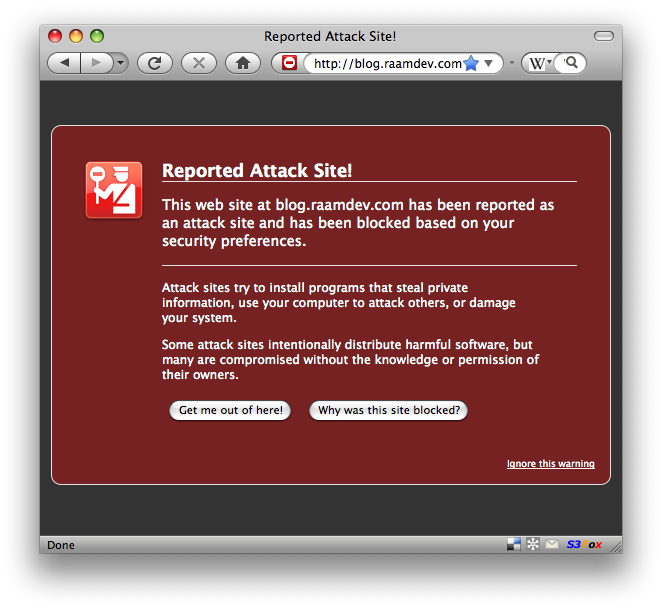
I'm sure some of you must have seen this warning when you tried to visit my site. Fear not, I have fixed the problem. There was an old file on my domain that had a link to a site that was defined as "malicious" by Google, so they basically added my entire domain to the watch list. I removed the file and, after asking Google to check my site again using Google's Webmaster Tools, they removed my domain from the list.
So, how did I find the few pages (among thousands of files on my site) that contained a link to the malicious site Google was blocking me for? I logged into my site via SSH and ran a command like the following:
for i in `find . -name "*.ht*"` ; do echo $i; cat $i | grep 195.2.252; done
This basically searched every single .htm or .html file inside my public_html directory and returned anything that contained the IP address I was looking for. Whenever there was a match, the filename that preceded the output was the offending file. I'm sure there's a more elegant way of doing this, but hell, I just wanted to fix the problem!
Although this was annoying to deal with, it made me feel good that Google is actually keeping track of these things and, with the help of Firefox, is warning people of such sites. Site owners must be vigilant in fixing such problems or they risk losing loads of traffic from Google (and from visitors with Firefox).
A Downside of Being Organized
One of the downsides of being organized and having a clear picture of everything you need to do is that you realize just how much stuff you need to do! I've been using David Allen's GTD method a lot lately, along with the help of an application called OmniFocus, and I can't believe how much stuff I have written down since I started using this method. I have 300+ items in OmniFocus. Try to imagine the relief and freedom I have given my brain by allowing it to let go of trying to remember (subconsciously) 300+ items and you'll begin to see why the GTD method is so powerful.
Escaping Filename or Directory Spaces for rsync
To rsync a file or directory that contains spaces, you must escape both the remote shell and the local shell. I tried doing one or the other and it never worked. Now I know that I need to do both!
So let's say I'm trying to rsync a remote directory with my local machine and the remote directory contains a space (oh so unfortunately common with Windows files). Here's what the command should look like:
rsync 'raam@example.com:/path/with spaces/' /local/path/
The single quotes are used to escape the space for my local shell and the forward-slash is used to escape the remote shell.