

"I hear this is an option in the latest Ubuntu release."

"I hear this is an option in the latest Ubuntu release."
I'm getting sick of the iG:Syntax Hiliter bug that causes it to lose its configuration every time I do anything in the Plugins section. I also hate its proprietary syntax tags ([php] or [html]) because if someday the plugin author stops maintaining it and a newer version of WordPress breaks the plugin, I'm screwed (unless I wade through the code to fix it myself).
Here is what my code looks like whenever the plugin options are reset:
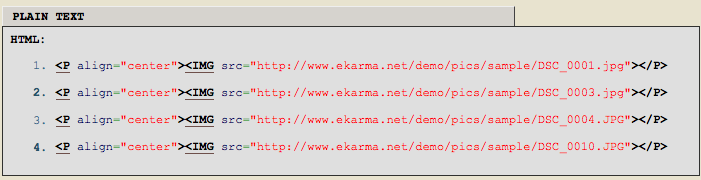
And here is what I want it to look like:

It makes so much more sense to use a plugin like Snippet Highlight which uses <pre> tags with CSS classes. The code for the plugin is dead simple, so maintaining it should be easy. Speaking of maintaining it, there's a bug that causes Snippet Highlight to allow WordPress to parse HTML. I already notified the author, but if I have some free time this week I'm going to see if I can fix it.
Something is wrong with the nerves connecting to the pinky finger of my right hand. Whenever I reach for the Enter key on my keyboard it shakes and feels very weak. I'm hoping it's just a temporary effect of the torture I put my arms through yesterday.
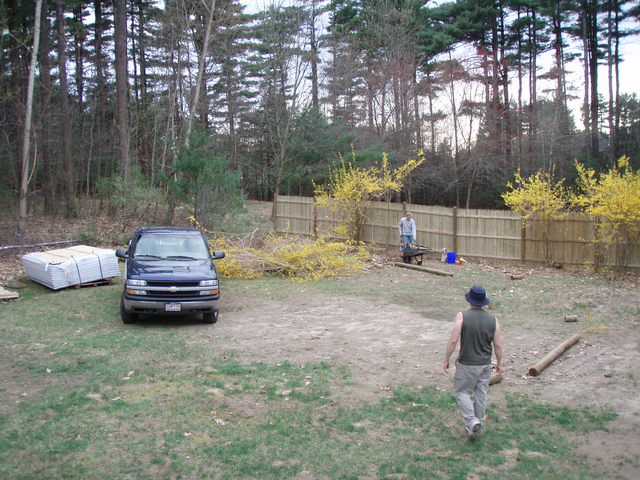
I spent the day helping my brother-in-law and my sister put up a fence in their yard.
Twitter is a service for friends, family, and co–workers to communicate and stay connected through the exchange of quick, frequent answers to one simple question: What are you doing?
I approach new services and tools the same way I approach a problem holding nothing but a roll of duct tape: How can I use that roll of duct tape to solve a problem?
Sure, Twitter has an intended use, but is there a law that forces people to limit themselves to that use? The hacker mentality is all about finding unconventional uses for existing things. I'm very anti-social. I have few friends. The friends that I do have are mostly like me and using a tool like Twitter to keep each other updated on what we're doing would be pretty boring.

A recent comic on Penny Arcade about taking the Twitter question "What are you doing?" to an extreme gave me a good laugh. This morning David, my co-worker, told me that the blog post follow-up to the comic explained exactly the way he felt about Twitter. Here is an excerpt from that post:
The last "tweet" I ever did really explains it all, for me. I was up in Vancouver, and I put up a message saying so, and what kinds of activities I was engaged in. After I did it, I heard a voice - my own voice - saying, "Who the fuck do you think you are? Who are you that you can force your Goddamned minutia on other people, your stupid bullshit, your stone-ground artisanal condiments? How dare you. You should be ashamed." And I was.
Excuse me, but what makes Twitter any different than a blog with an RSS feed?
The post length. That's it.
I'm against spending time authoring content that ends up being scattered all around the net, inside different free services that I really have no control over. They could disappear at any given moment, erasing all of my written history, all that time. I'd rather not give that power to anyone. Not Facebook, not MySpace, and not Twitter.
The only reason I'm using Twitter is because I have a plugin that automatically turns my "tweets" into a blog post -- not just a normal blog post, but one that is placed inside the Asides category so that it shows up specially formatted to make it clear that it's not something worthy of an entire post. If Twitter disappears, big deal. I still have all my tweets saved in the database for my blog.
But why use Twitter at all? It's simple. They provide an interface (SMS) that allows me to save my thoughts when they occur.
Quick, short thoughts. That's what I use Twitter for. Once in awhile I'll use it to say where I am or what I'm doing. If there happens to be someone following me on Twitter who's interested in that information, all the better.
The "hundred and forty character cage"? I like it. Since my tweets show up on the front page of my blog, I need to think about the importance of the message. If taking a shit is of great importance to me, then I have bigger things to worry about than whether or not I should use Twitter.
Update: The Amazon S3 service API now allows for deleting multiple objects with one request (up to 1,000 objects per request). Please see the Amazon S3 Developer Guide for more information.
I've been doing some stuff at work using Amazon S3 to store files and during my testing I uploaded a ton of files that didn't need to be there. Unfortunately, the command line tool I'm using, s3cmd, does not allow me to delete multiple files at once. There is no way to do a wild-card delete. This means I would need to get the full path to each object and delete them one by one:
./s3cmd del s3://s3.ekarma.net/img/1205794432gosD.jpg
Object s3://s3.ekarma.net/img/1205794432gosD.jpg deleted
./s3cmd del s3://s3.ekarma.net/img/1205794432g34fjd.jpg
Object s3://s3.ekarma.net/img/1205794432g34fjd.jpg deleted
Yea, there's no way I'm doing that for over 200 objects. I mean come on, there are tools to automate this kind of stuff! So I created s3delmany.sh:
#!/bin/sh
# -------------------------
# s3delmany.sh
# Author: Raam Dev
#
# Accepts a list of S3 objects, strips everything
# except the column containing the objects,
# and runs the delete command on each object.
# -------------------------

# Redirect output to the screen
2>&1

# If not using s3cmd, change this to the delete command
DELCMD="./s3cmd del"

# If not using s3cmd, change $4 to match the column number
# that contains the full URL to the file.
# This basically strips the rest of the junk out so
# we end up with a list of S3 objects.
DLIST=`awk 'BEGIN { print "" } { print $4, "t"} END { print ""}'`

# Now that we have a list of objects,
# we can delete each one by running the delete command.
for i in "$DLIST"; do $DELCMD $i
done
Download
s3delmany.zip
Installation
1. Extract s3delmany.zip (you can put it wherever, but I put it in the same directory as s3cmd).
2. Edit it with a text editor and make sure DELCMD is set correctly. If you're not using s3cmd, change it to match the delete object command for that tool.
3. Make it executable: chmod 755 s3delmany.sh
Usage
If you're using s3cmd and you placed s3delmany.sh in the /s3cmd/ directory, you should be able to use the script without modifying it. The script works by taking a list of objects and running the delete command on each one.
To pass s3delmany.sh a list of objects, you can run a command like this:
./s3cmd ls s3://s3.ekarma.net/img/ | ./s3delmany.sh
This will delete all objects under /img/. Make sure you know the output of your s3cmd ls command before you pass it to s3delmany.sh! There is no prompt asking if you're sure you want to delete the list, so get it right the first time!
Hint: s3cmd doesn't allow you do use wild-cards, but when you run the ls command, you can specify the beginning of an object name and it will only return objects starting with that. For example, s3cmd ls s3://s3.ekarma.net/img/DSC_, will return only those objects that begin with DSC_.
Alternate Usage
If you have a text file containing a list of S3 objects that you want to delete, you can simply change print $4 to print $1 and then do something like this:
cat list.txt | ./s3delmany.sh
By the way, print $4 simply tells s3delmany.sh that the S3 objects are in the 4th column of the data passed to it. The ./s3cmd ls command outputs a list and the object names are in the 4th column. The awk command expects the columns to be separated by tabs (t).
If you have any questions or comments, please don't hesitate to use the comment form below!
Wow, spammers are either becoming really desperate or totally creative. Here's a threatening email I received today:
From: slyder@webramp.net
To: [ concealed ]
Sent: Apr 23, 2008 13:03
Subject: She has already gone to hospital! ! !Hello, info.
Listen to me carefully, i don't know what your name is, but i'll find you and i'll cripple you, because this is you who tempted her!!!
She has already gone to hospital, you're next, this is evidence: [removed URL in case its virus infected]--
slyder mailto:slyder@webramp.net
Struggling with the big change in my blog style. I'm seriously considering going back to a plainer, flexible black on white theme. Thoughts?
Choosing the "upgrade automatically" option from the WordPress Automatic Upgrade plugin to upgrade from v0.8 to v1.1 fails with Fatal error: Cannot redeclare class pclzip in /home/raamdev/public_html/blog/wp-admin/includes/class-pclzip.php on line 162 unless you first disable the plugin. Upon disabling the plugin, I get a "Could not remove the old plugin" error. Well, at least it does it's job of upgrading WordPress!
I didn't realize how cool the MacBook keyboard lights looked in total darkness until I turned off all the lights to, ahem, save energy. I took a few photos with my Nikon D50 using 8, 15, and 20 second exposures, a timer, no flash, and a tripod. For a couple of the pictures (like the one below) I turned my display brightness all the way down.

Pixeloo has two incredible images created entirely in Photoshop CS2; a lifelike Homer Simpson and one of Mario.
I woke up this morning with a bad headache that got progressively worse. As I began eating breakfast I started to feel nauseous, have cold sweats; I wanted to puke. So I laid back down and slept for another three hours, missing most of the beautiful weather. Now I'm sitting in the backyard enjoying the last few hours of sun whilst munching on a ProBar, drinking green tea, and using my laptop.
Last year I wrote about how Akismet didn't satisfy my spam-blocking requirements and why I disabled both Akismet and all trackback/ping notifications. Needing to have trackbacks disabled has been unfortunate because it's fast becoming an important part of blogging. I just found and installed the Simple Spam Filter plugin. It is designed to be used with Akismet and only prompts the visitor with a reCAPTCHA if their comment fails to pass Akismet's spam block. This should help to eliminate any false-positives, but let's see how well this fixes trackback spam (I'm hoping Akismet is better now than it was a year ago). Enjoy the CAPTCHA-free comment forms while you can!
I just finished reading an excellent article called Teach Yourself Programming in Ten Years by Peter Norvig. If you've ever picked up one of those "Teach Yourself [X] in 30 Days" books, you really need to read this article!
How I decide whether something should be posted as an Aside or a full post on my blog: If it's more than one paragraph, it should be a separate post.
I've been seeing so many WordPress blogs with integrated Flickr photo streams showing off their photos and it's really making me want to do something similar with my photos. If I had an easy way to share photos I think I would do a lot more quality photography (just as this blog allows me to easily write and publish anything).
I created a Flickr account awhile back and uploaded some photos to my account to try out the features. Flickr is OK, but I hate the idea of relying on someone else's service. Plus, there's the whole paying-for-extra-storage thing that I really don't want to think about. I'm sure I could modify the script powering my current gallery to make it integrate more nicely with this blog and perhaps even take some design lessons from Flickr.
Must... not... spend... the... day... inside.. on.. the.. computer. I finally have time to get outside and here I am inside at 11:40 AM ...
4 AM -- Way too late to be working on my blog. But, now that it's all set, I can sleep in peace!
Yup, I did it! I've upgraded this blog WordPress 2.5 and, as I'm sure you can see, I've changed my theme. It's quite a change from the previous theme, but I like change and change is good. I spent quite a bit of time modifying it to my liking and there are still a few things to be done, such as adding the search bar (I couldn't find a nice place to put it and I didn't think it was really necessary to get the theme out there).
Another major addition that you'll soon notice is my use of Asides. Sometimes I want to post something on my blog but I feel it's not quite worthy enough for an entire post. Then if I do decide to post it, I'll end up trying to make the post long enough to feel like an actual post, which usually just ends up degrading the quality of everything.
You can think of an aside as a little sticky note. I might post an aside saying where I've been, what I'm doing, or just some random thought I had. My Twitter account is hooked up to WordPress using the Twitter Tools plugin so I can even post asides via SMS from my phone.
An aside post won't look like a normal post, but you can still comment on them like regular posts. An aside will look like this:
If you want to read more about asides, check out Matt's post on them. He's the one who started WordPress and his blog is where I first saw asides in use. He uses them a lot on his blog, so if you're still confused as to what they are, check out his page.
Feel free to give me your thoughts on the new theme. It was a really hard decision to go with something so dramatically different from the "clean and white" look that I usually try to stick with. I realized that if I had to design something in the physical world, these are the colors I would use. My online blog should reflect that. 🙂
Whenever I come home at night, I check to see if the person who lives upstairs from me has parked her car in the driveway. She leaves early in the morning so instead of parking in front of her, I park in front of the house on the street. I've been doing this for 4 months. Last night I got a ticket:

The funny thing is, I got home at 1:45 AM this morning. If you look carefully at the ticket, you'll see the violation is for parking between 1AM and 2:30AM (the violation is only for overnight parking over 1 hour). That means the officer just assumed I must have been there all night and put 1 AM on the ticket.

