Micro-dislocating Ankle Joint

I woke up last Monday unable to move my right ankle. It wasn't just stiff, it hurt. It was a very familiar feeling -- something I've had happen several times over the past few years. I'm not exactly sure what is happening inside the ankle, but it feels as if a bone has moved out of place, creating the same type of pain I have experienced after dislocating my ankle (of which has happened several times to both of my ankles).

Whenever this "micro-dislocation" has happened in the past, I was simply sitting down in a chair with my feet relaxed. Suddenly I would feel extreme pain in my ankle, as if it was slipping out. The pain wouldn't stop right away but would continue, even after I take pressure off the foot. I would quickly "push" it back into position disregarding the extreme pain, and after hearing a few clicks the pain would instantly subside. I tried this same technique after waking up last week, but it didn't work.

For the first few days, I had to limp around. It was too painful to walk normally. Climbing stairs felt awkward. After moving around for a few days with a dysfunctional ankle, my knee and hip started to suffer as well, since those joints were not being used properly. By Thursday, my ankle had become quite swollen. So, I iced it every morning after that and by Saturday the swelling was gone.

I forced myself to try and walk normally, but the pain was hard to ignore. I stretched it several times a day, but it felt as if there was something more than stiffness causing the pain. By Sunday evening, I was starting to wonder if I should have a doctor look at it.

This Monday morning I woke up and to my amazement, my ankle had returned to normal. I tried stretching it in several different directions which had caused extreme pain all week and I wasn't able to recreate any pain! Exactly one week: I woke up last Monday morning with extreme pain, one week went by, and then I woke up yesterday to discover the pain gone. I don't know how else to describe this other than a "micro-dislocation".

The whole week I was telling myself how I will start, and stick to, a regular exercise routine as soon as my ankle gets better. I didn't realize how fortunate I was until I lost the functionality of what I took for granted. What better wake up message than to be crippled for one week and then just as quickly be given another chance.

SSH Logout Hanging Problem: Fixed!

For several years now I have experienced the same problem when disconnecting SSH connections to my home or office Linux servers. I noticed the problem only occurred when I was using port forwarding. If I was using Putty to open the connection, then typing logout or exit to disconnect would leave an empty Putty window open, waiting for SSH to complete the disconnection process. So I would have to manually close the window each time. No big deal.

However, this was also happening when I connected from a terminal window on another Linux machine, or more recently, on my MacBook. Here it was becoming more of an annoyance, since I would usually want to continue using that terminal window after disconnecting the SSH connection.

Earlier this week, I discovered I could ask my ISP to modify the reverse DNS zone information so that my home static IP address resolved to the same hostname that I had configured it to point to (i.e., dev82.org -> 66.92.66.105). Whenever I open an SSH connection to my home server, I always use the hostname instead of typing the IP address. The SSH connection would work, but when I disconnected it would hang. As soon as the ISP had updated the reverse DNS zone information, disconnects started working properly and the hanging stopped!

So apparently, whenever you connect via SSH to a hostname while utilizing port forwarding, the IP address must have reverse DNS setup properly (to resolve to the hostname), otherwise SSH might fail to successfully disconnect the session.

If you're having similar SSH disconnect issues, I will show you how you can check your hostname. I will use dev82.org and 66.92.66.105 as examples. The nslookup command should work on Linux, OS X, or Windows systems.

First, check what IP address your hostname resolves to:

raam@eris:~$ nslookup dev82.org

Non-authoritative answer:
Name: dev82.org
Address: 66.92.66.105

Now do the reverse to make sure Name and Address match:

raam@eris:~$ nslookup 66.92.66.106

Non-authoritative answer:
105.66.92.66.in-addr.arpa name = dev82.org.

If running nslookup on your IP address doesn't return the same name you're connecting to, then that might be the cause for your SSH disconnection problems. If your broadband connection comes with a static IP address, you should be able to call your ISP and ask them to change the hostname that your IP address resolves to.

Believe in Possibility

In bodybuilding, it is known that you should always work your weakest muscle first. If your biceps are weak but your triceps are strong, always working your triceps first will leave you little energy to work and build your biceps -- your biceps will remain weak.

Similarly, when advancing our knowledge and intelligence it would make most sense to concentrate on those things which we find most difficult -- doing so would insure we live to our highest potential and do not become highly limited in our abilities.

Believing we have limits, and doubting the possibility of that which we cannot even imagine, greatly limits the extent to what we can accomplish. After all, believing something is possible is the first step in making it a reality. Christopher Columbus sailed across the ocean, Thomas Edison created the light bulb, and the Wright Brothers successfully proved manned flight was possible, by having strong belief in their possibility.

As human beings, we not only have the unique ability to make conscious decisions, but to take something unbelievable and believe it is possible. This leads us to discovery, invention, learning, and the self-improvement. It is our belief that we know everything which prevents us from discovering and learning new things. It is said that there are so few things left to be invented now-a-days, but I believe it's the vast wealth of information available to us that is restricting our creative energies. We're constantly reminded of how much we already know and how much we, as a human race, have learned and discovered.

Martin Cooper invented the cell phone after watching some of the first episodes of Star Trek. He saw Captain Kirk communicate wirelessly using the communicator and said, "Why not? That should be reality!". The cell phones carried around today are even more advanced than the "science fiction" communicator used in Star Trek.

Believe in possibility.

Reverse DNS: That's not me!

I have Speakeasy DSL at home with a static IP address (I'm boycotting Comcast). I run a Linux server on a Mac Mini and I use it for all my messaging (using naim IRC/AIM and Jabber via Bitlbee, but that's for another post).

Since I SSH into my Linux box several times a day, it would be nice to avoid typing the full IP address each time. So I decided to setup an A Record on one of the domains I own (we'll use dev82.org as an example) so that dev82.org points to the IP address of my home DSL connection (66.92.25.92 in this example).

After transferring the Speakeasy DSL to my new apartment in Cambridge, I had a new IP address. No problem -- I simply updated the A Record and dev82.org worked again. However, this time I noticed something funky. Take a look at what hostname my IP address resolved to when I pinged dev82.org:

raam@wfc-main2:~$ ping dev82.org
PING dev82.org (66.92.25.92) 56(84) bytes of data.
64 bytes from host103-spk.online-buddies.com (66.92.25.92): icmp_seq=1 ttl=53 time=38.3 ms

That's weird. What the hell is host103-spk.online-buddies.com? A little Googling tells me:

"Online Buddies, Inc., developer of MANHUNT.net is one of largest developers of web-oriented services serving the gay community."

Uh, I'm not gay. Besides, why the hell is my home DSL IP address responding to a domain I've never heard of? I ran a few more tests, including tests from different ISPs to rule out a local DNS issue. Each time, my home IP address resolved the same:

raam@wfc-main2:~$ nslookup 66.92.25.92
Non-authoritative answer:
92.25.92.66.in-addr.arpa name = host92-spk.online-buddies.com.

So I decided to pick up the phone and call Speakeasy. They have always been helpful and I figured worst-case scenario is that I'll have to request a new IP address and re-point dev82.org. At least that way my IP address won't resolve to some gay site.

I called Speakeasy at 3:30am and had a tech on the phone within 3 minutes (Speakeasy rocks). I explained to the tech my situation and he quickly had an explanation: Whoever was assigned my IP address before I was must have had it set up to resolve to that hostname.

I told the tech I had setup an A Record to point the IP address to dev82.org. After confirming that was true with a ping test, the tech said he would update the Reverse DNS record so that 66.92.25.92 resolves to dev82.org.

This is awesome. I had no idea I could request an update to the Reverse DNS record for my static DSL connection! I wonder how easy that process is with a Comcast connection, or if it's even possible. 😕

DNA is not Destiny

"Micah's DNA" by micahb37 is licensed under CC BY-SA 2.0 .

I have never believed that I was limited by my genetics, nor that I could not change my genetics. At last, epigenetics is beginning to prove that very fact: You are not your DNA, but you are responsible for it.

Our genetic makeup is influenced by our environment and those influences are inherited by our great-grandchildren. This makes complete sense! We know humans are very adaptable, so why wouldn't our bodies learn from not only our environment, but also from the effects the environment had on our ancestors? The only way for humans to maintain this adaptability through generations would be to inherit the effects the environment had on our ancestors.

Diabetes, cancer, autism, alzheimer's, obesity -- I believe with time we will discover that all of these are a direct cause-and-effect result of changes made to our epigenome by our diet and environment (including those changes inherited).

I also believe that each and every one of us is capable of curing any biological ailment (caused by our individual actions or inherited from our ancestors) by modifying our diet, environment, and thought processes. Additionally, I believe that collectively, this healing power can be amplified without limit.

Imagine a super-human. Someone with the ability to heal not only themselves, but others as well. Imagine a human who had the power to become anything or anyone he or she ever wanted. That person is you.

Read DNA is not Destiny by Ethan Watters and see how it changes your view of genetics.

My MacBook Pro

Last update: 2011-12-13

Raam's MacBook Pro Specifications

Operating System
Mac OS X v10.4 Tiger

Motherboard and CPU
2.4GHz Intel Core 2 Duo processor, 4MB on-chip shared L2 cache running 1:1 with processor speed

2GB 4GB of PC2-5300 (667MHz) DDR2 memory; two SO-DIMM slots support up to 4GB

800MHz frontside bus

Battery
60-watt-hour lithium-polymer battery (with integrated charge indicator LEDs) providing up to 6 hours of battery life

Networking
Built-in 10/100/1000BASE-T Gigabit Ethernet (RJ-45 connector)

Built-in AirPort Extreme Wi-Fi wireless networking (based on an IEEE 802.11n draft specification); IEEE 802.11a/b/g compatible

Display
15.4-inch (diagonal) TFT LED backlit display with support for millions of colors; glossy widescreen version

Video
NVIDIA GeForce 8600M GT graphics processor with dual-link DVI support, 256MB of GDDR3 SDRAM

Dual display and video mirroring: Simultaneously supports full native resolution on the built-in display and up to 2560x1600 pixels on an external display, both at millions of colors

DVI output port

VGA output using included DVI to VGA adapter

Built-in iSight camera

Storage
160GB 5400-rpm Serial ATA hard drive

8x slot-loading SuperDrive (DVD±R DL/DVD±RW/CD-RW)

When work offered to buy me a new laptop, I had the option of getting a Mac or a PC. My co-worker had recently switched from a Windows-based laptop to a new MacBook Pro and although I already had a PowerBook G4, something urged me to opt for a new Mac. There were a couple of things driving my decision, namely the fact that Apple switched to Intel CPU's (instead of PowerPC) and NVidia Video controller's (instead of ATI). I'm a strong follower of Intel and NVidia, so having both packaged together with a Unix-based operating system was a hard thing to pass up.

It was arguably the best computing decision I've ever made.

I purchased an older PowerBook G4 from a friend a few years ago specifically to become more familiar with the OS X operating system. More and more people were beginning to ask me for help with OS X issues and since I had basically no experience with OS X, I wasn't very much help. The PowerBook was nice, but it still left me hanging when I really needed to use Windows. When Apple switched to Intel CPU's, everything changed.

Windows XP on Mac OS X

Now I can use VMWare Fusion to run Windows XP on my Mac while I'm running OS X. I can seamlessly switch between the two -- it's like having two computers in front of me. Files can be dragged between the OS X and Windows XP, with VMWare automatically handling the transfer between operating systems.

With BootCamp, I created a separate partition on my hard drive, inserted the Windows XP CD, rebooted the MacBook, and the Windows XP installation started as if I was installing on any other computer. Now I can hold down the 'Option' button on my keyboard during boot-up and select the Windows partition to boot my computer right into Windows -- OS X never even starts and Windows has full system resources, including full control of the NVIDIA GeForce 8600M GT video controller, which allows for GAMING!

Gaming on the MacBook is not only possible, it's better than any other solution!

The excitement that followed my discovery of how well gaming works on my Mac is what finally drove me to finish writing this post. With BootCamp, Windows is given full system resources. This means you're running a Windows machine with an Intel 2.4ghz Core 2 Duo processor, 2GB of RAM, and an NVIDIA GeForce 8600M GT video card with 256MB of GDDR3 SDRAM. And yes, any game you install won't know the difference between your Mac and your desktop PC gaming rig!

OK, so you probably think my excitement is a little overdone. I've been looking for a good balance between stability, performance, and entertainment for a long time. With a MacBook, you can setup a partition for Windows and install your games on that partition (Update 2007-11-28: Due to the large space requirements for some games (World In Conflict requires 8gb!), I've started installing games on an external USB 2.0 drive. They still run awesome!). Then for general use, including work, you'll boot into OS X and feel safe and secure about your game-free environment (and less distracted!). When you're ready for some entertainment, simply reboot into Windows XP and start your favorite game.

I believe this separation makes gaming on the MacBook better than any other solution. I have played two of Valve's new games (Portal and Team Fortress 2) and they run awesome. Here are some other games that are known to work (there are bigger lists, but I'm trying to save space):

* Age of Empires III (1440x900)
* America's Army 2.6 (1440x900) (1680x1050)
* Battlefield 2 (small artifacting)
* Battlefield 2: Euro Force (small artifacting)
* Call of Duty 2 (1440x900) (1680x1050)
* Civilization IV (1440x900)
* Counter-Strike: Source (1440x900)
* Doom 3 (Enter this into the console: r_mode -1 r_customwidth 1680 r_customheight 1050 vid_restart. This will enable 1680x1050 resolution. Replace with 1440 and 900 to enable 1440x900 resolution)
* F.E.A.R. (1440x900)
* Far Cry (1440x900)
* Flight Simulator 2000
* Flight Sim 2004 - Century of Flight
* Grand Theft Auto: San Andreas (1440x900)
* Grand Theft Auto: Vice City
* Half-Life 2 (1440x900)
* Portal
* Team Fortress 2
* Quake 3
* Quake 4 (1440x900 and 1680x1050)
* Return to Castle Wolfenstein
* Return to Castle Wolfenstein: Enemy Territory
* Splinter Cell: Chaos Theory
* UT2004
* World of Warcraft (1440x900)

For a long time, my thought-process was "Linux is good for servers, Windows is good for gaming and general use, and OS X is good for video and graphics design artists". I've been using my MacBook Pro for a couple of months now and my thought-process has changed to "Linux is good for servers, Windows is good for gaming, and OS X is good for everything else including general use".

Screenshot 2007-10-31

A list of some applications I've installed:

Firefox or Chrome (web browser)
Thunderbird or GMail (email)
Cyberduck (FTP, SFTP, etc.)
iTerm (an awesome tabbed terminal I use)
OpenOffice (Office for Mac)
GeekTool (used to add stuff to your desktop, such as the IP info and server monitoring in my screenshot, very cool!)
Quicksilver (application launcher, and more!)
XCode (from Mac OS X Install Disc 1)
Fink (Debian package management tools)
wget, rsync (using Fink)
VMWare Fusion (for Windows XP, Linux, whatever!)
Macromedia Dreamweaver 8 (Web design, *cough* BitTorrent)
Eclipse (programming IDE)
TextWrangler (I recently switched to TextMate) (nice quick code editor)
VLC (video/media player)
Skype (Chat, Phone, SMS, Video Conference)
Transmission (BitTorrent client)
Adobe Photoshop CS3 (photo editing on your Mac, *cough* BitTorrent)
Audacity (lightweight audio editor)
Witch (awesome application switcher)
InsomniaX (used to prevent MacBook from sleeping when I close the lid)
USB Overdrive (a must have if you use an external USB mouse!)

Some tips and other things I've done:

Added set term=linux to my ~/.exrc file to fix the Usage: [[ problem when using arrow keys in vim with iTerm (thanks Isaac)

Changed my OS X Hostname to eris (thanks bcrow):
sudo scutil --set HostName eris

Replaced the default OS X Command+Tab application switcher with Witch.

Changed the default Utility Lock background to this picture with this quote as my password prompt: "Linux is what you get when a bunch of PC hackers try to port UNIX to the PC. BSD is what you get when a bunch of UNIX hackers try to port UNIX to the PC."

BSD Ascii

There are lots of good post-installation tips here too.

And here is a good list of apps on LifeHacker.

Van Helsing's Curse – Oculus Infernum

If you're going to listen to even one Halloween album this year, this has to be it! I heard a song on the radio the other night while driving back to Cambridge. All I could remember the DJ (Dee Snider) saying at the end of the song was "Van Helsing". After a little Googling, I determined I had listened to a song from Van Helsing's Curse - Oculus Infernum, an album inspired by the Trans-Siberian Orchestra.

I don't normally care for "Halloween" music, but this album is definitely an exception. It's an amazing compilation of different music styles, sounds, and instruments. If you've seen a handful of well-known horror flicks, you'll recognize many of the tunes in this compilation. If you know how, get the album through the BitTorrent network.

Upgraded to WordPress 2.3 – Growing Pains

I generally like to wait awhile before upgrading things, especially since most bugs (serious or otherwise) come out after the new version has been released. A little over a month had passed, so I decided it was time to upgrade my WordPress installation to version 2.3.

How can we make upgrading as quick, painless, and safe as possible?

I found a really nice way of upgrading WordPress: The Automatic Upgrade plugin. It basically automates the process of backing up your existing WordPress installation (including the database), downloading the latest version of WordPress, and installing it. I don't like the idea of putting my entire blog in the hands of a plugin and I would never have even considered using it if there wasn't a backup feature included. I was happy to see a zip file of all my WordPress files, as well as a backup of my entire database, delivered to me through the browser before any upgrading began.

The upgrade to WordPress 2.3 went smoothly with Automatic Upgrade. In the future, it would be really nice to see something like the Automatic Upgrade plugin included directly in WordPress, since upgrading to a newer version is always going to be a necessary evil. The WordPress developers seem to have started down this path by including an Upgrade Notification feature in this version (which I discovered while writing this post):

WordPress Upgrade Notification

What happened to inline preview!?

After upgrading, I immediately noticed something very annoying with post Preview. The inline preview box at the bottom of the post editing window was gone! Instead, there was Preview link next to the Title field which opens an entirely new window to preview the post:

WordPress 2.3 Preview Link

The ability to preview your post from the edit page after clicking 'Save and Continue Editing' seems to make a lot more sense to me (at least from a work flow perspective) than saving the post, clicking preview to open a new window, previewing the post, and then closing the window.

I read somewhere on the WordPress forum that the decision to remove inline preview was based upon speed and performance concerns. However, in the 500+ posts I've created prior to WordPress 2.3 I have not once experienced a performance issue with the inline preview. If the developers wanted to remove inline preview, they should have at least created an option to enable/disable it and simply made the default disabled.

I found a really nice plugin that fixes the missing inline preview problem by adding a the inline preview back onto the edit page. It's called Preview Frame and is created by Rob Miller.
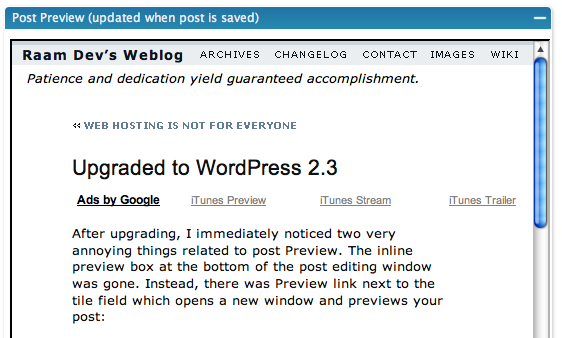
Ah, sweet familiarity! It's so nice being able to preview my post without leaving the editing window! Hopefully a future version of WordPress will bring back the option to preview inline, but until then, thanks Rob!

Drafts: My start-but-not-finish habit is finally (at least somewhat) hidden!

If you're like me, you probably have dozens of drafts saved up for a rainy day. Perhaps there was something interesting you found and wanted to blog about but simply didn't have the time to write a fully polished post, so you jotted down some stuff and saved it as a draft. Once in awhile you'll finish a draft, but otherwise the pool continues to grow.

Prior to version 2.3, when you clicked on "Write" you would be presented with a big blob of your drafts, probably about 15 - 20 of them, which would take up about 1/3 your screen. Of course, this was very unnecessary. Version 2.3 fixes this in two ways. First, the list of drafts has been shortened to three:

Secondly, clicking the "more" link brings you to the Manage Posts section where you're now able to filter posts by their status, sorted by Modified Date (see the timestamp bug below!):

Tagging and Tag Clouds: Should I follow the crowd?

Another big addition to WordPress 2.3 is the support for tags. Some people believe that tags are a better solution to categories (the Web 2.0 solution). I'm still trying to decide if I agree with that statement, since I really like the organized method of current category design.

The idea behind tagging is that you "tag" each post you write with multiple words, similar to selecting a category or multiple categories for the post. Then, using the new wp_tag_cloud() template tag available in WordPress 2.3, you can display a tag cloud:

Tag Cloud Example

A tag cloud is basically a way of visually displaying the most common tags and allowing the user to click on any tag to bring them to a list of posts containing that tag. If you tag a lot of posts 'Publication' and a few posts 'Security', then the security tag will appear smaller in the cloud (as in the example above). There is an alternate way to implement a tag cloud without using the tags feature by using the existing categories instead. This blog explains in detail how it can be done.

Until I find a good reason to start tagging my posts, I will continue using categories and leave the Tags field empty.

Everything has bugs!

I've found at least two bugs so far. I don't know if they've been fixed with 2.3.1, since I haven't installed that yet. The first is less of a bug and more of a usability issue, but both are related to the post timestamp.

When you start writing a new post, clicking Save does not save a timestamp. This means it won't show up at the top of your drafts list! If you click "Save and Continue Editing" or "Publish", the current timestamp is written and everything works as expected -- or does it?

I had another issue with timestamp. After publishing a post, I decided I wanted it to show up tomorrow instead of a few hours from now. So I modified the timestamp and re-published the post, fully expecting it wouldn't show up until tomorrow. However it still showed up when the original timestamp date passed, even though the current timestamp showed a later date!

As with any type of bug, replication is a requirement. I performed a couple of tests to see if I could duplicate the second timestamp issue, but I was unable to. Raf suggested a possible plugin conflict, but I disabled all plugins and still had the same problem. I discovered the second timestamp bug before the first and now I'm wondering if the two are related.

Obligatory Summary

WordPress is definitely morphing into a better piece of software. I like the new features, though I'm a bit surprised at the remove of inline preview and the obvious timestamp bug. I've been using WordPress since the first 2.0 version and I really like the way things are designed. In determining what to use as a CMS for the website of my web hosting company, I've decided WordPress is an ideal candidate due to the ease of customization and the power provided through the templates.


A Colorful Autumn

Perhaps it's just because I drive more between Boston and NH now that I'm living in Cambridge, or maybe it's the crazy weather we've been having (it was 83 degrees on October 22nd!), but this year seems to be an especially colorful autumn.

Web hosting is not for everyone

As you may know, I run my own web hosting business called Akmai.net Web Hosting (soon to be CORBAWeb) and I host about 45 active domains for a small but dedicated base of 15-20 clients. Running a web hosting business is not particularly difficult, especially with software like CPanel (to give the customer easy access to common domain related functions like email, subdomains, etc), WHM (to allow the administrator to control nearly all aspects of running a web server, including DNS, shell access, etc) and WHM.AutoPilot (to assist with billing, invoicing and automatic account creation).

You might be thinking, "if running a web hosting business was so easy why wouldn't everyone be doing it?". Everyone is doing it and that is the reason 90% of the email on the Internet is spam! There are so many inexperienced web host administrators who don't understand the technology behind the software they're using because wonderful applications like CPanel and WHM remove that requirement (don't get me wrong, I love CPanel and WHM). All the people who jump at the chance to run their own web hosting business need to understand there is more to it than just creating accounts and watching your Paypal balance increase -- there is great responsibility that comes with running a web hosting business and there is no room for incompetence.

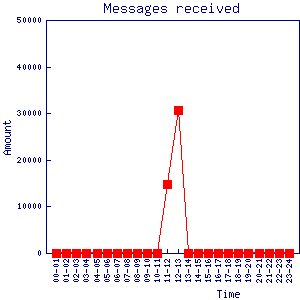
Let me give you an example. Late this morning my Blackberry beeped to indicate an incoming email. No big deal -- I hear that beep dozens of times throughout the day. But the beeping didn't stop -- it kept beeping as if it was an alarm. Sure enough, I had 12 "Mail Delivery Failed" messages. Then 13. Then 14. After about 40 seconds it was up to over 100 messages. I instantly knew what this meant. Someone, or some thing, was sending a huge number of emails from my web server and the vast majority of those were bouncing back because the recipient email address was invalid. A quick check of the server showed over 20,000 emails had already been sent.

With the help of an on-site engineer, at the data center where my server is located, I was able to track down the origin of the email spamming. It was coming from a mail form installed on one of the domain on my server. The form wasn't anything harmful, and neither was the domain (nor the person who owned the domain), but the mail form wasn't secure. It didn't have any type of captcha installed to prevent a spam bot from submitting endless requests to the script. A spam bot crawling the web for insecure forms found the script hosted on my server and started using it to send a 'Paypal Account Notice' email designed to phish account details from the recipient. I quickly deleted the script from my server and had any remaining messages purged from the mail queue.

This is a perfect example of how incompetent web host server administrators are to blame for all the Internet's spam. If I didn't allow myself to be bothered on my Blackberry with all the "Mail Delivery Failed" messages for my server (including legitimate ones), I wouldn't have discovered this was happening as quickly as I did. Most people simply let those emails drop into an Inbox somewhere and forget about them. If 20,000+ messages were sent out in the 5 minutes it took me to discover and fix the problem, how many messages would have been sent out if I didn't discover the problem for a few hours? Or a few days?

You cannot blame the creator of the mail script, because while the programmer might understand that his script needs additional security before being used in the real world, a web designer will simply upload the script to a web server and expect it to work. This means that there will always be instances where a faulty script is utilized in a malicious way by someone with bad intentions. So who is responsible? The system administrator is responsible. It's his job to make sure everything runs smoothly and there is no room for incompetence. How many web host administrators regularly read their logs for suspicious activity or broken software? I read akmai.net's logs on a daily basis.

Web hosting is not for everyone because many people lack the technical understanding, the competence, and the time required to properly manage a web server. If you're running your own personal web server at home, fine. If you're running your own mail server, I hope you know what you're doing. If you're running a web server that's located in a data center with lots of bandwidth and you're hosting domains, email, and DNS for people you don't know very well, then you'd damn well better know what you're doing and understand the nasty things that exist out there on the Internet. You will be attacked. Be prepared.

SongBird: A formidable replacement for iTunes?

I've been looking for something to replace iTunes as the main library for my 20,000+ mp3s. Whatever application replaces it needs to stand up to some high expectations, including the ability to manage such a large number of mp3s without slowing down or crashing, and a rating system that allows me to rate my favorite songs (I'm always finding new songs in my huge collection, so rating them is important for when I want to come back to them). Of course, the ability to import my current iTunes library and support for my iPod would be huge pluses.

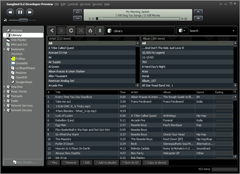
Welcome SongBird, a multi-platform media player developed by a group known as the Pioneers of the Inevitable. They're responsible for the creation of Winamp and the Yahoo! Music Engine. The current version of SongBird is 0.2.5 and although it's a bit rough around the edges (literally, the edges don't look as smooth as they should) it still shows a lot of promise:

The list of features is very impressive and includes support for importing your iTunes library, interfacing with your iPod, and of course, an iTunes-like rating system. SongBird also has a built-in web browser which automatically searches the current webpage for any available music and allows you to play the music in SongBird as if it were a local file. Check out the SongBird Screencast to get a better idea of how all this stuff works.

I've started using SongBird on my Mac and so far I love it. A couple more skins (known stylishly as feathers in SongBird) would be nice, especially an iTunes skin. 🙂 SongBird is still in the development stages and, as far as I can tell, is not an open-source project. However the website says the group does "support the Mozilla Foundation's mission to preserve innovation and choice on the Internet". This means that even if there is a cost associated with SongBird when it's finally released, I'll be happy to purchase it knowing the money will go towards a good cause.

Sunlight Stars

These tiny white sparkling dots are actually little bugs flying around the top of the tree! Since they were partially transparent, the sunlight both reflected off their bodies and filtered through them, they created what looked like dancing stars in the middle of the day. Seeing them in motion was even more impressive! It's incredible what nature creates.

You can see a few more pictures (including higher resolutions) here.