
2008
Spent the entire 95 degree sun…
Spent the entire 95 degree sunny day in an open parking lot, stuck wearing long pants, a long sleeve shirt, gloves, and a helmet.
reactable – A tabletop tangible multi-touch interface
A little old (in the technology world anyway), but still very cool. More YouTube videos of reactable in action.
Official site: reactable.iua.upf.edu
Amazon Http/1.1 Service Unavailable
This can't be good for business:
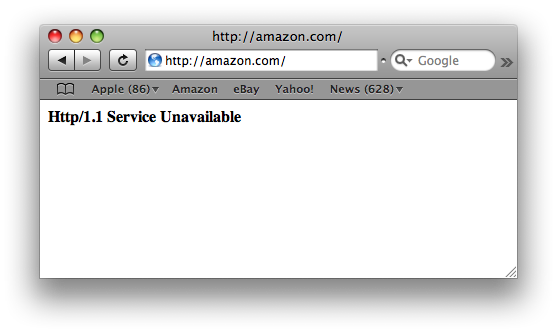
I tested the website from a remote computer in Europe, on an entirely different ISP, and I get the same error.
Visiting www.amazon.com return…
Visiting http://www.amazon.com returns Http/1.1 Service Unavailable. I also tested it from a remote computer in Europe and I get the same message.
Firefox 3 Bug: Warn me when closing multiple tabs
When I started using the beta version of Firefox 3, I quickly discovered a bug (which remains in RC1): Even though I had enabled the "Warn me when closing multiple tabs" option (Preferences -> Tabs), Firefox did not give me any warning when I accidentally pressed Cmd+Q. It would just quit without a prompting me, even if I had 15 tabs open!
In Firefox 2, enabling "Warn me when closing multiple tabs" option would cause this prompt to appear whenever I pressed Cmd+Q:
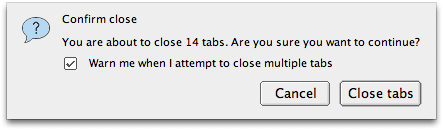
I searched Bugzilla@Mozilla for an open bug regarding this problem and quickly found Bug 422040 - Quit Firefox 3 beta 4 does not give "closing multiple tabs" warning. I commented about my own experience regarding this bug and further confirmed its existence in Firefox 3 RC1.
Finally, Paul O'Shannessy explained in comment #24 how the warn on close functionality works in Firefox 3:
Do you have the start up behavior to restore tabs & windows from last time?
If so, when you quit (cmd-Q) the dialog regarding save session will not show
and Firefox will quit. Session will be restored upon starting Firefox.This used to bug me until I thought about it more. Perhaps a dialog confirming
that you intended to quit is in store for this case, but that would be a
different bug. On the plus side, if you hit cmd-Q by accident your session
should restore.
So basically, if you want to be warned when closing multiple tabs in Firefox 3, you need to make sure your "When Firefox starts" option (Preferences -> Main) is set to "Show my home page" and not "Show my windows and tabs from last time". Setting it to the latter prevents the warning dialog when using Cmd+Q (however, you will get the warning if you try to close Firefox by pressing the X icon with your mouse).
To further confuse things, the warning dialog that comes up has a "Save and Quit" button. This button saves and restores your tabs the next time Firefox starts, which overrides your "When Firefox starts" setting of "Show my home page".
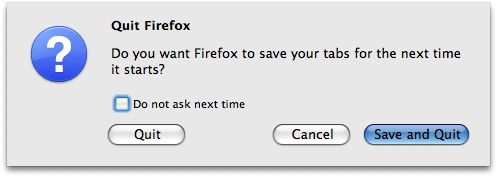
Talk about inconsistent behavior. Even though this bug seems to be limited to Mac OS X, I really hope it gets fixed in the final release. But if it doesn't get fixed, I'm glad it's at least possible to get the warning dialog when pressing Cmd+Q and that you can choose to "Save and Quit", even if it means making silly changes to the "When Firefox starts" option.
Workaround
One of the commenters mentioned the following workaround. I tested it with Firefox 3.5.7 on OS X 10.6.2 and it works perfectly:
- Install the Session Manager Plugin
- After restarting firefox, Go to Tools > Addons > Session Manager > Preferences
- Under General, set “At Shutdown” to "Ask whether to back up the current session"
I stopped at a gas station in …
I stopped at a gas station in Cambridge to fill my bike tire with air. I got out holding 75 cents and was amazed at what I saw: FREE AIR!
goosh.org – the unofficial google shell
goosh.org uses AJAX and CSS to mimic a command line interface in your browser. You can type commands to search Google Web, Images, Feeds, Blogs, News, and Wikipedia.
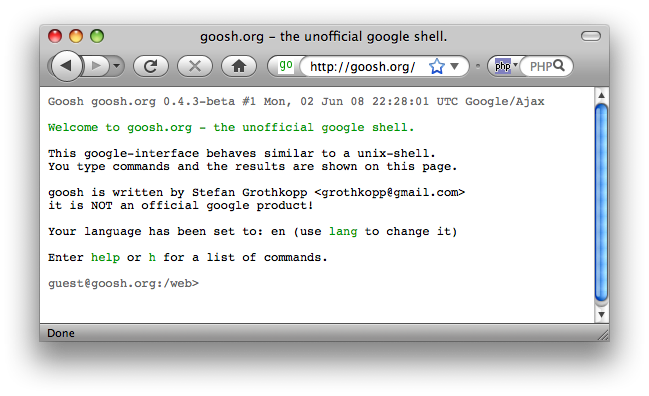
Probably the coolest part is that you can open a result in a new browser tab by simply typing the number next to the result! You can also type "open raamdev.com" from the command line to open that URL in a new tab.
You can also switch to a particular search mode by simply typing the mode. For example, to search only Wikipedia just type 'wiki' to switch into that mode. The prompt will change to '/wiki' and subsequent searches will be for Wikipedia. Awesome!
You can type an address in 'web' mode and it will display the Google Map with a link to visit the address on Google Maps.
Here is the output of the 'help' command:
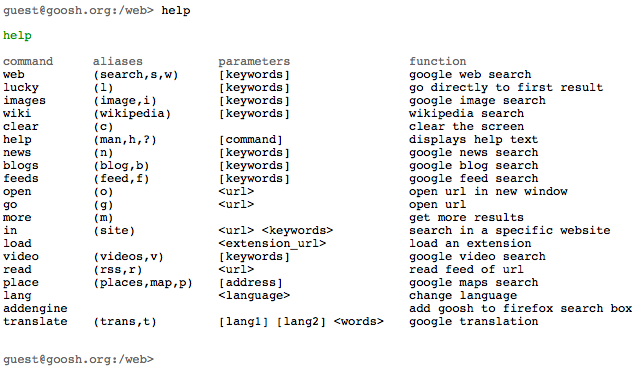
Google calculator functions don't work and searching for "define: bagatelle" returns nothing. I use those two functions quite often, so I won't be switching to goosh anytime soon. However, it has reminded me how nice it is to do web-based things from the command line. There is a utility called surfraw that, when combined with screen and elinks, can give you a powerful command line search interface.
Class M permit test started ou…
Class M permit test started out difficult; asking about exact penalties for certain offenses; changed to common sense questions. Passed 16/20
Mac OS X Leopard: Grammar Check
After upgrading to Leopard, I noticed something different while typing a message in Adium:
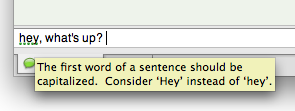
The tooltip was rather humorous and it caught me by surprise. I never realized grammar checking wasn't there until I upgraded to Leopard. I opened TextEdit and confirmed that it also has a grammar check option. Cool!
Leopard includes a ton of new features but I haven't even bothered to look over the list of 300 new features on Apple's website until now. Included in the list is the global grammar checking (assuming the app makes use of it):
Grammar Check
Let your grammar set a shining example. A built-in English language grammar checker helps ensure that you don’t make errors in grammar.
Upgraded to Mac OS X Leopard
Well I finally did it. I upgraded to the latest and greatest version of Mac OS X: Leopard (10.5).
But why?
A little over six months ago I wrote about not fixing what isn't broken, including the previous version of OS X: Tiger (10.4).
There were a combination of events that drove me to write that post, including hearing numerous stories about how Leopard was causing problems for people upgrading. Also around the same time I was hearing about how so many people (including myself) were refusing to upgrade to the latest version of Microsoft's OS: Vista. But I now realize that every upgrade comes with its bumps and you won't be hearing stories from people who didn't have any problems upgrading (negativity is something to complain about, positivity is taken for granted).
So what drove me to upgrade to Leopard? Well a customer at work was having problems with an application I created and he was using the latest version of OS X (Leopard). I was running Tiger, so I wasn't able to replicate his problem and confirm the bug. This is unacceptable and if Apple is shipping new computers with Leopard, then my software should work with the latest version.
Impressive Upgrade Process
After using RsyncX to create a bootable backup of my entire Tiger installation (183 GB!), I started the upgrade process for Leopard. This was the first upgrade of an OS X system I had ever done and the first thing that impressed me was the 30+ minute "Verifying installation disc" step. I say it impressed me because it made me feel confident that the software was going to verify the entire installation disk before continuing with the upgrade process. I can't remember how many times I've installed/upgraded a Windows system only to discover the CD was corrupted and the resulting installation was flaky.
No Hiccups
The entire upgrade must have taken about an hour and a half, but I wasn't timing it so I could be wrong. With the exception of BOINC, OS X started up without any hiccups. The first thing that came up was the Software Update dialog with a whole slew of things to upgrade the system to 10.5.3. I let it do its thing, including a reboot when it was finished.
After the reboot, I started all the applications I use on a daily basis to confirm they worked properly: Eclipse (v3.3.2), Firefox (3.0 RC1), FileZilla (v3.0.5.2, though now I can upgrade to the latest version), iTunes (v7.6), Adium (v1.2.5), iTerm (v0.9.5), QuickSilver (vB51), Thunderbird (v2.0.0.14), and VMWare Fusion (v1.1.2).
Feeling a Little Sluggish
Right off the bat, the system felt a lot more sluggish than it did with Tiger. With 4GB of RAM in my system, I knew it shouldn't be slow. I was beginning to worry that I made a mistake by upgrading until I remembered something I read about Spotlight Indexing. I clicked on the Spotlight icon in the top left and sure enough it was in the middle of indexing my entire drive. I don't use Spotlight (I always know where everything is on my computer) and after a quick visit to macosxhints.com I had a solution to disable it completely:
Turning off and disabling Spotlight (helps prevent the slowness associated with indexing)1:
1) Stop and disable the spotlight application itself:
cd /System/Library/LaunchAgents

launchctl unload com.apple.Spotlight.plist

sudo launchctl unload -w com.apple.Spotlight.plist
(Ignore the error message from the last command. That command tries to stop the application for every user, including root. Since root isn't running the app, you get that error.)
2) Stop and disable the background server:
cd /System/Library/LaunchDaemons

sudo launchctl unload -w com.apple.metadata.mds.plist
3) Remove the .Spotlight-V100 directories
sudo find / -iname '.Spotlight-V100' -type d -maxdepth 3 -print0 | xargs -0 -t -n1 sudo rm -rf
Wow, that sped things up a lot! Being the user-friendly operating system that OS X has become known to be, I'm a bit surprised they don't at least notify the user that indexing is running and that the system might be a bit slow until its done.
Conclusion
I'm running Leopard and so far I'm really liking all the new features. There are so many slight things that, when put together, make the upgrade well worth any hiccups that might come as a result. I will be posting about these new features over the next few weeks as I discover their usefulness (or lack thereof).
If you're thinking of upgrading but haven't yet taken the plunge, I encourage you to do so. The sheer number of tips on macosxhints.com and LifeHacker which require Leopard should be enough to annoy you into upgrading.
Multiple Query Problems with mysql_query()
I was writing some code earlier today that involved writing data to two separate MySQL tables. The second INSERT statement needed to contain the automatically generated ID (auto_increment) of the first INSERT statement, so I wanted all the queries to run one after another.
Thinking it made the most sense to just build one long query and execute it all at once, I wrote code similar to the following:
// Build a query with multiple INSERT statements
$q = "INSERT INTO sessions VALUES(NULL, '$name', '$desc', '$stime');";
$q .= "INSERT INTO events VALUES(LAST_INSERT_ID(), '$event', '$e_desc');";

// Execute query
mysql_query($q, $conn) or die(mysql_error());
Upon running the code I received this error:
You have an error in your SQL syntax; check the manual that corresponds to your MySQL server version for the right syntax to use near '; INSERT INTO events VALUES(LAST_INSERT_ID(), '24', 'my event1', 'button')' at line 1
So, as I normally do when this kind of problem arises, I echoed the query that was being executed and, hoping to get more information on the error, I ran it directly from phpMyAdmin. Here is the SQL I ran:
INSERT INTO sessions
	VALUES(NULL, 'Raam', 'example', '2008-04-24 21:59:08');
INSERT INTO events
	VALUES(LAST_INSERT_ID(), '24', 'my event1', 'button');
phpMyAdmin says:
Your SQL query has been executed successfully
OK, so my SQL is fine.
I then looked up the mysql_query() function on php.net and found this little tidbit of info:
mysql_query() sends an unique query (multiple queries are not supported) to the currently active database on the server that's associated with the specified link_identifier .
Ah, so multiple queries are not supported with the mysql_query() function. That's most likely a security feature, but quite annoying none the less. The bottom line is, you cannot run multiple queries with mysql_query().
PHP5 has the mysqli_multi_query() function, which does allow you to run multiple queries (I know, I know, I should be coding for PHP5 by now).
Tired Week
I've felt unusually tired this past week. I'm not sure if it has something to do with starting the new workout routine (Phase III) or if it's because I caught something (if I'm working out regularly, I can get sick and not feel the symptoms as long as I keep working out). My eyes have also been unusually sensitive to bright sunlight and headaches have been more intense and widespread.
Adding CC Recipients With PEAR Mail
I use the PEAR Mail package quite often in projects that require sending email -- either user-generated or system-level notification emails. I recently wrote something at work that required CCing the user a copy of the email. My first thought was that simply adding CC headers with the users' email address would suffice, but that just isn't the case.
Since mail headers can be modified to state anything you want, PEAR Mail doesn't actually use them to to figure out where to send the email (adding the CC header works fine and the users' email address even shows up in the CC field, but they never receive the email).
A comment by Armin Frey that I found on the PEAR bug page for this problem explains what's going on and offers a solution:
[2007-07-06 15:22 UTC] arminf (Armin Frey)
It seems that the Recipients decides where to send the e-mail and the
headers decide how to display it.The simple solution is that you add all the addresses to $recipients.
Here is the code I used:
$to = 'to@example.com';
$cc = 'cc@example.com';
$recipients = $to.", ".$cc;
$headers['From']    = 'from@example.com';
$headers['To']      = $to;
$headers['Subject'] = 'Test message';
$headers['Cc']	    = 'cc@example.com';
$headers['Reply-To'] = 'from@example.com';

$send = $mail->send($recipients, $headers, $body);
The solution works perfectly. Now the email addresses show up in the correct fields and all the recipients receive the email. Unfortunately, this method does not work for BCCing users. I wonder if BCCing is even possible with PEAR Mail or if I'll need to find something else. To Blind CC (aka, BCC) an address, simply add the address to the $recipients, but not to any of the $headers (thanks Jason!).
Switched to a Different Syntax Highlighter
A few weeks ago I wrote about my annoyance with the iG:Syntax Hiliter. I've been using it on my blog for a while now and I finally decided it was time for a change. As a comparison, here is what the old syntax highlighter looked like:

Today I came across the SyntaxHighligher Plus plugin, which turns the awesome syntax highlighter code by Alex Gorbatchev into an easily installable WordPress plugin. It looks a lot more pretty and has useful, but unobtrusive, 'view plain' and 'copy to clipboard' options:

The language support is very impressive: Bash, C++, C#, CSS, Delphi, Java, JavaScript, PHP, Python, Ruby, SQL, VB, and XML/HTML. For more eye-candy, including real PHP syntax highlighting, you should browse posts in my Programming category.
Memorial Day Landscaping
My landlord paid me to pull up the weeds and grass in the front yard and replace it with landscaping fabric and mulch. It couldn't have been a nicer day for yard work. 🙂

New Register.com Design Accidentally Leaked?
A few weeks ago visited register.com (sometimes I use their domain checker to quickly check the availability of different TLDs) and I was surprised when I saw this:

The design is hugely different from what I'm used to seeing, so I took a screenshot thinking I would write a post about the new design. But then about two minutes later I visited register.com again and the new design was gone!

It's been a couple of weeks now and I'm still seeing the original site. Did I accidentally get a peek of a new design they're working on? Only time will tell (and it's kind of ironic how the domain on the new design says "allingoodtime.biz"). 🙂
The Object-Oriented Thought Process
 I started reading a book called The Object-Oriented Thought Process

After finishing the first chapter earlier today, certain techniques I remember seeing used in Java (which didn't make any sense to me at the time) suddenly make perfect sense. Not only that, but terms like "Encapsulation", "Polymorphism", and "Composition" suddenly mean something that I can now understand. All this from just the first chapter!
One of the main reasons I'm excited to gain a solid understanding of the Object-Oriented thought process is because it will allow me learn and use features of programming languages such as Python and Ruby without feeling as though I'm missing something or lacking the ability to use the features those languages are designed around.
Let's see how many chapters I can finish this Memorial Day weekend!
Loading Widget Added to GMail?
I'm not sure if this is new or if I'm only now seeing it because GMail took longer than usual to load:

I'll admit I don't access my GMail account very often (all my email is forwarded to a "real" email account), but never the less, cool!
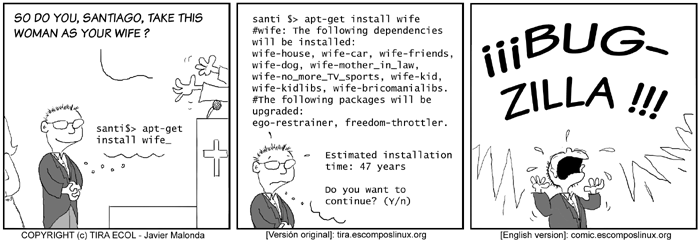
apt-get install wife
n