
Lazy Linux: 10 Essential tricks for admins is an awesome list of cool things you can do with Linux. I learned about trick #3 (collaboration with screen) from an admin at the datacenter where one of my servers is hosted. I remember being thrilled sitting there watching him do stuff on my server while sharing the keyboard to type messages back and forth in vi (think Remote Desktop or VNC, but on the console). Trick #5 (SSH back door) is something I've been using for years at work for remote diagnostics. It is an invaluable trick for getting around firewalls. Very cool stuff!
Raam Dev

The Subterranean World of an Ant Colony
Scientists pour ten tons of concrete down the hole of a giant ant colony and after letting the concrete dry for a month they spend weeks excavating to uncover an enormous underground city. The size and complexity of the structure is absolutely incredible. Ants are awesome.
Most Innovation is Just Reinvention
On the radio this morning someone was explaining how several current technologies very closely resemble older technologies or ideas: Twitter is comparable to the telegram (they're short), Facebook comparable to the first day of school (your interests, social networking, etc), and e-mail comparable to the Pony Express (postal service at extremely high speed). Most innovation is simply the reinvention of things that already exist and truly new ideas or inventions are few and far between.
Count Your Marbles
Sean Johnson's post on 1040 Marbles talks about how we should learn to appreciate the finiteness of our lives by learning to count our marbles (quite literally). Although I feel as though I've already learned to appreciate each day much more than I used to, I'm considering implementing the marble technique.
Installing rTorrent on OS X Leopard (10.5) using Fink
I've been using Transmission as a BitTorrent client on my MacBook Pro for a while now, but after setting up rTorrent on my Linux server earlier today and seeing how awesome it was, I just had to install it on my laptop as well. I absolutely love text-based applications!
The easiest way to install rTorrent is by using Fink or MacPorts. (Both of these tools allow you to download software that has been ported from Unix/Linux to Mac OS X.) I'll use Fink since I'm a fan of Debian Linux and Fink uses the Debian dpkg and apt-get package management tools.
Apparently there is no Fink binary available yet for OS X Leopard (10.5), so it must be compiled from source. These directions (which also contain instructions for setting up rTorrent on earlier versions of OS X) helped explain the overall process presented here. Since you'll need to compile from source, you will need to have Xcode installed (a set of development tools from Apple).
The basic steps for setting up Fink are as follows:
- Download the latest Fink source
- Open up a terminal (Applications -> Utilities -> Terminal.app) and run the following commands
$ cd /path/to/download/directory$ tar xvzf fink-x.xx.x.tar.gz$ cd fink-x.xx.x$ ./bootstrap- You will now be presented with several questions. Answer using the defaults (press Enter) for everything except the question about whether you want to enable the unstable tree; you must answer Yes to this question (see here if you accidentally missed this step).
- When the script finishes, run
/sw/bin/pathsetup.sh- For good measure, run
apt-get update
Great! Now that Fink is installed, installing rTorrent is really easy:
$ fink install rtorrent
You might be notified that a bunch of extra packages need to be installed (there were 46 needed on my system!) so just choose Yes. After the packages have been downloaded and compiled (this might take a while) rTorrent should be on your system and ready to use.
Getting Started with rTorrent

You can launch rTorrent by simply running rtorrent in a Terminal, but before you get started you should look over the man page (man rtorrent) and then set up a configuration file (~/.rtorrent.rc). There are only four lines in my configuration file (check the man page to see what these do):
port_range = 26000-26999

directory = ~/downloads/torrents/

session = ~/downloads/torrents/sessions/

encryption = allow_incoming,try_outgoing,enable_retry
If you're interested in a lot more options, you might want to grab a copy of the sample .rtorrent.rc config file (why this wasn't included in the package, I don't know) and place it in your home directory.
The rTorrent User Guide has information about all the stuff on the screen as well as various commands to navigate the interface.
Using the wonderful screen utility, rTorrent becomes even more powerful on remote systems. I leave rTorrent running on my server and whenever I remotely SSH into the box I can then reattach the screen session that rTorrent is running inside of and instantly have access to it!
Tim O'Reilly on Working on Stuff That Matters
Tim O'Reilly has a blog post on working on stuff that matters. He makes several insightful points including one about creating more value than you capture. He also talks about the importance of working on something that matters to you more than money and says that "the most successful companies treat success as a byproduct of achieving their real goal, which is always something bigger and more important than they are."
Do one thing every day that scares you
Yesterday my parents badly needed sand because their big driveway was covered in sheer ice. Many people have told me that as long as I was a Lowell resident I could get free sand from a particular Lowell Public Works yard. (It's actually better than regular sand because it's a salt/sand mixture they use on the public roads.) I've seen plenty of municipal plow trucks drive down the long dirt road to the yard but never any non-municipal trucks, so I was always hesitant to check it out. None of us really has the money to spend on bags and bags of sand or salt from Home Depot, so filling my truck with free sand would be really helpful for everyone.
I'm not a Lowell resident anymore (I used to own three rental properties in Lowell but I live in NH now) however my truck still has a Massachusetts license plates. For many years I've imagined the worst possible outcome for driving down that long dirt road to get sand. I imagined armed guards with guns ready to fire upon me for trespassing, getting arrested by the police, etc, etc. Then yesterday, after realizing the worst possible thing that could actually happen (of all the most likely bad things) would be for someone to simply tell me "no, the sand is for city use only", I finally built up the courage to drive down the road to see if I could get some free sand.
The yard was empty. There were no armed guards with guns ready to fire upon me. There were no gates preventing me from passing. In fact, there weren't even any signs that said "No Trespassing" or "Official Use Only" and not a single person in sight to stop me! I drove up to the huge pile of sand, filled my truck, and drove away. That's when it hit me. If I had only built up the courage to do something that had very little risk associated with it, I could have had access to free sand for all my rental properties for the past 6 years! As I drove away from the huge pile of sand, I remembered a quote by Eleanor Roosevelt: "Do one thing every day that scares you."
Comfort makes us feel good; it's relaxing and it allows us to enjoy life. Unfortunately like many narcotics comfort has a nasty side-effect; too much of it leads to the exact opposite: discomfort. It should, therefore, be used in moderation (like everything else in life) and we should not use it as a constant destination. The destination of every moment should be the growth and gratitude of this life.
Staying within our comfort zone limits our ability to grow and learn. Niels Bohr, a Nobel Prize winning Danish physicist who made fundamental contributions to understanding atomic structure and quantum mechanics said, "An expert is a person who has made all the mistakes that can be made in a very narrow field." Nobody is comfortable making mistakes, but if mistakes are such a vital component to advancing our growth then we need to embrace doing things that scare us; we need to embrace doing things that make us feel uncomfortable so that we can live richer, fuller lives, instead of living a life of fear, worry, and uncertainty.
It's no doubt a scary thing to intentionally do something that makes us feel uncomfortable; to intentionally do something where the outcome or consequences are unknown. However, if we recognize that much of the fear comes from our own subconscious playing out the worst possible outcome, the outcome that is probably less likely to happen than lightning striking us from inside an office building, then we can quickly overcome our fears and grow in amazing ways.
Doing something every day that scares you may be quite a challenge but just try to think of all the little things that you don't do every day simply because you're afraid or because you're uncertain of their outcome. Saying hello to the cute girl who works in an adjacent office, taking an alternate route to a frequent destination down roads you've never traveled, selling something you don't use but think you'll eventually need, being extra friendly to a family member who you've never gotten along with, standing up to your boss or manager when you know you're right. I'm sure if you think carefully you can find plenty of harmless things you've avoided simply out of fear of the unknown.
Be more open to new experiences and grab life by the horns. Get out of your comfort zone and face challenges head on. Do one thing every day that scares you. Don't be afraid to learn something new about yourself or to change something about who you think you are as a person. But remember, as Mrs. Roosevelt also said, "Learn from the mistakes of others. You can’t live long enough to make them all yourself."
Very Sore Chest and Arms
It's been three days since I started my new workout routine and even though I haven't done anything (except running) since then, my chest and arms are still incredibly sore. That's a good thing though because it means my muscles have been challenged and will grow back even stronger! I start the routine again tomorrow and will stick with it on a daily basis regardless of how I feel. Another thing I start tomorrow is a routine of waking up early (6AM).
Being Greedy With Bash
Last night at my C/Unix class the professor quickly glossed over an interesting shell scripting technique that allows you to strip stuff off the beginning or end of a variable. I forgot about it until I saw the technique used again while editing a shell script at work today.
I didn't know what the technique was called but I remembered the professor saying something about "greedy clobbering" and, since I cannot search Google for special characters, I Googled "Bash greedy" and luckily found 10 Steps to Beautiful Shell Scripts, which just so happened to contain the technique I was looking for (#5).
There are basically four versions of this technique:
${var#pattern}
Searchvarfrom left-to-right and return everything after the first occurrence ofpattern
${var##pattern}
Searchvarfrom left-to-right and return everything after the last occurrence ofpattern(be greedy)
${var%pattern}
Searchvarfrom right-to-left and return everything after the first occurrence ofpattern
${var%%pattern}
Searchvarfrom right-to-left and return everything after the last occurrence ofpattern(be greedy)
Here's how it works. Let's say you have a variable that contains the path to a file:
FILE=/home/raam/bin/myscript.sh
Now let's say you wanted to extract the myscript.sh part from that variable. You could do some funky stuff with awk but there is a much easier solution built into Bash:
SCRIPTNAME=${FILE##*/}
Now $SCRIPTNAME will contain myscript.sh!
The ##*/ tells the shell to search left-to-right for everything before and including the slash (*/), be greedy while doing it so that all the slashes will be found (##), and then return whatever is left over (in this case, myscript.sh is the only thing remaining after the last slash).
AFAIK, this is a Bash-specific feature, but I'm not entirely certain and I wasn't sure where I could look to find out. It's amazing how four characters can do so much work so easily. The more I learn about what I can do with Bash, the more I wonder how I ever lived without all this knowledge!
Starting the P90X Workout Routine
A few days ago a friend told me he was starting the P90X workout program. (I remembered seeing an infomercial for P90X and thinking it would be an interesting routine to try, but I knew nothing would convince me to buy something I saw on an infomercial.) I've always used my own self-designed programs or followed 30-day workout routines that I find in health magazines. However, it's a new year and I need a new routine.
When I inquired how much he paid, he said he downloaded the entire thing free. Doh! Why didn't I think of that!? A quick search of mininova.org and a day's worth of downloading later and I have 4gb of videos and the entire P90X program on my laptop.
Having a workout routine (any routine, really) is important to maintaining a consistent level of difficulty and for maintaining consistency. The P90X routine has a lot of variety, including things like yoga, kenpo, and plyometrics, so I'm going to stick with it for the next 90 days. I strongly agree with the methodology it preaches: constant changes in the workouts are necessary to keep your body constantly adapting and growing. I just finished the Back & Chest + Abs routine and all I can say is wow. I can already feel the results just from the first workout!
Another Surge of StumbleUpon Visitors
A few weeks ago there was a sudden surge of StumbleUpon visitors to my Loituma Clock post. Well its happened again! In the past two days there have been over 2,800 visitors from StumbleUpon to that post. If any of you are reading this, welcome!
An Example of Bad HTML Form Usability
While recently reconfiguring a Netgear FVS-124G router I was astounded by the blatant misuse of HTML form elements. In the router configuration there was a list of services that were forwarded to various computers. (I would call it port forwarding but Netgear has its own way of doing things -- another usability mistake.) The router was being configured for a new office so none of the existing dozen-or-so entries were valid and needed to be removed.
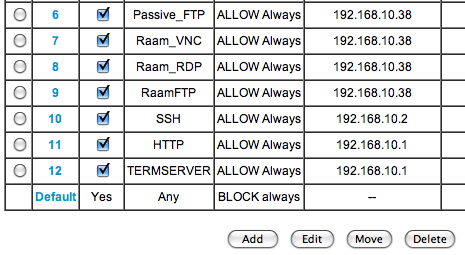
Since the list used Radio Buttons (wrong) instead of Check Boxes (correct), I was only able to select a single entry at a time, delete it, click Continue on the following confirmation page, and then return to the list to start the process all over again. Sure, the Radio Buttons could be a way to prevent someone from accidentally deleting a whole selection, but that's what confirmation boxes are for.
You'd think someone as big as Netgear would have gotten their act together by now and worked out some of these really silly usability issues. For that matter, they (along with Linksys) should do away with their interface all together and adopt DD-WRT!
Apple finally advancing laptop battery tech?
AppleInsider has an article taking a look at the battery technology used by the new 17" MacBook Pro announced at Macworld today. Apple claims the new battery technology gives the MBP up to 8 hours of battery life -- pretty impressive considering it's the largest laptop Apple sells. Check out the battery video on Apple's website to see exactly how the new battery technology differs (including clips of the manufacturing process). I'm really happy to see that someone is making a real effort to push laptop battery standards. It's one of the areas in technology that really needs improvement.
Instantly Preview Files in OS X using Quick Look
I discovered this feature as I discover many new things in OS X: entirely by accident. While I had a file on my desktop selected, my wrist accidentally hit the space bar on the keyboard. Instantly a quick preview window popped up giving me a preview of the image:
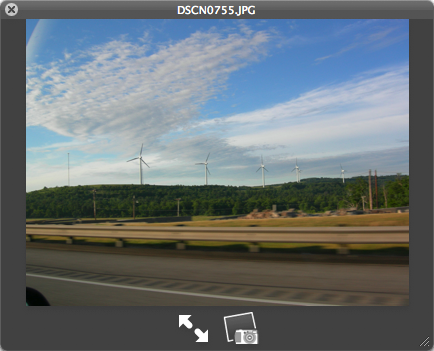
The feature, known as Quick Look, is one of the more than 300 new features in OS X Leopard (10.5). Quick Look also works on text files, documents, PDF files, and even HTML and PowerPoint. This method of previewing files is so much easier than opening them in their native application! (It's more than a preview though, since you can also scroll through the pages for multi-page documents.) Closing the preview window is as easy as pressing Esc, or you can simply select another file with the preview open and it will preview the newly selected file.
Bounce-back Spam (Backscatter)
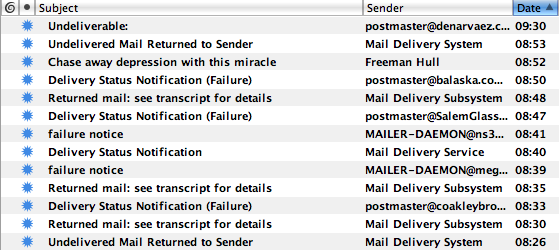
I really hate bounce-back spam! (I call it bounce-back spam, but the official name for it is Backscatter.) I've read, and been told by sysadmins, that there is not much that can be done about it. The Wikipedia page on bounce messages has a little section that explains why:
Excluding MDAs, all MTAs forward mails to another MTA. This next MTA is free to reject the mail with an SMTP error message like user unknown, over quota, etc. At this point the sending MTA has to inform the originator, or as RFC 5321 puts it:
If an SMTP server has accepted the task of relaying the mail and later finds that the destination is incorrect or that the mail cannot be delivered for some other reason, then it MUST construct an "undeliverable mail" notification message and send it to the originator of the undeliverable mail (as indicated by the reverse-path).
This rule is essential for SMTP: as the name says, it's a simple protocol, it cannot reliably work if mail silently vanishes in black holes, so bounces are required to spot and fix problems.
Today, however, most email is spam, which usually utilizes forged Return-Paths. It is then often impossible for the MTA to inform the originator, and sending a bounce to the forged Return-Path would hit an innocent third party. This inherent flaw in today's SMTP (without the deprecated source routes) is addressed by various proposals, most directly by BATV and SPF.
It looks like I'll have to just deal with it. (I could set up filters and such, but then I might miss a real bounce-back and not know that my message didn't go through!) I'm just grateful it comes in waves of a few hours every few weeks instead of non-stop! Has anyone else had to deal with this? If so, what did you do about it?
Procrastination is a Time Killer
I've been working feverishly this weekend on revamping the website and billing system for my web hosting business. I really can't believe it's been on my to-do list for over a year now! Procrastination is a serious time killer!
2009: New Year's Resolutions
Here are my New Year's resolutions for 2009:
- Get in the best shape of my life
- Improve my social skills
- Improve my handwriting
- Make at least one of my website ideas a reality
- Read one book every month
- Learn more about microcontrollers
- Add more programming languages to my skill set (maybe Scheme, Perl, Python, and Ruby)
- 500-yard swim in under 10 minutes (using sidestroke or breaststroke)
- 80 Push-Ups in 2 minutes
- 80 Sit-Ups in 2 minutes
- 25 Pull-Ups (no time limit)
- 1.5 Mile Run in under 10 minutes
- Become a certified scuba diver
- Complete the AFF program
I'm really looking forward to this new year and I can already feel big changes headed my way!
EDIT: I added #8 - #14 on February 15th.
2008: Year in Review
For the past few years I have been writing a end-of-year review summarizing major events or changes in my life that occurred for that year as well as reviewing the resolutions I had set at the beginning of the year. I have found the process of writing these reviews extremely helpful for my own personal advancement. Having such reviews to look back at the years also helps me see where I could have improved and what things I considered important. If you have a blog, journal, or even a diary, I strongly encourage you to do something similar.
This past year seems to have brought the greatest number of changes to my life, as seems to be the case for every year that passes (a good thing, I think). Changes on the material level have been equally as great as those on the personal level. Continue reading
Mint.com on Walking Away From Your Home
I just finished reading a Mint.com blog post about whether or not you should walk away from your home. It was especially interesting to me because I made the decision almost a year and a half ago to walk away from all three of my rental properties when I saw what was happening to the market. If you're not familiar with my situation, you can read my comment on the post, or below, for a quick overview.
I purchased my first rental property at the age of 21. Everyone said I would make a killing and was really smart for investing so young. I wish I had done more research and seen that we were approaching an inevitable bubble. I bought my first property (a 2-family) for $190k in 2003. Within a year it was valued at double that.
After refinancing and putting money into the first property, I bought two more properties the following two years. I had 12 tenants total (being a landlord is no easy task!). The mortgage lenders were pushing ARM’s like crazy… and they made sense to an investor like me. I needed the lowest monthly payment so I could take the little income left from the rent to put back into the properties. Plus, I could always just refinance my 2-year fixed / 28 year adjustable mortgage before the 2 years-fixed were up (refinance to a conventional 30-year fixed)… right?
Well, taxes went way up. I had a few tenants that cost me over $15k in lost rent (damn tenant-rights laws!), unexpected property damage from frozen water pipes, a couple more bad tenants, and while all this was happening the value of my house secretly dropped below the amount I owed… oh sh*t.
Then I get a letter in the mail saying my monthly mortgage payments are going to increase by more than $600 a month… but wait, I’m already dishing out over $200 a month from my pocket to pay for the properties (assuming all the units are fully rented)! I can’t refinance because the value of the property is less than what I owe. I can bust my ass for the next 5-10 years trying to keep up with the payments or I can let everything fall down, file for bankruptcy, and move on.
I’m filing. And I’m damn glad. $450k multi-family properties are now for sale at $140k… less than I bought my first property in 2003. For me it’s easy because they were investment properties, not houses my family lived in (I’m single). I’m renting now and saving as much money as I can, because when things start to turn around I want to be ready, not buried under a million dollars in debt.
Slow Down and Listen to Life
When was the last time you voluntarily spent lots of time away from technology? When was the last time you laid in the sun and simply enjoyed doing "nothing"? For myself, spending long amounts of time away from technology is extremely relaxing and healing (and by long, I mean more than six hours!).
Technology operates on a timescale much different than that of life. By constantly surrounding ourselves with and using technology we subconsciously expect ourselves to keep up with it (and to operate on the same level). It's like looking at the road directly in front of your car on the highway and expecting yourself to process and react to changes in the road conditions.
We need to slow down and relax our minds. Try taking a 24-hour vacation from all technology (that includes mobile phones). Light some candles. Meditate. Have a conversation. Play a board game. Enjoy the life-giving sunlight. Listen to the wind. Listen to your heartbeat. Listen to silence. Breathe.