
Diary of a Self-Help Dropout: Flirting With the 4-Hour Workweek is a fun and interesting article by Chirs Hardwick where he writes about his adventures in applying the tactics provided by three time-management books: David Allen's Getting Things Done


Raam Dev

A Snowy Weekend of Snowboarding
We had two big snow storms this weekend, one on Friday night that dumped 6" - 9" of snow on us and then another on Sunday that dumped at least another 12". Looking to enjoy the new snow, I went snowboarding at Wachusett Mountain and Loon Mountain (despite the fact that I was running on only 3 hours of sleep, both days were awesome). The snow was soft (none of that icy man-made stuff) and the slopes weren't packed (probably because the storms caught a lot of people by surprise). The conditions on Loon Mountain were both insane and awesome at the same time (40 - 50mph gusts of wind, whiteout blizzard conditions, and snow whipping at your face so hard it felt like sand). My 4x4 truck got me through 12"-14" of unplowed roads like a knife through butter and I almost felt bad for the dozens of people who wiped out on the side of the highway.
I subconsciously converted a problem into a shell script
I have been writing a lot of shell scripts lately as part of the C/Unix class that I'm taking at Harvard Extension. My familiarity with how the Unix shell and the underlying system works has grown exponentially. When I came across a problem earlier today, I subconsciously turned the problem into a shell script without even thinking about it!
The problem: "How can I check to make sure my program is running every 30 minutes and restart it if it's not?"
Answer:
# If myscript isn't running, restart it
ONLINE=`ps aux | grep -c myscript`
# 2 because grep myscript also finds 'grep myscript'
if [ $ONLINE -ne "2" ]; then
        $MYSCRIPT_PATH/restart_service.sh
fi
I'm sure there are many better ways to solve this problem, but the fact that I instantly translated the problem into shell scripting code (and that it worked as expected on my first try) astonished me. I can see how good programmers who write in a particular language, and know the in's and out's the like the back of their hand can turn problems into code seamlessly (or know exactly where to look to find answers if they're unsure).
It's really amazing how easily you can solve simple problems when you have a deeper understanding of how the system works.
That's all. I just wanted to share my excitement. 🙂
HOWTO: Take a Screenshot on your iPhone
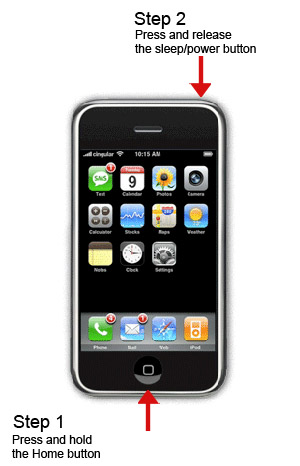
Taking a screenshot on your iPhone is really useful for documenting stuff or when submitting a bug report to a developer (a picture is worth a thousand words!). I mentioned how to do this in an Aside a few months ago, but I really think it deserves a little more attention. It's so useful, but also so simple:
Step 1: Press and hold the Home button
Step 2: Press and release the sleep/power button
The screen will flash white for a second and return to normal. Now you can find the screenshot in the Photos section and email, or send it to MobileMe.
HOWTO: Remove Google Software Update on Mac OS X
A few days ago I wrote about how evil Google secretly installed software update on my computer. Well, even worse than that, when I choose to continue with the update it gives me this message:
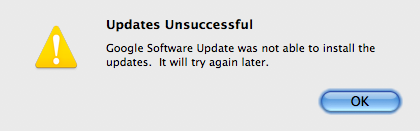
So every other day for the past two weeks I have been prompted to update the Google Talk plugin, and every single time I choose OK this same error message pops up. I had planned to leave the software update installed, but since it's not working and it's really starting to bug me, I'm removing it.
According to some discussion on Google Groups, the Google Software Update can only be removed by uninstalling any plugins associated with it (Google Earth, Google Talk, etc). Well that's not fair. I never installed any plugins to begin with! Time to do it the hacky way.
Hidden away on a page labeled "What is Google Software Update?", Google provides the single command you need to run to uninstall Google Software Update from your entire system:
sudo /Library/Google/GoogleSoftwareUpdate/GoogleSoftwareUpdate.bundle/Contents/Resources/GoogleSoftwareUpdateAgent.app/Contents/Resources/install.py --uninstall
NOTE: Make sure the --uninstall portion of the command actually has two dash characters. It's possible your browser replaced the two dashes with a single dash character.
If you have something like the Google Gears plugin installed in your browser, you should either uninstall the Gears plugin or use it with caution. The Google Software Update is meant to help keep your Gears plugin (and other plugins) updated with any new security patches. Of course, if the Software Update isn't working, then it's really nothing more than an annoying nag screen.
UPDATE 2016-01-27: this comment has several links that may contain more up-to-date information.
UPDATE 2016-02-25: It appears this is the most recent command that seems to work:
sudo ~/Library/Google/GoogleSoftwareUpdate/GoogleSoftwareUpdate.bundle/Contents/Resources/ksinstall --nuke
Removing the Update Engine from your Home Directory
Several commenters mentioned the update engine was installed in their home directory. If the update engine was installed on a per-user basis (as opposed to system-wide), then use this command instead:
~/Library/Google/GoogleSoftwareUpdate/GoogleSoftwareUpdate.bundle/Contents/Resources/GoogleSoftwareUpdateAgent.app/Contents/Resources/install.py --uninstall
NOTE: Make sure the --uninstall portion of the command actually has two dash characters. It's possible your browser replaced the two dashes with a single dash character.
Update: A commenter mentioned that if the install.py file is not found, you can try running the following command instead:
/Library/Google/GoogleSoftwareUpdate/GoogleSoftwareUpdate.bundle/Contents/Resources/GoogleSoftwareUpdateAgent.app/Contents/Resources/ksinstall --uninstall
Preventing Google Earth from Reinstalling the Update Engine
A commenter provided this solution for preventing Google Earth from reinstalling the update engine:
Google Earth reinstalls the software updater when it’s launched. To prevent this I created an empty file at ~/Library/Google/GoogleSoftwareUpdate, then transferred ownership to root and made it read-only for normal users:
touch ~/Library/Google/GoogleSoftwareUpdate
sudo chown root ~/Library/Google/GoogleSoftwareUpdate
sudo chmod 644 ~/Library/Google/GoogleSoftwareUpdate
Update: As one commenter mentioned, Google now has a page relevant to this discussion.
Update: It appears that at least some of Google's software now gives you the option for disabling the installation of the automatic update engine during the setup process. See this blog post for an explanation.
It appears that now you can plug this into your terminal to disable Google Software Updater from checking for updates:
defaults write com.google.Keystone.Agent checkInterval 0
Google Update Uninstaller Tool
Viktor Petersson from Wireload notified me of a tool they put together to make uninstalling the Google Update engine really simple. If you don't feel comfortable with the command line, download the Google Update Uninstaller.
Using 'rsync –exclude-from' to Exclude Files Containing Spaces
A few months ago I wrote a post about escaping filename or directory spaces for rsync. Well that wasn't the end of rsync giving me problems with spaces.
When I used the --exclude-from rsync option to specify a list of exclusions, I figured using single or double-quotes around files/directories that contain spaces would be enough to escape them. However, after swashing through hundreds and hundreds of lines from rsync's output, I discovered the excluded directories were still being synced!
When using --exclude-from, files and directories should not contain any single or double quotes, only a backslash:
/afs/*

/automount/*

/Users/raam/Documents/Virtual Machines/*
Note: A commenter pointed out that this no longer applies to the latest version of rsync. I tested this on Mac OS X 10.9 (Mavericks) and rsync v2.6.9 and confirmed that you no longer need to escape spaces in the exclude file.
iPhone: Create an Application Icon from a Safari Bookmark
Have you ever wanted to easily access to your favorite news site directly from your iPhone Home Screen? I don't know about you, but I really hate opening Safari and navigating the various windows just to load a single site, especially when I'm short on time and I just want to read a few headlines.
You can create a bookmark to a particular site and have an icon for it created on your iPhone Home Screen:
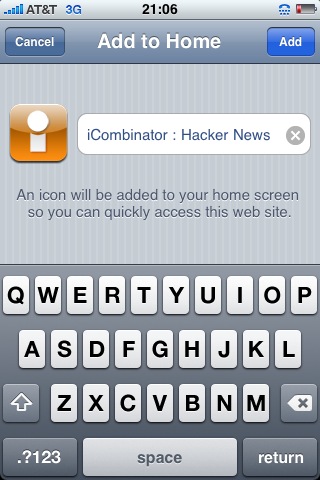
- Browse to the site and click the + icon at the bottom of the screen.
- Click Add to Home Screen
- If you want, modify the name or accept the defaults. If a favicon is not provided by the site, an icon is generated using the visible portion of the site.
- The icon is then added to the Home Screen and can be moved around and deleted like the other icons (by pressing down on the icon until it starts wiggling).


flaab.com – the wrong kind of motivation
Flaab.com is a website that allows you easily create a motivational goal to lose weight. The site authors say that they "employ the two greatest motivators known to the human race: Money and Humiliation". Having lost over 70lbs myself, I know first-hand that money is definitely not a great motivator for losing weight and humiliation doesn't last long enough (as soon as you're in slightly better shape, everyone around you will start saying good things and you won't be humiliated anymore). The best motivators for losing weight? A slow painful, unhealthy, disease-ridden life of struggle inside your own body, and eventually premature death.
The day the Earth was run on Generators
Well, not quite the entire Earth, but it almost seems that way. I saw The Day the Earth Stood Still this weekend and I couldn't imagine a more fitting movie for what we're dealing with around here. We've been without electricity for three days now and living at the very end of a dead-end dirt road means we're probably last on the electric company's fix-it list. There are power lines strewn across the road and wires hanging from the telephone poles, big broken branches being held up by nothing more than a few thin wires, and entire trees toppled over alongside the road.
At night, the darkness is incredible. The full moon, the closest to the Earth it has been since 1994, is the only source of light around. Normally silent enough to hear a distant neighbor shut their front door, the night is filled with the sounds of dozens upon dozens of humming machines, each providing a little bit of that life-giving force to its owner. So often taken for granted, this electricity is not used for running televisions or computers or even for lighting the entire house, but instead for only our most basic necessities: heat to keep ourselves (and the water pipes) from freezing and for the small electric water pump that allows us to shower.
My hands smell of gas, my shoulder hurts from pulling the starter, my body is tired, and for the first time in a long while, I feel like I actually had a real weekend. The vast world of technology and the Internet seemed so distant -- like a dream of the way things once were. Everything felt more real, and life, more difficult. Life should be difficult. Not only mentally, but physically too. If the entire Earth was run on generators I think people would have more appreciation for not only life itself, but one another.
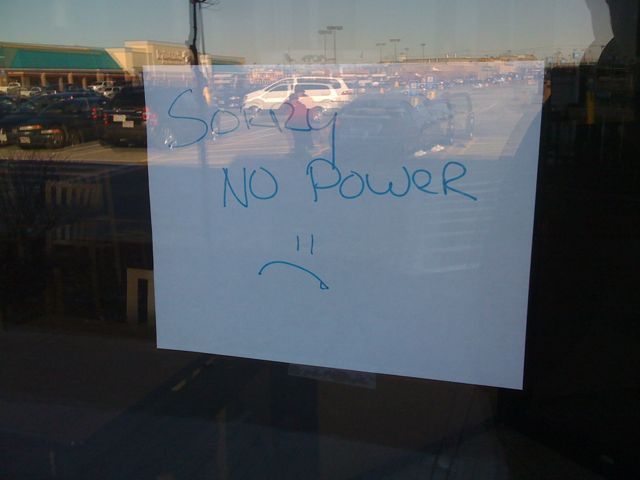
Photo: No Power
Lots of businesses are still without power and the electric company says not to hold our breath.
Power Still Out
The power is still out in parts of NH and MA, including where I live. Looks like I'm in for more cold showers by the candle light, iPhone+NetShare for Internet access, and limited laptop usage (as long as the battery lasts).
HOWTO: Show the Full Path in Finder's Title
An annoying feature of the OS X Finder is that it doesn't show the full path of the folder you're currently browsing -- it only shows the name of the folder in the title. I like seeing the entire path of the folder because I do a lot of stuff from the command line, so as you can imagine I was thrilled to discover an easy fix to this problem.
Simply open the terminal (Applications -> Utilities -> Terminal.app) and run the following command:
defaults write com.apple.finder _FXShowPosixPathInTitle -bool YES
You'll then need to restart Finder by either rebooting or running the killall Finder command. Now Finder will show the full path in the title!
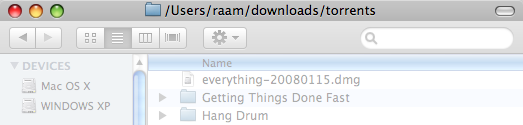
If for some reason you want to revert back to seeing only the folder name (I can't imagine why you would), simply repeat the process and change YES to NO at the end of the command.
Sid Savara's Productivity Blog
I discovered Sid Savara's blog today while browsing Hacker News. Unlike most productivity blogs I have come across, Sid's blog has very practical information that is easy to understand and apply. I've only started exploring his posts, but his description of metawork and his post on paying himself with his time were real eye-openers for me, as I too think in terms of "time" and his post reaffirmed my thinking. Like myself, he is also a follower of the GTD method.
WordPress 2.7: Fixing 'Fatal error' with Automatic Upgrade
A few days ago I installed WordPress 2.7 RC1 on one of my blogs to get a feel for the new interface. One of the awesome new features of WP 2.7 is the built-in upgrade feature, a feature that the very cool WordPress Automatic Upgrade plugin has handled for me up until now.
I was eager to try the new built-in upgrade feature, so when WP 2.7 was officially released I rushed to upgrade the RC1 blog (Tools -> Upgrade). To my surprise however, I was shown something that did not even remotely look like a success message:
Fatal error: Cannot redeclare class pclzip in /home/homeproj/public_html/wp-admin/includes/class-pclzip.php on line 171
After a little research, I discovered the problem was the WordPress Automatic Upgrade plugin! Both the WPAU plugin and the built-in upgrade functionality of WordPress 2.7 must declare the same pclzip class. This means you cannot have the WPAU plugin active and use the built-in upgrade functionality of WP 2.7 at the same time.
To fix the problem, you simply need to deactivate the WordPress Automatic Upgrade plugin.
If you don't have the WPAU plugin installed, you can try deactivating all of your plugins to see if any of them are causing a conflict.
WordPress 2.7 "Coltrane" Released
WordPress 2.7 has been officially released! It was only a few days ago that I wrote about the first WordPress 2.7 Release Candidate, so congrats to everyone on the dev team (literally hundreds of people) for the quick release! It appears the WordPress team is now publicly giving the releases their own code name, with this latest release being called "Coltrane". (As far as I know, this is something new, but I could be mistaken.) For those who know the Simpsons like they know their own family (I don't), you may be aware that Coltrane was the Simpsons' fourth cat (and of course we can't forget John Coltrane, the American jazz saxophonist to whom the release is really dedicated).
Study, Learn, Read, and Grow Faster!
Hacking Knowledge: 77 Ways to Learn Faster, Deeper, and Better is an incredible compilation of useful information, including links to several great tools and sites, like the free online speed reading application. Hat tip: Matt Mullenweg.
Stunning Flower Photo on Flickr
This has got to be one of the most stunning pictures I have seen in a long time. My first reaction to seeing it was literally saying "WOW" out loud. If you look at the photo in its original size you can even see the outline of a grasshopper on top of one of the flowers!
Two useful iPhone features you might not know about
Here are two iPhone features I discovered entirely by accident and that I now find myself using several times a day. They're not terribly exciting, but you may find them useful if you're not already aware of them.
Easily Access the First Page of Apps
The first one appears to be a newly added feature included in the latest software update. If you have several pages of application icons on your iPhone, you may find yourself constantly going back to the first page to access things like the Camera, Calculator, or Safari apps (which cannot be moved from the first page). Now instead of flicking back through your 5, 10, or 15 (!) pages of apps to get to the first page, you can do it with one click.
Press the home button on the bottom of the phone one time to immediately go to the first page of apps.
Delete Email Gesture
The second feature is a little more interesting and it has been around for a while. I discovered it by accident while scrolling through my list of emails:
From the email list, you can use a single-finger gesture to bring up a delete button on a per-email basis. Simply flick your finger across an email to the left or right (I found going to the left works better) and a Delete button will show up next to the email (see screenshot below).

Moved comment and date underneath post title
In attempt to fix a slight usability issue with this blogs' theme that caused the post comments link to appear that it might belong to the previous post, I moved the comments and date line underneath the post title (as opposed to above it) and adjusted the spacing to bring the two closer together.
Minty Mints
I came across an impressive self-hosted web site analytics program called Mint (haveamint.com). It's $30, but for those with privacy concerns it looks like an awesome alternative to Google Analytics. The site's color scheme (and of course the name) reminded me of another popular web app that allows you to manage your personal finances online: Mint (mint.com). I'm a bit skeptical about giving a 3rd-party site all my bank account information, but it appears to have been reviewed by some big names, including Forbes, The Wall Street Journal, and the New York Times. The idea of being able to easily access all my spending and budgeting info online is compelling, but I'm still debating with myself the security/privacy issues.