Here’s what my portfolio could like – Part 2

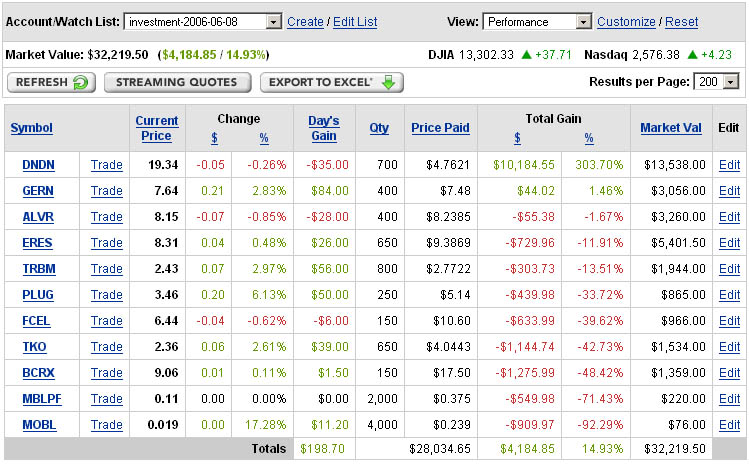
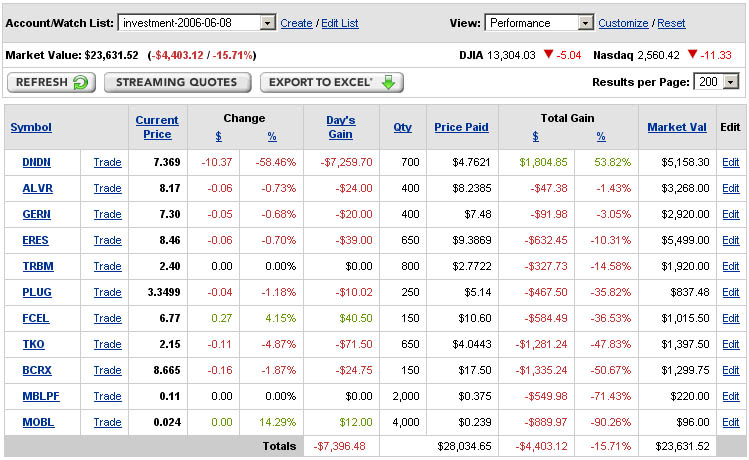
A few days ago, two to be exact, I posted what my portfolio would look like if I had kept all the stocks I owned in 2006. I would have been making 303% on one of the stocks, Denderon (DNDN). This morning that stock dropped 60% on news that the FDA is delaying any chances of approval for their prostate cancer drug Provenge. Here's what my portfolio would look like today:

The lesson: don't place all your eggs in one basket.

Erasing a Disk Using Linux

Here is a really quick way to erase a disk in Linux. Maybe "erase" is the wrong word -- the command actually fills the entire disk with 0's thereby overwriting any existing data. Assuming the disk you want to erase is /dev/hda, here's what you would run:

dd if=/dev/zero of=/dev/hda bs=1M

Technically, this is a better option than simply "deleting" the data or removing the partitions, as those options make it easier to recover data. So, if the FBI is about to raid your little lab and you only have time to run one command, thats what it should be. 🙂

Here's what my portfolio could like

Here are the stocks I owned a little less than a year ago. I sold them all because I was in a really tight financial position and needed the money. If I had held on to them, here is what my portfolio would look like today:

But instead I lost about $10k by selling them when I did. You just can't win'em all...

I Would Donate to Support Digg

As many may already be aware, Digg was recently the site of, what will probably be known historically as, the first real "Internet Revolt". For the less informed, here's what happened:

On May 1st, someone posted a link to a blog which contained a line of code that could be used to unlock the copy protection features of HD-DVD's. Digg in turn, was issued a Cease and Desist declaration by the AACS stating that the code violates copyright law. As any company would do, the Digg administrators removed the original post. However, in response, the Digg community spoke out by flooding Digg with additional story submissions, and comments in unrelated stories, containing the code. Additionally, Digg users "Dugg" the stories and comments which caused the code to be given more visibility on the site. The users made it clear: we believe that we have the right to do what we want with something we purchase using our own hard earned money.

If you buy a door with a lock on it for your house, you can be expected to also be given the key, correct? Why then should any company be able to sell you something and then tell you what you can and cannot do with it? As long as you're not making a profit or mass-reproducing what you bought, where's the harm? Companies need to realize that law's are not going to prevent people from copying something they own and the only stand worth making is to prevent the mass-distribution of copied content, not the action of copying itself.

After seeing the huge response, Kevin Rose, the founder of Digg, decided to stop preventing the code from being posted and even posted it on his own blog. He made a very bold and commendable move by doing this, knowing very well it may mean the end of Digg. The users of the Digg community used the site for what it was designed for: to speak their mind and make their opinion clear. Kevin has had to make a difficult financial decision about the direction to take and he has made it clear that he has chosen to go with us, the community.

If Digg needs financial support because of this incident, and they setup a donation page, I will happily donate whatever I can afford. I'm in no way a rich person and like everyone else I have my fair share of financial burdens. However, I'm willing to put my money where my mouth is and stand for something I truly believe in.

We're living in the birth of the technology revolution and it's our responsibility to define a solid foundation for future generations. Let's make ourselves heard.

Firefox Extension: Window Resizer

I found a really useful extension for Firefox: Window Resizer. If you do any kind of web development you should already be checking to make sure your content looks good in different resolutions. Nothing screams 1990's like a fixed width, "Best when viewed in 1280x1024 resolution" website. I'm rather anal when it comes to making sure my websites are as good looking on one computer as they are on another; why should I put all the time and effort into making a website look good if it only looks good on my computer?

But of course I need to set some kind of standard, so I used my StatHound visitor resolution statistics to determine what the lowest common resolution is for visitors to this blog -- it happens to be 1024x768. The Window Resizer extension is useful because it allows me to quickly resize my Firefox window to see what my website would look like in that resolution. It's a lot easier than changing the resolution on my monitor, maximizing Firefox, and then changing the resolution back to the original.

I also believe content should be readable from any web browser -- again, it's so 1990's to say "Best when viewed with Internet Explorer 6+". I actually test my websites using Firefox, Internet Explorer, Safari, and even the text-only web browser Lynx. I consider a text-only web browser to be the ultimate test for readability and that's one of the reasons why I frown upon flash-only websites, or websites that don't provide a "text version" option.

See how I've changed in the past 6 years (Picture)

I was browsing through my images directory and I found a picture I made a few years ago showing how I had changed over a period of two years. I decided to update it and extend it by digging up some pictures of myself for the past six years. Surprisingly, I was able to actually find at least one picture of myself for every year in the past six years. I'm 18 years old in the first picture:

Click to Enlarge

The biggest change happen between 2001 and 2004, when I transformed my body by losing ~80LBS. The biggest changes however were in my personality, goals, desires, and understanding of life. When I get around to writing a biography section on this site, I'll describe those changes there.

Internet Explorer "Remember my password" Checkbox Missing

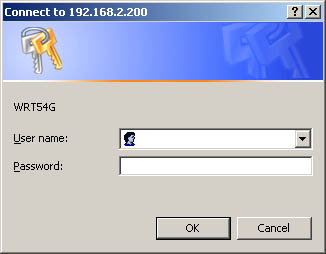
On my office laptop, I discovered the Internet Explorer "Remember my password" checkbox option was missing. This was quite annoying, as I started using Eclipse's internal browser to test my development work on the staging server I setup at home. The staging server is protected by a simple .htaccess file, which prompts you for a username/password with a dialog box like the one below:

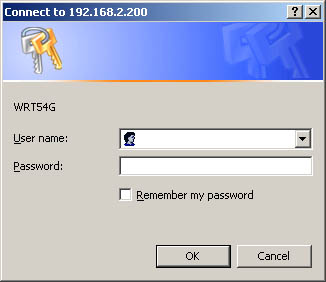
As you can see, its missing the "Remember my password" option, which means I have to reenter the credentials every time I want to login. After a lot of research on Google, I finally figured out the problem: the Protected Storage service needs to be running. Either I disabled the Protected Storage service or a Windows security update did. Either way, after changing the "Startup type" to Automatic and restarting all IE browsers, here's how the password dialog looked:

I have a feeling that a Windows, or an Internet Explorer, security update changed the way IE stores passwords. For most users, the update had no effect since the Protected Storage service is set to Automatic by default. But not for me; I love tinkering with stuff. I disabled a lot of unnecessary Windows XP services on my laptop last year to help keep it secure while I'm on the move.

Update:
In the comments, Haiman posted the following alternate fix. Several users reported his fix worked for them, so I'm including it here. (You'll need to use the registry editor to make this change, Start->Run->regedit.exe, but be sure to make a backup of your registry before fooling around with it!)

Your office pushes out a GPO or registry change to disable users from caching passwords.

User Key: [HKEY_CURRENT_USERSoftwareMicrosoftWindowsCurrentVersion
Internet Settings]
Value Name: DisablePasswordCaching
Data Type: REG_DWORD (DWORD Value)
Value Data: (0 = default, 1 = disable password cache)

April Camping Trip

I went camping in the white mountains over the weekend. My dad and I drove up together, however we didn't camp in the same place; I camped by the river (1/2 a mile through the forest) and he stayed in the hut. I camped in the same area near the river almost exactly two years earlier with Thea and Ravi. The weekend forecast called for rain, so I made sure I came prepared. I love roughing it as much as possible, so I used birch bark to start my fire instead of newspaper. It's amazing how well it burns, even when wet. Even though I brought my laptop with me, I decided to leave it in the car instead of risking getting it wet. I did, however, manage to respond to email questions about my eBay auctions using my Blackberry -- reception wasn't great, but I was able to do what I needed every time I got a 2 minute window of reception.

Due to the Nor'easter we had a few weeks ago, there were lots of trees that were blown over. It was pretty wild -- seeing huge trees toppled over in the middle of the forest, as if a giant came by an pushed them over. The trees certainly helped with finding my way back to the hut, as they were very easy spot landmarks! My dad found a really weird foam donut created by the water in the stream. I posted a video of it on YouTube.

It felt so good to walk around barefoot on the rocks and in the mud. For Saturday night, I decided to carry four logs down from my Dad's dry wood stash. Everything was so wet that I had to constantly be feeding the fire to keep it going. I figured the effort I put into carrying the logs down canceled out the hard work required to constantly feed the fire, so technically I was still roughing it. 🙂 That night, I heard a big splash in the river, like someone throwing a softball size stone into the water. After staring into the darkness for several minutes at the shape of a big animal moving through the water, I finally concluded it was a beaver and I had no reason to worry. The following morning the beaver was still out there, swimming around and cleaning himself off. I'm still not entirely sure how the hell he could make such a loud splashing sound... it didn't sound like his tail!

Sunday morning, I managed to hit myself in the knee with my hatchet while cutting down the trunk of a birch tree to use for a morning fire. Luckily it was nothing serious, but it made me realize I need to be more careful with my body. I have a long life to live and the more damage I do to my body now, the lower my quality of life will be as I get older. If I did some serious damage to my knee(s) now, it would effect me for the rest of my life.

It drizzled on and off the whole weekend, however it was mostly warm and cloudy on Saturday (I even saw a hint of blue sky!). Sunday morning it started to rain consistently, which wasn't so bad since we left by noon. Overall, I had an awesome time. Each time I go camping, I seem to realize more and more how much I miss nature. The air smells to clean and life feels so natural. I made the decision to try and sell two of my three rental properties. I'm also going to try to make the time to go camping once a month, April - September.

Linux Power on Windows Machines

The other day I needed to update a bunch of links inside several files for a website, which was hosted on a Windows 2000 server (ugh!). I had no idea which files needed to be updated, and there were well over 60 files. You may recall I had to do the very same thing a week earlier, however that website was hosted on a Linux machine.

Then I realized I had installed Cygwin on the Windows 2000 server awhile back, but never got around to using it! I copied and pasted the search and replace command I had used on the Linux machine and pasted it in the Cygwin console, changing the directory to the one I needed to search. Ten seconds later, all the files were updated!

After this event, I have a new found respect for Cygwin.

Recursively Renaming Multiple Files

I needed to rename a bunch of files for a customer at work the other day -- more than 60 files. The files were on a Linux system, so I knew there was an easy way of doing it. A few days ago I used perl to search and replace a piece of text in a several files , so I decided to find a way to do it with perl.

I found the following script on this site:

[perl]
#!/usr/local/bin/perl
#
# Usage: rename perlexpr [files]

($regexp = shift @ARGV) || die "Usage: rename perlexpr [filenames]n";

if (!@ARGV) {
@ARGV = ;
chomp(@ARGV);
}

foreach $_ (@ARGV) {
$old_name = $_;
eval $regexp;
die $@ if $@;
rename($old_name, $_) unless $old_name eq $_;
}

exit(0);
[/perl]

After saving the script to a file called rename (and chmod 755'ing it) I was able to run the following command to change the file extension on all .JPG files from uppercase to lowercase .jpg. To search for all files underneath a particular directory, I used the find command and piped it's output to the rename script:

find /home/customername/content/images/ | rename 's/JPG$/jpg/'

A few seconds later and all the files were renamed! This script is incredibly versatile, as you can pass it any regular expression! A few quirks I found were that you cannot reference the script; you must use it from the directory you stored it in (find / | ~/rename 's/JPG$/jpg/' won't work). This is because the script uses itself (on line 17). This also means if you save the script as something other than rename, you must also modify line 17 of the script.

Using rsync to Mirror two CVS Repositories

I have two personal Linux servers, named Mercury (located in Lowell, MA) and Pluto (located in Cambridge, MA). Monday through Friday I stay in my Cambridge apartment to be close to work and on the weekends I go back to Lowell.

I've been storing all of my projects, both work and personal, in a CVS repository on Mercury. A few weeks ago, however, there was a power outage in Lowell during the middle of the week and Mercury didn't turn back on (probably because I don't have the "PWRON After PWR-Fail" BIOS option set to Former-STS, if it even has that option). So, since the computer wasn't on, I wasn't able to commit or sync any of the projects I was working on. This would normally not be a problem, however I have several staging scripts setup on Mercury which I use frequently to test my work -- so basically I was dead in the water.

After this incident, I realized I needed to mirror my CVS repository to prevent anything like that from happening again. This mirror would not only allow me to access the same CVS repository in the event that I was unable to reach one of my servers, but it would also act as a backup in case I somehow lost all the data on one of the servers.

After a little research using Google, I found this site which basically explains the -a option for rsync:

By far the most useful option is -a (--archive). This acts like the corresponding option to cp; rsync will:

* recurse subdirectories (-r);
* recreate soft links (-l);
* preserve permissions (-p);
* preserve timestamps (-t);
* attempt to copy devices (if invoked as root) (-D);
* preserve group information (-g) (and userid, if invoked as root) (-o).

Using that info, I ran the following command from Mercury (l.rd82.net is the DNS address I have mapped to it's public IP, and c.rd82.net is mapped to Pluto's public IP)

rsync -a /home/cvs raam@c.rd82.net:/home

That's it! After waiting a few minutes (it took several minutes the first time) my entire CVS repository was copied to Pluto, my Cambridge Linux server. Of course, before I ran that command I had to create the CVS repository on Pluto first by running cvs init /home/cvs. After the rsync command completed, I added a CVS repository for c.rd82.net in Eclipse and confirmed that all my projects were there.

The only thing left to do is to setup a cron job to run the command every night. Of course, I'll need to setup SSH keys so the rsync command can run without user input, but thats easy.

All-Zyme Double Strength by Rainbow Light

While I was working on computers at LifeAlive Tuesday night, I mentioned to Heidi (the owner) that I've had a lot of digestion trouble the past few months. She gave me a bottle of All-Zyme Double Strength; plant-source enzyme pills. She thought I might not be getting the right enzymes my body needs to properly digest and process food. So I took one pill before I went to bed and three more yesterday. I had no idea I would feel results after only 24 hours!
Yesterday was the first day in the past several months I've felt as good as I do now. I used to always get a stomach ache during the day, and when I tried to eat something in the late afternoon (when I was the most hungry) the stomach ache would only get worse. Today however, I was able to eat the same things I normally eat but without feeling like my stomach wasn't working.

My Apartment Home Gym

When I moved to Cambridge in back January, I decided to get a gym membership at the local Gold's Gym. It was $40 a month, no contract, and they were open 24 hours a day, five days a week. I figured that would be great, since I could go workout at 11pm or whenever I wanted.

As it turned out I started going there at 1am to avoid the crowds of people (yes, there were plenty of people there at 10pm and 11pm!), but parking was always an issue -- not parking at the gym, but parking near my apartment. If I had a parking spot a few hundred feet from my apartment, it was gone when I got back from the gym. That meant I had to park in the office parking lot and walk 1/2 a mile to my apartment. No big deal, but when it's -20 degrees outside with the wind, 1/2 mile is pretty tough.

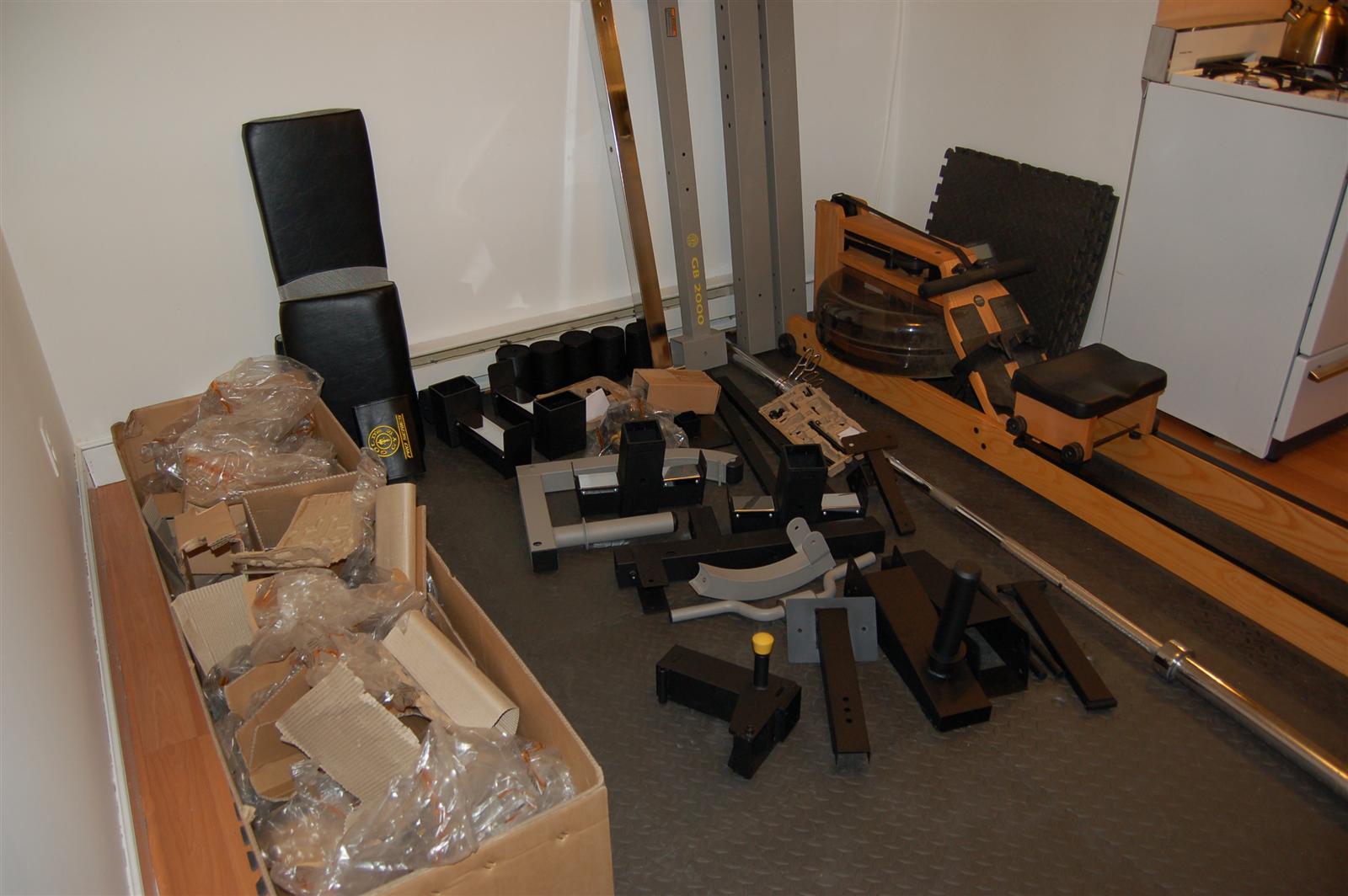
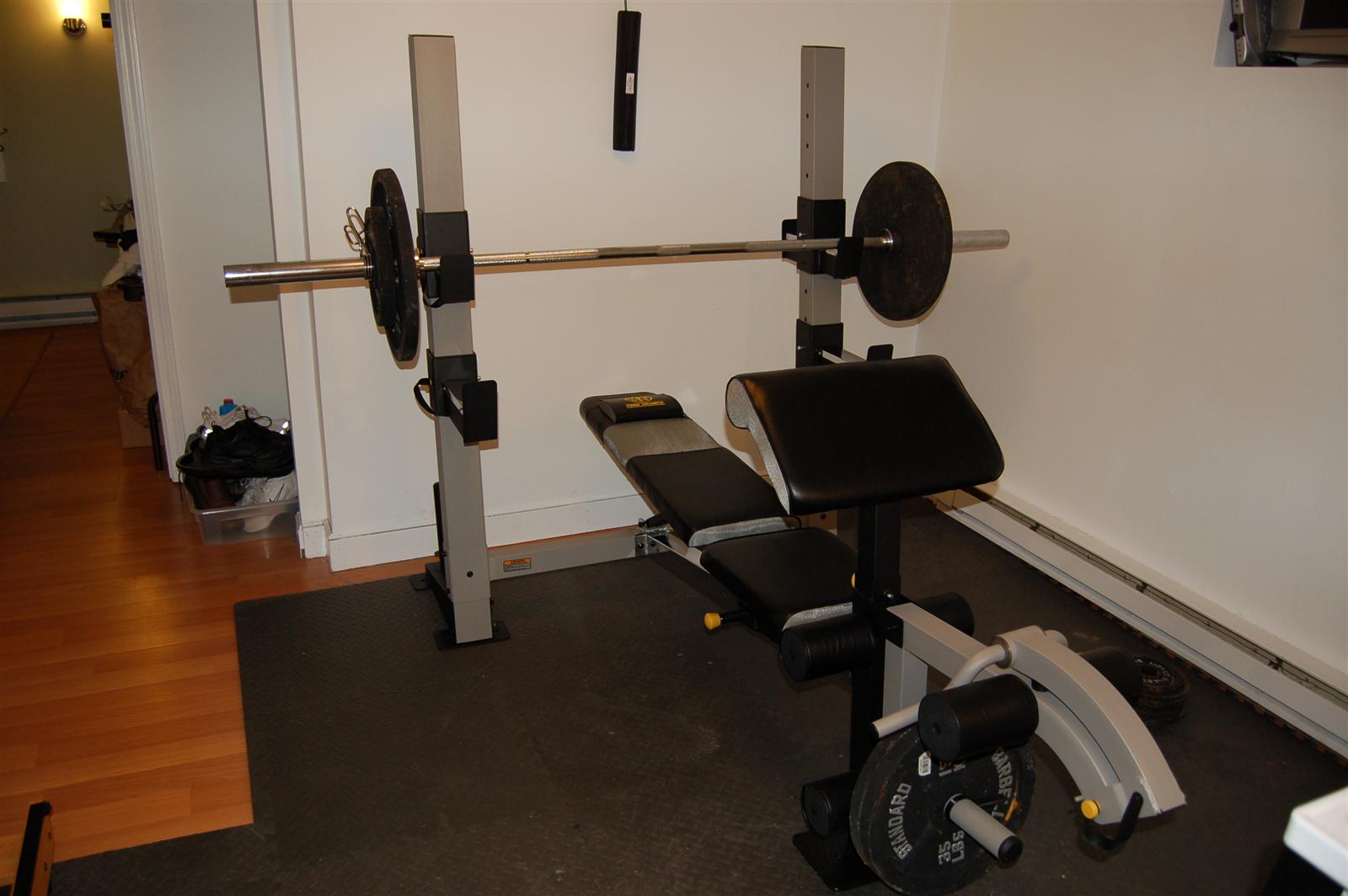
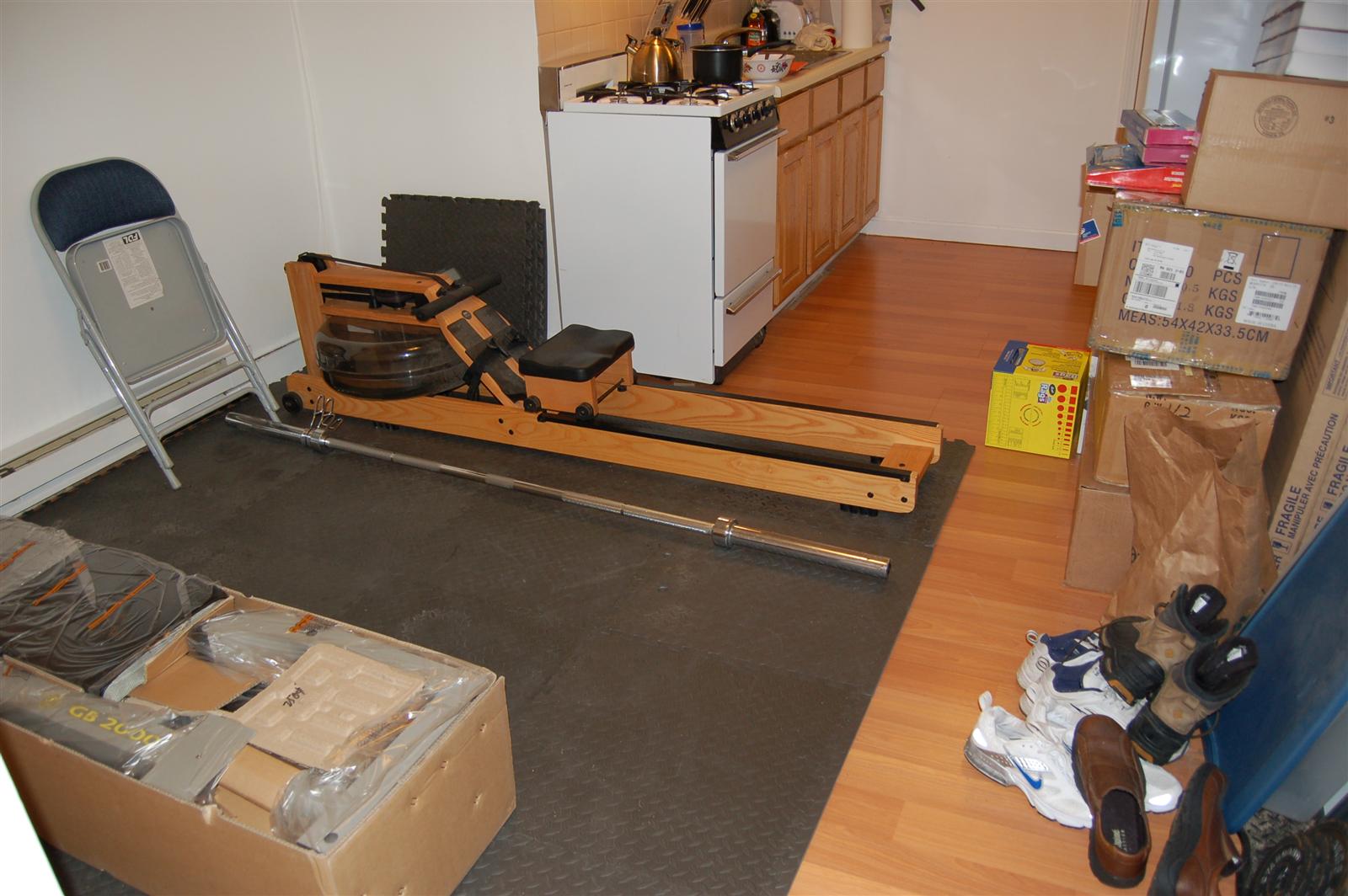
Thanks to Sitha who bought me a weight bench for my birthday, I'm now able to do my entire workout from home! After I cleared the space I planned to use, I emptied the box of parts (78 parts to be exact) and discovered the user manual was missing! I know the male species love to put things together without directions, but 78 parts... I'll take directions! Luckily, I was able to find a PDF version of the manual online. It took me about an hour to put the entire thing together.

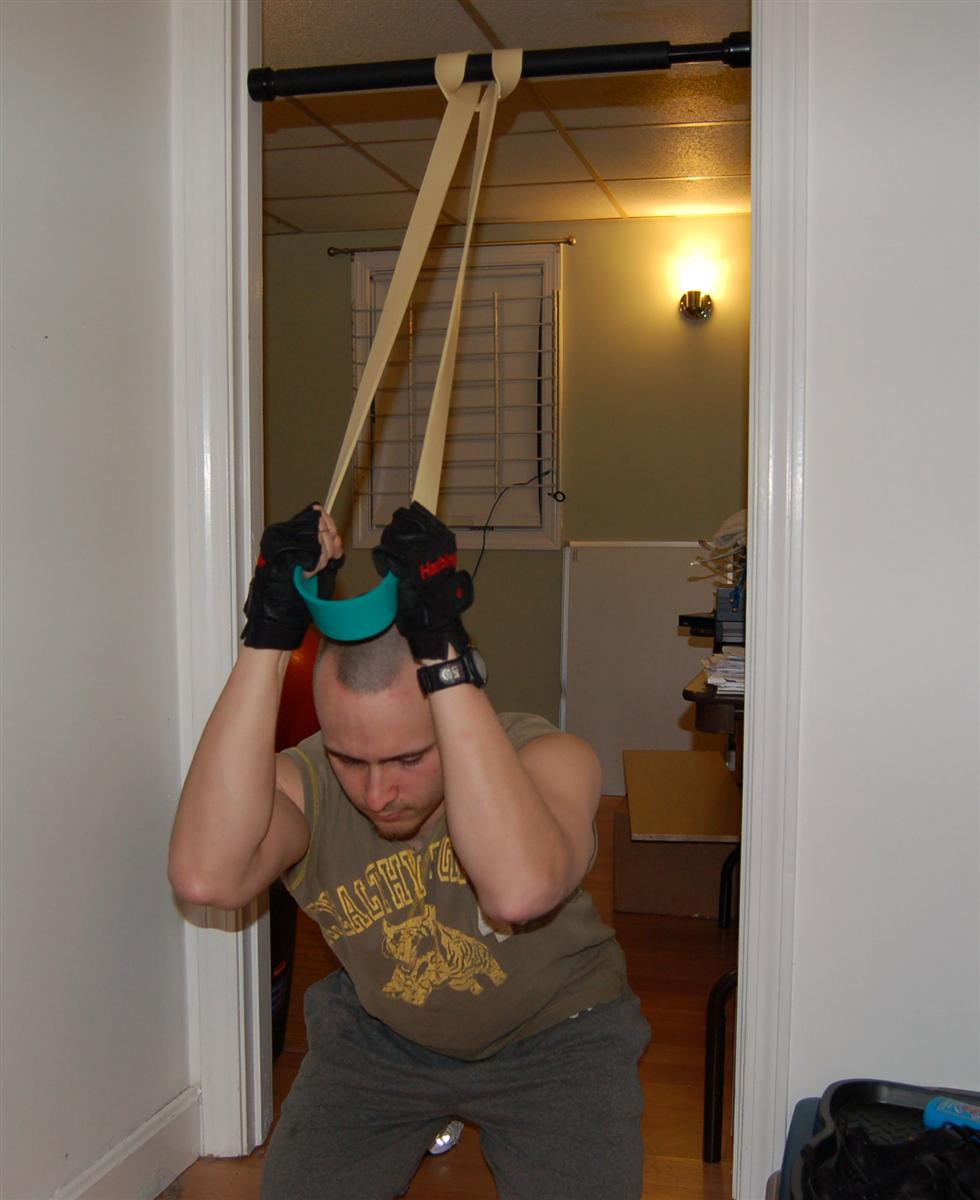
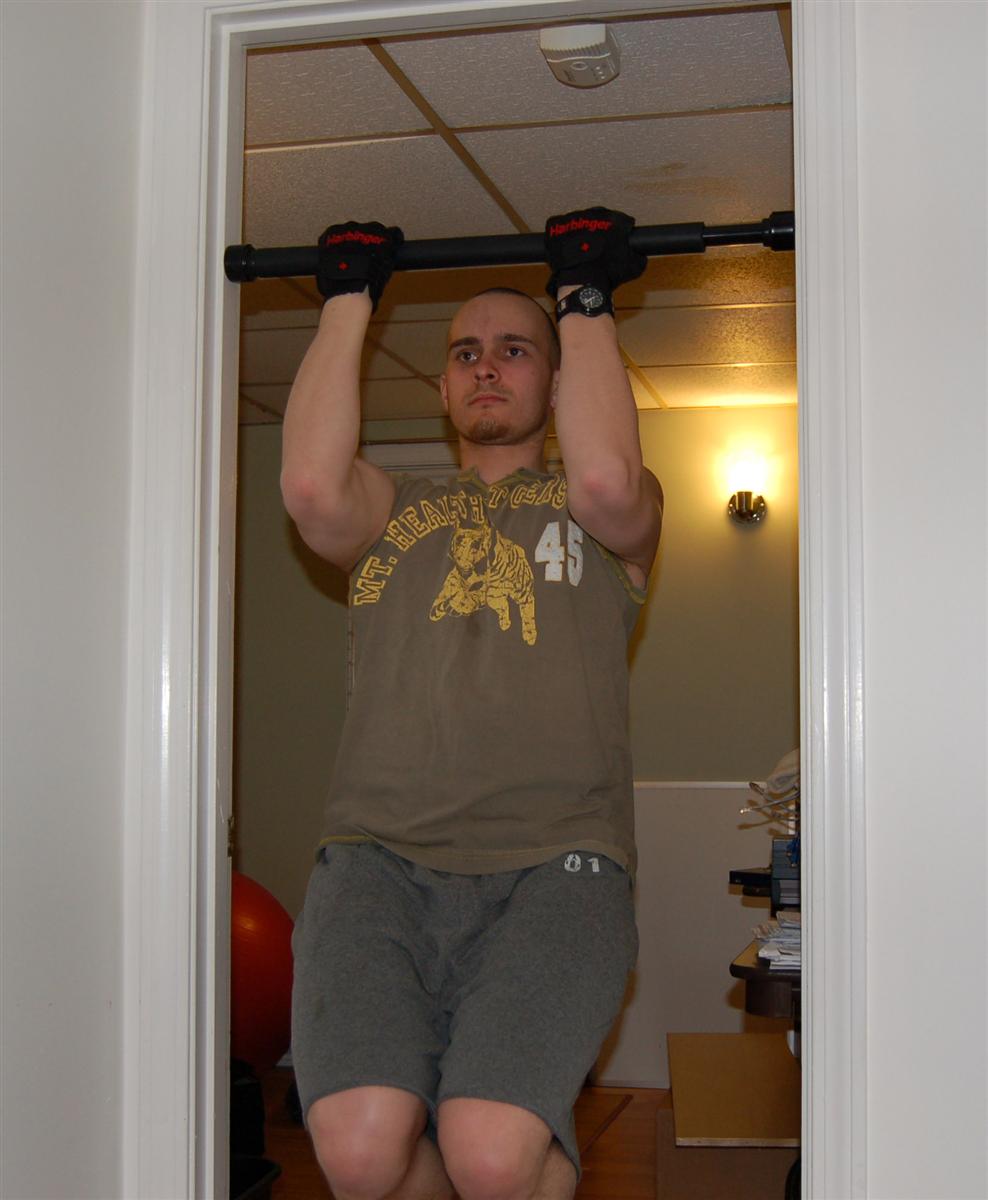
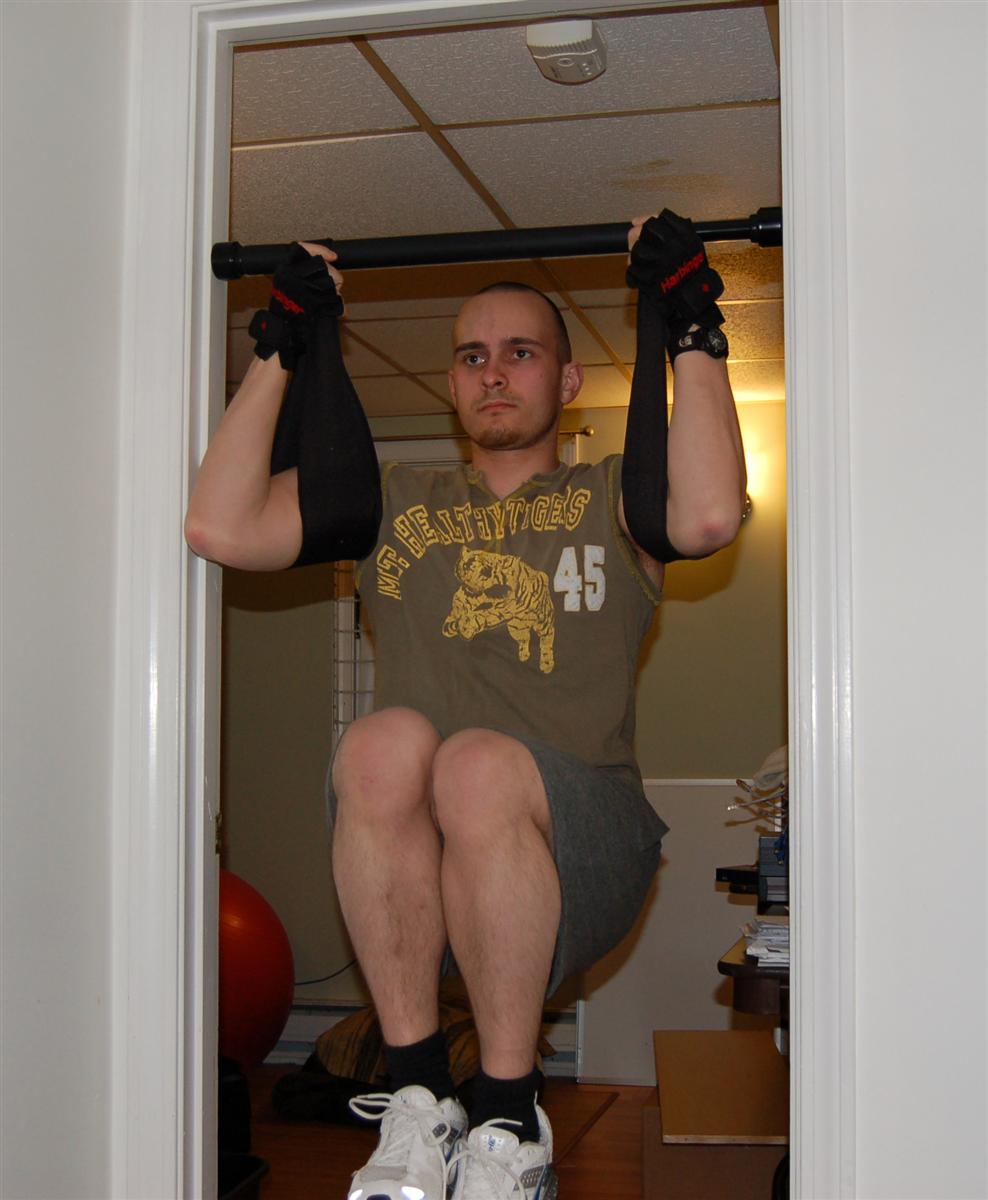
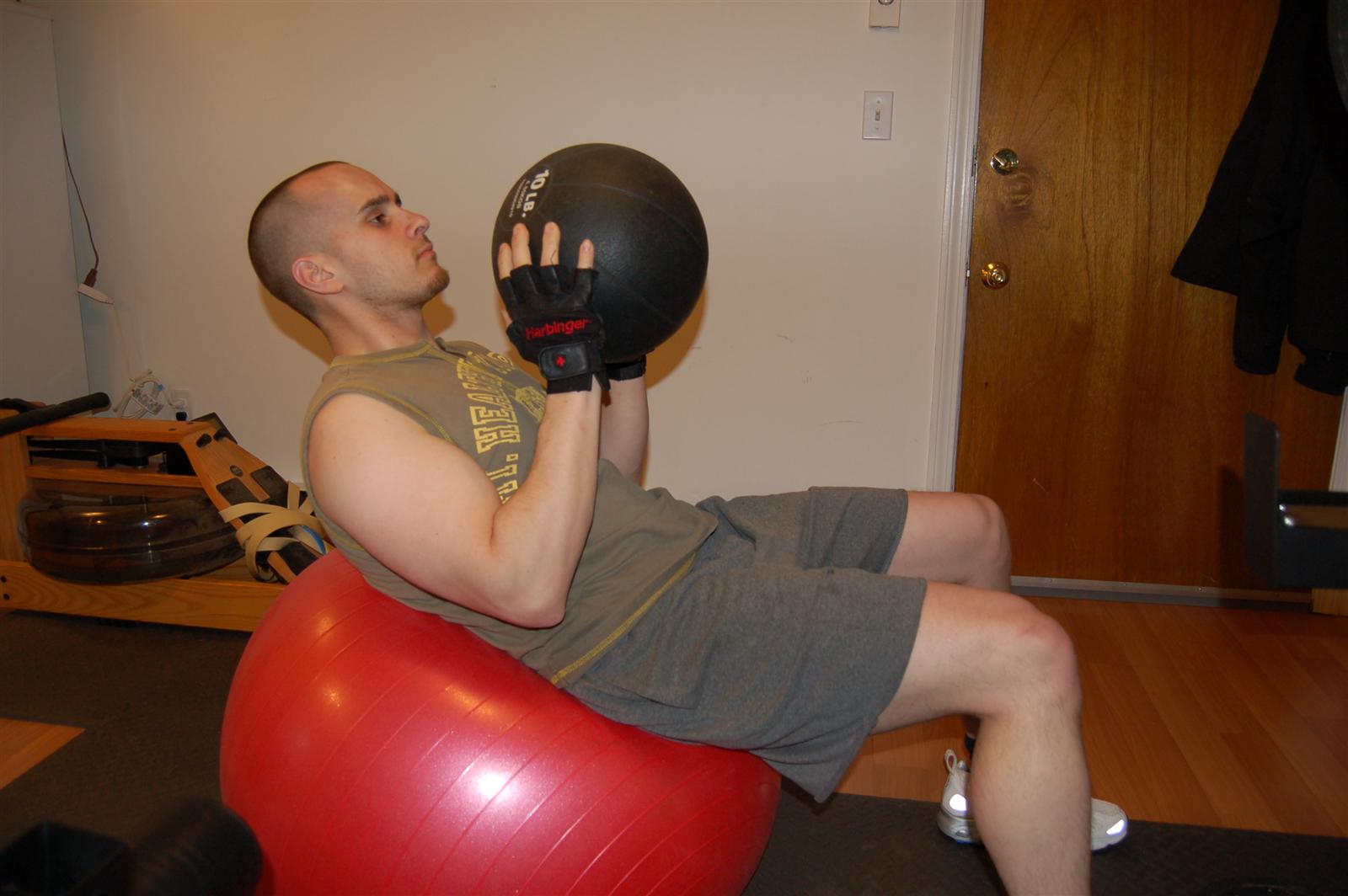
I already brought my rowing machine to the apartment, so I have almost everything I need. I mounted my pull up bar in the bedroom doorway and using the ab loops I can do an amazing range of pull ups and leg raises. Sure, I can't stretch my legs out all the way, but it still works! I also have the Intermediate set of Iron Woody Bands, which gives me the ability to do a huge variety of exercises, such as seated rows and cable crunches (below). The bands really make you think creatively! When I add the yoga ball and 10LB medicine ball into the mix, I've got more than I would take advantage of in a gym! I also managed to scavenge a bunch of interlocking floor mats from the old gym in the factory (the business is moving to a new, smaller office location) and created the perfect area to use the equipment.

So really, the only thing that's missing are some dumbbells. I've decided that I can do without them for the time being, since I really can't afford them. However once I have enough money I would like to get the Personal PowerBlock Set. The pair of them replaces 18 individual dumbbells -- a must for an apartment gym. I've already dedicated a large portion of my apartment to the gym, but I don't mind. If it was up to me, I would dedicate all my time to physical training and conditioning.

Minor Thunderbird Change Reduces my Productivity!

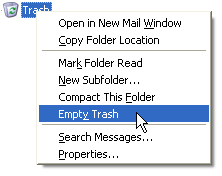
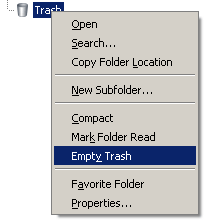
It's quite annoying when a new version of software is released and the programmers modify the menus, specifically the context menus. In Thunderbird 2.0, for example, they changed the context menu quite a bit from previous versions. I constantly use Thunderbird's context menu to "Mark Folder Read" and I used to instinctively know exactly how much to move my mouse after right clicking. Since they've changed the menu I have to stop and actually look at it.

Ignore the fact that the mouse is selecting "Empty Trash" in the following pictures. I couldn't find a picture of the old context menu showing Mark Folder Read selected.

Prior to Thunderbird 2.0:

Thunderbird 2.0:

Now really, why did it need to change that much? They only added two additional items! Talk about reducing productivity with minor changes to a commonly used GUI!

Open(Anything) – The way of future products?

So I was reading Digg the other day and I came across a link to a story about OpenCola. This lead me to read the Wikipedia page on OpenCola and got me thinking beyond OpenSource software. Laird Brown, the senior strategist for the company which created OpenCola, attributed the success of OpenCola (over 150,000 cans sold) to the vast public mistrust of big corporations. This is understandable, since many of the processes used to create what we consume or use on a daily basis are not even public knowledge. At the very least, the knowledge is not easily accessible.

Take for example proprietary software. I can give many historical examples of how proprietary software (and hardware) has failed (think IBM, Sun, etc), but probably the best and most commonly used example of closed-source software would be Microsoft. They are an example of closed-source software which succeeded, not failed. So why did it succeed? I believe Microsoft's success can be attributed to two things: the computer illiterate nature of users who became the first generation of humans to start using computers on a daily basis (who didn't even know another option existed and therefore passed on their MS-knowledge to the next generation), and the lazy nature of humans who would rather put up with a broken, works-good-enough, product rather than learn something new.

As long as money is the driving force behind a product, whether it's software or food, there will always be consumers who doubt the quality and genuineness of the product. There will always be a person, or a group of people, who can be blamed when something goes wrong. Having an openly created product not only moves responsibility to "the people", but also allows the masses to agree on a single idea and solution. This helps remove not only public doubt but also helps to create a feeling of confidence and security. If something is created and we're left entirely in the dark about the specifics of how it was created, then we will always be relying on others to do their work with honesty and goodwill -- something I'm sure we are all aware is a rare combination in this world driven by greed.

pathping: A Faster Trace Utility than tracert

Last week I was testing network connectivity with another engineer and he used pathping instead of tracert on a Windows machine. I had never heard of pathping so I was quite interested to see how it was different. After using it, I realized that it's much faster than tracert on Windows! When I run the traceroute command on Linux, it usually completes the trace lightning fast. Using tracert on Windows, however, usually takes at least 10 - 15 seconds to complete a trace.

Here is what Wikipedia says about the pathping command:

"Pathping is a network utility supplied in Windows NT, Windows 2000, Windows XP and Windows Vista. It combines the functionality of Ping with that of Traceroute (in Windows: tracert), by providing details of the path between two hosts and Ping-like statistics for each node in the path based on samples taken over a time period, depending on how many nodes are between the start and end host."

So, I have officially replaced pathping with tracert in my mental toolbox of diagnostic commands for Windows machines.

Thunderbird 2.0 Released

Yesterday, while in the office composing an email, I noticed Thunderbird wasn't automatically underlining misspelled words. So I checked the version of Thunderbird I was using and as I suspected, it was quite outdated. So I upgraded and the auto spell check worked great. Then this morning Thunderbird 2.0 was released and now I've had to upgrade again!

Get Thunderbird

Enough with my complaining. Thunderbird 2.0 is worth the upgrade. I use Thunderbird exclusively for email, at home and in the office. I've wanted to switch to a console based email client such as Mutt or Pine, however I would only feel comfortable doing that if I was running my own mail server and kept constant backup's of all my email. There are so many things you can do to your mail file in Linux that screwing around with an unfamiliar email client would be too dangerous.

One of these days I will get around to setting up an IMAP email server that uses fetchmail to retrieve my email. And from what I've heard, Mutt is the king of console email clients, so I'll probably take my time to learn that as well. But that's for another day, and another post. Until then, Thunderbird is an excellent OpenSource email client.

The Ultimate Star Wars Personality Test

So just for the hell of it, I took The Ultimate Star Wars Personality Test. Here's which character it says most closely resembles me:

"You are Boba Fett! You're the typical loner. Well, a psychopathic loner. You have a mean streak and people shouldn't mess with you unless they want their nuts chopped up in a blender. You have no loyalties to anybody but yourself. You don't answer to anybody but yourself, and thats why you're a survivor."
Hah! Suits me well...

Installing Apache 1.3 on Debian Etch

I few days ago I setup a new Linux box to use for testing my web development work. The production environment for the site is hosted on a Linux machine, so I wanted to test it in a Linux environment, not a Windows environment (which is where I currently do my development work). So, I decided to setup a Linux box with Samba, map a network drive, and simply work on my site files directly from the Linux server. This way I can just save my changed file, press refresh in my browser, and see the changes. I'll explain more about my actual staging setup in a future post.

I did not find very much, if any, information about how to easily setup Apache 1.3 on a Debian 4.0 (Etch) system. Why do I want Apache 1.3 instead of Apache 2? Because I'd like to replicate the production environment as closely as possible. My web host uses Apache 1.3.37, PHP 4.4.3, and MySQL 4.1.21.

I documented the steps I took to get everything setup here on my Wiki. This is the first time I've used the Wiki to store information that I would normally post here in my blog, and I'm still trying to figure out how I will decide what information goes on the Wiki and what goes on the blog.

The quick answer to getting Apache 1.3 installed on an Etch system is to edit /etc/apt/sources and change etch to sarge. Then run apt-get update and apt-get install apache. You can make sure you’re going to install Apache 1.3.X beforehand by running the following command: apt-cache showpkg apache and checking which version it displays. It should show something like this:

Package: apache
Versions:
1.3.34-4.1(/var/lib/apt/lists/debian.lcs.mit.edu_debian_dists_etch_main_binary-i386_Packages) (/var/lib/dpkg/status)

Easily Replace all Occurrences of a String in Multiple Files Using Linux

This came in handy when I needed to change the IP address used in several links on a customer's site. I simply specified the path to all the web files, and ran a command similar to the one below.

find /path/to/directory -name "*.txt" | xargs perl -pi -e 's/stringtoreplace/replacementstring/g'

Note that you can change *.txt to just * to search inside all files. Also keep in mind the replacement command will be completed recursively (files nested inside directories will also be searched).