Google tells users to drop IE6. All I can say is, good riddance! If there is one good thing I can say about IE6 it would be that it’s relatively lightweight, however it looks like Google Chrome might solve that issue.
Posts Tagged: Google
HOWTO: Remove Google Software Update on Mac OS X
A few days ago I wrote about how evil Google secretly installed software update on my computer. Well, even worse than that, when I choose to continue with the update it gives me this message:

So every other day for the past two weeks I have been prompted to update the Google Talk plugin, and every single time I choose OK this same error message pops up. I had planned to leave the software update installed, but since it’s not working and it’s really starting to bug me, I’m removing it.
According to some discussion on Google Groups, the Google Software Update can only be removed by uninstalling any plugins associated with it (Google Earth, Google Talk, etc). Well that’s not fair. I never installed any plugins to begin with! Time to do it the hacky way.
Hidden away on a page labeled “What is Google Software Update?“, Google provides the single command you need to run to uninstall Google Software Update from your entire system:
sudo /Library/Google/GoogleSoftwareUpdate/GoogleSoftwareUpdate.bundle/Contents/Resources/GoogleSoftwareUpdateAgent.app/Contents/Resources/install.py --uninstall
NOTE: Make sure the --uninstall portion of the command actually has two dash characters. It’s possible your browser replaced the two dashes with a single dash character.
If you have something like the Google Gears plugin installed in your browser, you should either uninstall the Gears plugin or use it with caution. The Google Software Update is meant to help keep your Gears plugin (and other plugins) updated with any new security patches. Of course, if the Software Update isn’t working, then it’s really nothing more than an annoying nag screen.
Removing the Update Engine from your Home Directory
Several commenters mentioned the update engine was installed in their home directory. If the update engine was installed on a per-user basis (as opposed to system-wide), then use this command instead:
~/Library/Google/GoogleSoftwareUpdate/GoogleSoftwareUpdate.bundle/Contents/Resources/GoogleSoftwareUpdateAgent.app/Contents/Resources/install.py --uninstall
NOTE: Make sure the --uninstall portion of the command actually has two dash characters. It’s possible your browser replaced the two dashes with a single dash character.
Preventing Google Earth from Reinstalling the Update Engine
A commenter provided this solution for preventing Google Earth from reinstalling the update engine:
Google Earth reinstalls the software updater when it’s launched. To prevent this I created an empty file at ~/Library/Google/GoogleSoftwareUpdate, then transferred ownership to root and made it read-only for normal users:
touch ~/Library/Google/GoogleSoftwareUpdate sudo chown root ~/Library/Google/GoogleSoftwareUpdate sudo chmod 644 ~/Library/Google/GoogleSoftwareUpdate
Update: As one commenter mentioned, Google now has a page relevant to this discussion.
Update: It appears that at least some of Google’s software now gives you the option for disabling the installation of the automatic update engine during the setup process. See this blog post for an explanation.
It appears that now you can plug this into your terminal to disable Google Software Updater from checking for updates:
defaults write com.google.Keystone.Agent checkInterval 0
Google Update Uninstaller Tool
Viktor Petersson from Wireload notified me of a tool they put together to make uninstalling the Google Update engine really simple. If you don’t feel comfortable with the command line, download the Google Update Uninstaller.
Evil Google Secretly Installs Software Update
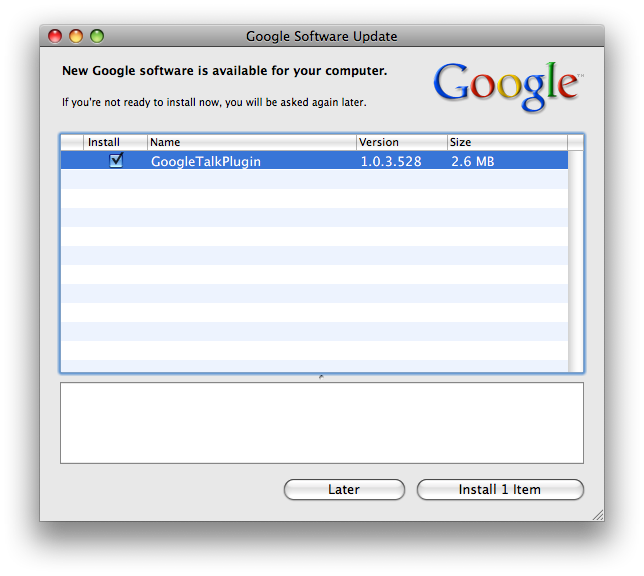
I was shocked to see this Google Software Update window on my Mac this morning asking me to install an update to the Google Talk Plugin:

First of all, I had never seen this update window in my life and I never approved the installation of any such Software Update Engine! Secondly, what Google Talk Plugin is it talking about? As far as I can remember, I never installed a GTalk plugin. I use Adium for chatting on GTalk and I never had to install a plugin to use Google Talk! Maybe the update engine is trying to update the GTalk plugin that came with Adium?
There are some other people who are also quite annoyed by this secret update engine installation. Apparently the update engine is fully open-source, but there is no uninstall program. To uninstall it, you must unregister applications that are using it and wait a day for it to automatically uninstall itself. How ugly.
Google’s Growing Visual Clutter
Google’s latest “feature” is nothing short of annoying. I fell in love with Google Search for the clean, textual layout of the search results. The colored text I can deal with, but not visual buttons next to every single result! To make matters worse, Google doesn’t provide a way to disable this feature either, so your only two options are logging out of your Google account or installing a Greasemonkey extension.
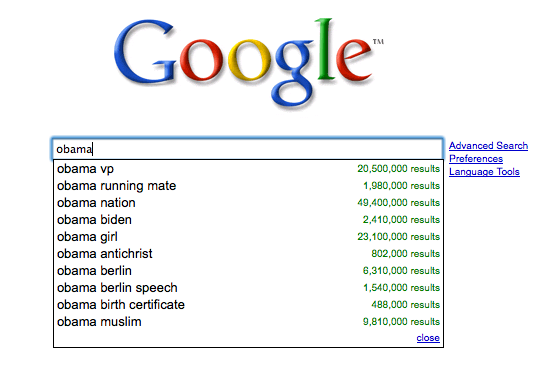
Oh, and my rant doesn’t end there. Another feature that was recently added, Google Suggest, has been more trouble than it has help. I can’t even count how many times I’ve went to Google something only to have a big list of suggestions instantly erase the original search query from my head. There are hacky ways to disable that too, but come on Google! There should be options to disable this stuff!
Googlebot Relentlessly Using Bandwidth
When one of my hosting clients complained about continuously running out of bandwidth on his low-traffic site, I took a peek at the access logs and discovered that Googlebot was indexing every single possible day on a simple calendar addon for the phpBB2 forum software installed on the site. (Googlebot is the program that crawls the web indexing everything so you can search for it using Google.)
A quick peek at the access logs showed thousands of Googlebot requests for a forum calendar:
66.249.71.39 - - [01/Sep/2008:17:09:12 -0400] "GET /forums/calendar.php?m=7&d=21&y=1621&sid=79b643b30eer7140adcd2ba76732688a HTTP/1.1" 200 44000 "-" "Mozilla/5.0 (compatible; Googlebot/2.1; +http://www.google.com/bot.html)" 66.249.71.40 - - [01/Sep/2008:17:09:33 -0400] "GET /forums/calendar.php?m=4&d=2&y=2188&sid=e4da1ee0a488096e3897a8f15c31cea2 HTTP/1.1" 200 43997 "-" "Mozilla/5.0 (compatible; Googlebot/2.1; +http://www.google.com/bot.html)" 66.249.71.40 - - [01/Sep/2008:17:09:44 -0400] "GET /forums/calendar.php?m=12&d=4&y=1624&sid=cc5d5084d158457ce3c7a9d38263f553 HTTP/1.1" 200 44076 "-" "Mozilla/5.0 (compatible; Googlebot/2.1; +http://www.google.com/bot.html)" 66.249.71.41 - - [01/Sep/2008:17:10:05 -0400] "GET /forums/calendar.php?m=10&d=15&y=1621&sid=a4e8af0d20715g965b3e616ae6f95004 HTTP/1.1" 200 43751 "-" "Mozilla/5.0 (compatible; Googlebot/2.1; +http://www.google.com/bot.html)" 66.249.71.41 - - [01/Sep/2008:17:10:15 -0400] "GET /forums/calendar.php?m=9&d=13&y=2187&sid=80c79b2491ddf3d8d46076d48a6282d1 HTTP/1.1" 200 43896 "-" "Mozilla/5.0 (compatible; Googlebot/2.1; +http://www.google.com/bot.html)" 66.249.71.40 - - [01/Sep/2008:17:10:26 -0400] "GET /forums/calendar.php?m=5&d=30&y=1618&sid=f0619ba6517an57bcd6a7e9ca6289a32 HTTP/1.1" 200 43820 "-" "Mozilla/5.0 (compatible; Googlebot/2.1; +http://www.google.com/bot.html)" 66.249.71.39 - - [01/Sep/2008:17:10:38 -0400] "GET /forums/calendar.php?m=11&y=2189&d=30&sid=97c0a58bbd2b3914dbf255ea0a2b1a4c HTTP/1.1" 200 44107 "-" "Mozilla/5.0 (compatible; Googlebot/2.1; +http://www.google.com/bot.html)"
A quick Google search turned up many others who’ve had the same problem:
Just found exactly the same on one of my client’s sites. They were complaining that despite being a small site, they’d apparently used all of their bandwidth within 4 days.
They had one of these PHP calendars on their site, where you click the day and it tells you what’s on. Googlebot had tried to index EVERY SINGLE POSSIBLE DAY. And, in the first four days of September, had used up all this site’s bandwidth, clocking up an impressive 19,000 hits and 800MB of bandwidth.
You can use robots.txt to tell all decent robots to push off. I’ve just done that. Let’s see if it works!
So I added a file to the root web directory for the site and named it robots.txt. Inside, I put the following:
User-agent: *
Disallow: /forums/calendar.php
Sure enough, the next time the Googlebot came through it ignored /forums/calendar.php and didn’t use up ridiculous amounts of bandwidth indexing something that need not be indexed.
I can’t blame the Googlebot though. It was just doing its job. The fault goes to the creators of the calendar addon. What they should have done was add a rel="nofollow" to all the links in the calendar. You can add a nofollow tag to individual links to prevent Googlebot from crawling them. Google started using the nofollow tag as a method of preventing comment spam back in 2005.