Raam Dev

Hello, future.

Send2Fax

For the past year or so, I've had a Verizon landline number which I used for my Speakeasy DSL and a fax machine. Now that I have Speakeasy OneLink DSL, which doesn't require a phone line, I don't have any need for the Verizon landline number -- except to use it as my fax. Having a fax machine is really useful to me, so I decided to continue paying the $21 per month for the Verizon phone line.

A few days ago, I decided to look into Internet based faxing services. After checking the prices on a couple different ones, I concluded Send2Fax had the best pricing. $7.95 per month gets me 100 faxes (inbound and outbound). I'm given a dedicated fax number, I can choose the area code for the fax number (or choose a 800 number, in return for not being able to accept international faxes), and best of all I receive faxes as an email, with the actual fax as a PDF attachment. I can then fax the PDF attachment, or any of several other supported attachment formats, including Word files, to any fax machine using nothing but email. I simply create a new email, in the TO field I enter the fax-number@fax.send2fax.com, the subject and body of the email become a coversheet, and my attachment becomes the rest of the fax. Very cool indeed.

Now I can cancel my Verizon account and save $13 per month. Plus, I have the awesome ability to view archived faxes when I login to my account on Send2Fax.com, and I can send/receive faxes anywhere I have access to email.

Bodybuilding on a Vegan Diet

It's been about six weeks since I last worked out regularly. I have no excuses. For the past two months I have been vegan (no meat, fish, poultry or dairy) with the exception of occasional dairy (cheese/whey). I feel a lot healthier without any dairy in my system, however the vegan diet has dramatically decreased my protein intake. I feel as though I've lost a ton of muscle mass in the past six weeks -- but after checking the scale, I believe it's mostly a psychological effect. I'm still 164.2lbs and 13.5% BF -- not at all much different than six weeks ago. Still, I feel physically weaker (again, could be psychological!).

I haven't done any research on vegan bodybuilding, but I know there are successful vegan bodybuilders out there, so it can be done. My brother has done considerable research on the topic and he says there isn't much scientific information available. I'm going to spend at least the next two months concentrating on my workouts and seeing what results I can obtain while on a vegan diet.

The workout routine I'm doing is the same routine I started back in June. It's designed to build muscle, while keeping your metabolism fired up by varying the exercises and hitting many different muscle groups in each workout. There are four parts to the routine which are completed in a single week, with the first half completed back to back (A and B), then a days rest, and then the second half back to back (C and D). I'm using the same weights as I was in June, however I will probably increase the weight over the next two months. To save you from having to view the old posts, I'll copy the workouts here:

    Workout A (Monday)
    Bench Press, 3 sets, 5 reps, 170 LBS
    Dumbbell Row, 3 sets, 6 reps, 45 LBS
    Dumbbell Bench Press, 4 sets, 8 reps, 50 LBS
    Snatch-Grip Barbell Row, 4 sets, 8 reps, 90 LBS
    Incline Dumbbell Press, 3 sets, 12 reps, 40 LBS
    Dumbbell External Rotation, 3 sets, 10 reps, 8 LBS

    Workout B (Tuesday)
    Squat, 3 sets, 6 reps, 100 LBS
    Rear-delt Raise, 3 sets, 10 reps, 20 LBS
    Romanian Deadlift, 4 sets, 8 reps, 100 LBS
    Dumbbell Split Squat, 4 sets, 8 reps 35 LBS
    Swiss Ball Jackknife, 3 sets, 10 reps
    Bicycle Crunches, 3 sets, 50 reps
    Swiss Ball Rollout, 3 sets, 10 reps

    Workout C (Thursday)
    Pullup, 4 sets, 8 reps
    Neutral Grip Dumbbell Press, 4 sets, 8 reps, 45 LBS
    Weighted Chinup, 3 sets, 5 reps, 16 LBS
    Lateral Raise, 3 sets, 8 reps, 25 LBS
    Bench Press, 3 sets, 6 reps, 160 LBS
    Barbell Curl, 3 sets, 8 reps, 50 LBS
    Decline Dumbbell Triceps Extention, 3 sets, 8. reps, 30 LBS 30 LBS
    Incline Dumbbell Curl, 3 sets, 12 reps, 20 LBS

    Workout D (Friday)
    Deadlift, 3 sets, 6 reps, 140 LBS
    Side Plank, 3 sets, 20 second hold
    Front Squat, 4 sets, 8 reps, 60 LBS
    Good Morning, 4 sets, 8 reps, 60 LBS
    Overhead Squat, 3 sets, 5 reps, 30 LBS
    Calf Raise, 3 sets, 10 reps, 35 LBS
    Swiss Ball Curl Up, 3 sets, 15 reps

I'm reading a really good book right now called Pain Free, by Pete Egoscue. It contains exercises designed to get your body back into it's correct alignment and function. I'm starting to incorporate the exercises into my morning yoga routine. I'll write a review of the book once I've given the exercises some time.

Rebates and PO Boxes

I'm sure everyone has filled out rebates. You've probably also had an experience where you never received your rebate back in the mail. Have you ever put down your PO Box as the address to insure the safest arrival of your rebate check? If you have, you probably never received the rebate at all! All rebate forms specifically note that you cannot use your PO Box as a return address. Why?

Well the only reason that makes sense to me is if the rebate companies are intentionally hoping a certain percentage of the rebates never arrive at their destination and therefore are not cashed. Since they are checks, not money orders, the funds remain in the company's bank account until the check is cashed or deposited. They always put a short expire date (90 days) on the checks, so they know if the check has not cleared after 90 days they can consider that money theirs again. Genius.

Whatever they can do to keep their money!

Firefox 2.0 & The Linux Backspace Key

Firefox 2.0 was released on Tuesday and if you haven't already downloaded it, I highly recommend you do. There are several new features which I believe make it worth the upgrade:

  • A huge speed increase, in both starting the browser and loading web pages
  • A very large number of bug fixes over previous versions of Firefox
  • Built-in spell checker, which automatically checks the spelling of words you type inside text boxes, including web based email clients
  • Session-save feature, which allows you launch your browser and have it load all the web pages you were previously viewing

A number of the features which have been included with Firefox 2, such as the spell checker and session saver, were previously available as extensions for Firefox -- those two in particular were my favorite extensions and I'm happy to see them finally built-in.

The disadvantage to upgrading right now is the small number of extensions that have been updated to work with Firefox 2. About 80% of my extensions no longer work after upgrading, however the ones that are most important to me -- the session saver and spell checker -- are already built-in. If there are some extensions you are currently using that you absolutely cannot live without, then make sure they support Firefox 2 before you upgrade!

For those Linux users who have upgraded to Firefox 2, you may have noticed that your backspace key no longer works as a back button to go back one page. The Firefox developers decided to change the backspace action to scroll up one page instead of back one page, as explained here:

The backspace key was mapped to the browser “Back” function in Mozilla for consistency with Internet Explorer. However, to improve consistency with other applications running on Linux, it was decided that this mapping should be optional—and set based on which platform the browser was running on. As a compromise, this preference was created to allow the backspace key to either go back/forward, scroll up/down a page, or do nothing.

You can easily change the backspace action by using about:config (in your address bar) and then changing browser.backspace_action to 0 instead of 1. Restart Firefox, and backspace will have the same action as it did in previous versions.

There are lots of little bells and whistles in Firefox 2 and I'm still discovering them every day. Today for example, while I had about 15 tabs open, I noticed a little arrow on the right edge of Firefox next to all the tabs. Clicking that arrow brings down a list of all the tabs, with each of their titles fully visible. That is an extremely useful feature if you regularly have several tabs open (as I usually have 20+ tabs open at a time).

Great work on Firefox 2 Mozilla and Firefox developers! Don't worry, I won't send you a poisoned cake like Microsoft. 😉

SimplrRaam – Modified Simplr Theme

As you can see, I am now using a modified version of the WordPress Simplr theme by Scott. It took me a good 4 1/2 hours to modify and to make sure everything was working the way I wanted it to.

Changes:

  • The sidebar has been moved from the bottom to the right.
  • Single post pages are shown without any sidebar to make room for actual post content when you're reading the post.
  • Each of the pages (About, Contact, Archives, etc) also do not show the sidebar.
  • From the main page, when you click one of the categories from the sidebar to browse the posts in that category, you will be provided with a sidebar to further navigate via categories while you're reading posts.
  • The theme is designed to stretch with the browser window, so it should work on many different resolutions (even 640x480, though that wouldn't be very usable)
  • Moved the title of the blog into the top left corner, on the same line as the page links
  • Moved the tagline (my quote) to the right corner, under the page links

Important Installation Notes:

  • You can no longer use the Simplr Layout Width or Sidebar Layout options.
  • You MUST change Layout Width to 95% once you have activated the theme.
  • I recommend you set the Base Font Size to 75%
  • If you change the Base Font Size option to something greater than 75%, you may need to increase the following in style.css: div.postcontainer { margin-right: 330px; }
  • The rest of the Simplr options should work.

Screenshot:

Download: simplrraam.zip (379kb)

Keep in mind that I did this in a hurry, so many of my changes to the theme files are not documented. I also plugged in extra CSS styles where I needed to get things working. Please feel free to post comments, fixes, or suggestions to this theme below.

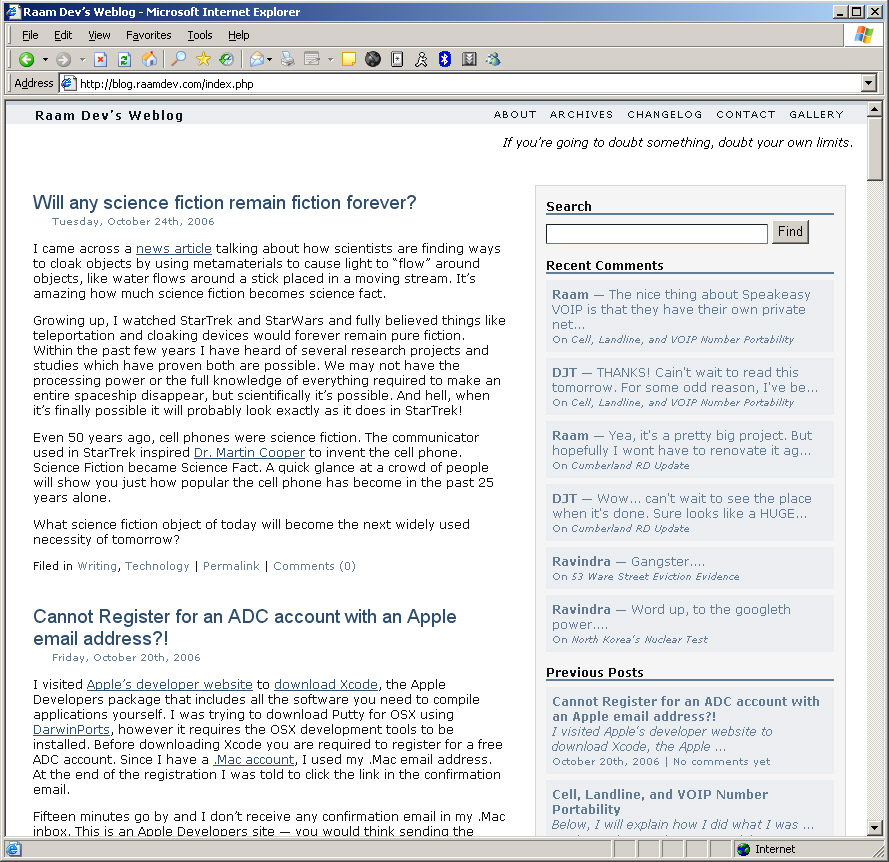
Will any science fiction remain fiction forever?

I came across a news article talking about how scientists are finding ways to cloak objects by using metamaterials to cause light to "flow" around objects, like water flows around a stick placed in a moving stream. It's amazing how much science fiction becomes science fact.

Growing up, I watched StarTrek and StarWars and fully believed things like teleportation and cloaking devices would forever remain pure fiction. Within the past few years I have heard of several research projects and studies which have proven both are possible. We may not have the processing power or the full knowledge of everything required to make an entire spaceship disappear, but scientifically it's possible. And hell, when it's finally possible it will probably look exactly as it does in StarTrek!

Even 50 years ago, cell phones were science fiction. The communicator used in StarTrek inspired Dr. Martin Cooper to invent the cell phone. Science Fiction became Science Fact. A quick glance at a crowd of people will show you just how popular the cell phone has become in the past 25 years alone.

What science fiction object of today will become the next widely used necessity of tomorrow?

Cannot Register for an ADC account with an Apple email address?!

I visited Apple's developer website to download Xcode, the Apple Developers package that includes all the software you need to compile applications yourself. I was trying to download Putty for OSX using DarwinPorts, however it requires the OSX development tools to be installed. Before downloading Xcode you are required to register for a free ADC account. Since I have a .Mac account, I used my .Mac email address. At the end of the registration I was told to click the link in the confirmation email.

Fifteen minutes go by and I don't receive any confirmation email in my .Mac inbox. This is an Apple Developers site -- you would think sending the confirmation email to an Apple email account would be instant! I tried sending the email to my Yahoo account and within seconds the confirmation email arrived.

Cell, Landline, and VOIP Number Portability

Below, I will explain how I did what I was told was impossible: Port a cell phone number to a VOIP line.

I wanted to port my Nextel cell phone number to Speakeasy VOIP so that I could use the number as my home phone and have the ability to forward calls to my new cell phone number -- without giving the new cell number out to anyone. Speakeasy VOIP, and all VOIP providers as far as I know, cannot port (carry over) a cell phone number, only landline numbers.

So I called Verizon and asked if I could transfer my Nextel cell number to Verizon and use it as my home landline phone. They said I could and that it might take up to 4 weeks. They confirmed that I would continue to receive calls on my Nextel cell phone until the hour they actually make the transfer, so that I wouldn't be missing any calls.

I then talked to Speakeasy VOIP tech support again and asked if I could transfer my landline number from Verizon to Speakeasy VOIP. I explained that I was going to transfer my Nextel cell number to Verizon first and then transfer the Verizon landline number to Speakeasy VOIP. The tech told said as long as the number is a landline number, they can transfer it. He also explained it could take up to 4 weeks, but that I would continue receiving calls until the very hour they actually make the transfer, at which point my VOIP phone equipment should already be setup.

A few days later, I called Verizon to transfer my Nextel cell number to a landline number. I explained that I did not want an actual phone line installed in my house with that number and that I just wanted to use call forwarding (an extra $1.60 per month) to forward all the calls to my new (T-Mobile) cell number. The Verizon representative took my information, including my Nextel cell number, Nextel account number, and the T-Mobile cell number to which I'm going to forward the calls. The rep explained that if the T-Mobile number to which I am forwarding calls is a long distance number, I'm going to be hit with long distance charges every time a call is forwarded. She suggested a $34.99 package that included Verizon nationwide long distance and told me after taxes and other fees, the total was going to come to around $48 per month. I wasn't too concerned with the price because as soon as the Nextel cell number was a working Verizon landline number was going to be transferring the number to Speakeasy VOIP. I was told that I would experience no outage on my Nextel number and as soon as the number is transferred over to Verizon, the call forwarding would already be in place to forward calls to my T-Mobile number.

After talking to a long recording, confirming and agreeing to the transfer, everything was all set to transfer the number from Nextel to Verizon. About a week later, the transfer was done. No extra phone lines, no phone technician, just a simple transfer from Nextel to Verizon, with Verizon using call forwarding to automatically forward the calls to my new T-Mobile number. One thing worth mentioning about the Verizon call forwarding is that people calling me would hear three rings before the call was even forwarded to my cell phone. On the 4th ring, my cell phone would actually ring. So usually people would hear 5 rings before I answered.

I then called Speakeasy and informed them I wanted to transfer my Verizon landline number to Speakeasy VOIP. The Speakeasy VOIP service requires that you already have their OneLink DSL package. I upgraded to that a few months ago, so I was all set. They took all my information, including my Verizon account number and the number I was transferring, and after going through the same recording to confirm all the information and agree to the transfer, everything was all set for the second transfer. About two weeks later I received the VOIP hardware, hooked it up between my DSL modem and my router, and left it alone. A few days after that, I received an email explaining how to login to the VOIP Web Portal. I logged into the portal right away and was able to configured call forwarding. Again, I set it up to forward all calls to my T-Mobile number.

The next day I received another email containing the port date for the phone service. On that day (which was today), the VOIP service took over and since I already setup call forwarding on Speakeasy's VOIP Web Portal, the calls to my old Nextel number were automatically forwarded to my T-Mobile number. I turned on the "Hide my Identity" option on my T-Mobile Blackberry, so everyone I call doesn't get to see my new T-Mobile number. I simply continue giving out the number I've been giving out and it will still ring to my cell phone.

The nice thing about this setup is that I can turn off the call forwarding on the weekends and force everyone to leave a message. With the VOIP Web Portal, I can even specify which numbers should be forwarded to my cell phone even when call forwarding is turned off. That way family members, and anyone else I specify, will still be able to get through. Overall, my experience was very good and everything went smoothly and happened relatively quick.

Apache Error: Permission denied for /images/

I was trying to test a project I'm working on using my local Apache web server. Everything worked fine, except that it wouldn't load any of the images. I dealt with it for awhile, until I couldn't take it anymore. Why the hell weren't the images showing up?

I tried accessing http://localhost/images/ where they are stored and it said permission was denied. So I tried accessing another directory under the root, in this case /notices/, and everything worked fine. I was able to list the contents of the directory and access the files inside. OK, so I should be able to simply change the permissions on the /images/ directory so they match /notices/. But wait... they already match!

[code]
drwxr-xr-x 3 raam raam 4096 Sep 7 13:31 images
drwxr-xr-x 3 raam raam 4096 Sep 7 13:31 notices
[/code]

OK, so maybe the permissions of the files themselves are wrong? Nope, those match too. I dealt with a problem similar to this awhile back and I resolved it by asking for help in #apache on EFNet. So I decided to head over the #apache once again and ask for help. When I entered the channel, the topic of the room was set to "Read your error log and use your own domain". So before I asked anything, I decided to check my error log. Sure enough, here's what I found in /var/log/apache/error.log:

[code]
raam@mars:/var/www$ tail /var/log/apache/error.log
[Tue Oct 17 14:30:42 2006] [error] [client 127.0.0.1] File does not exist: /usr/share/images/logout.png
[Tue Oct 17 14:30:42 2006] [error] [client 127.0.0.1] File does not exist: /usr/share/images/aerchannel.png
[Tue Oct 17 14:30:46 2006] [error] [client 127.0.0.1] Directory index forbidden by rule: /usr/share/images/
[Tue Oct 17 14:30:48 2006] [error] [client 127.0.0.1] Directory index forbidden by rule: /usr/share/images/
[Tue Oct 17 14:32:48 2006] [error] [client 127.0.0.1] Directory index forbidden by rule: /usr/share/images/
[Tue Oct 17 14:32:56 2006] [error] [client 127.0.0.1] Directory index forbidden by rule: /usr/share/images/
[Tue Oct 17 14:33:31 2006] [error] [client 127.0.0.1] Directory index forbidden by rule: /usr/share/images/
[Tue Oct 17 14:40:42 2006] [error] [client 127.0.0.1] Directory index forbidden by rule: /usr/share/images/
[Tue Oct 17 14:41:44 2006] [error] [client 127.0.0.1] File does not exist: /usr/share/images/logo.jpg
[Tue Oct 17 14:41:52 2006] [error] [client 127.0.0.1] Directory index forbidden by rule: /usr/share/images/
[/code]

Ah hah! "Directory index forbidden by rule: /usr/share/images/" Thats odd, there's rule preventing it? So I looked over my httpd.conf AGAIN. After a quick search of "images", I found this:

[code]

Alias /icons/ /usr/share/apache/icons/


Options Indexes MultiViews
AllowOverride None
Order allow,deny
Allow from all

Alias /images/ /usr/share/images/


Options MultiViews
AllowOverride None
Order allow,deny
Allow from all


[/code]

Alias /images/ /usr/share/images/!? What the hell? How inconvenient is that? You would think that the Apache developers would assume that people will have a directory called /images/ in the root of their web path. It is after all a very common directory used to store images for the website. As soon as I removed the alias definition for images and restarted apache, everything worked perfectly. I was able to access /images/ and all the pictures showed up on my site.

Cumberland RD Update

Here are a few pictures of the on-going work of the Cumberland RD unit, which previously had a tenant whom I had evicted. Steve Stairs, the contractor doing the work on the unit, charged me $2,400 to strip all the old wallpaper from the walls, patch several areas of the sheetrock, paint everything (including the ceiling), paint the moldings and part of the bathroom a separate color, replace an entire bedroom wall with new sheetrock (the old wall was falling apart too badly to simply patch), replace the front door with a solid door, and replace two bedroom doors. I will post new pictures as soon as he finishes.

Over the weekend I took some pictures of an old police car and some birds taking a bath. DJT, I thought you might like the police car. 🙂

Bay State Marathon Traffic

Did anyone else get stuck in this? I left home around noon time to grab a coffee in Drum Hill (Chelmsford), fully aware there was a marathon going on today. However, this wasn't like most of the marathons I see happening along the boulevard and in Lowell. Starting from the Aiken St bridge, going towards Nashua along the VFW Highway, they closed all the bridges going into Lowell (and Chelmsford). They allowed traffic out of Lowell and onto VFW Highway, but not in the other direction. So I decided to drive all the way towards Nashua, hop on RT3 and get off the exit for Chelmsford. As I neared the RT113 bridge in Tyngsborough, the noticed the traffic was backed up for two miles. And knowing how messed up the lights at that intersection are, there was no way I was going to wait in that traffic. So I turned around, went all the way back through the traffic I had already been through, took a couple of back roads to avoid some of it, went past my house, then took the bridge into downtown Lowell. There was some traffic that way too, but it wasn't nearly as bad.

I basically spent 1 hour in traffic, in Lowell. There should have been signs, several days prior to the marathon, which announced which bridges would be closed to traffic. Instead, the signs simply said "Expect Significant Delays". That isn't very helpful if they don't inform you how to avoid the "significant delays"!

A Free Mac Mini and Bad 3rd Party Memory


I now have two Mac mini's sitting on my desk. David (at Aerva) gave me the broken Mac mini that was sitting in the office unused. Here are the specs:

  • Mac mini G4 1.25ghz
  • 1GB RAM
  • 40GB HD
  • DVD-ROM/CD-RW
  • ATI Radeon 9200 32MB graphics card

I brought it home, turned it on, and sure enough it wouldn't boot. So I went to MacEdge in Nashua, NH and gave it to them for repair, only to have the problem incorrectly diagnosed as bad 3rd party memory; or so I thought. Here's the letter I wrote to the Mac technician the second time I brought the computer in:

----------------------------------------------------------------------------------------------------
Dear Mac Technician:

I originally brought this Mac mini in for repair because it would not boot. I have the care plan on it, so I should be covered for another 2 years (purchased in Jun of 2005). A few days ago, a Mac tech called and informed me the problem was bad 3rd party memory. This being the case, it was not covered under warranty. So the Mac tech reinstalled the software, stuck the old memory back in the Mac and I paid $75 when I picked it up.

When I arrived home, I plugged the Mac in, fully expecting it not to work. However, it booted with the new software, asked for my registration information, and finally booted into the OS. I was then prompted to download updates, which I did, and then went to bed.

The next morning the Mac mini was still running. It had finished installing updates and asked me to reboot, so I did. After rebooting however, I received the following message:

“You need to restart your computer. Hold down the Power button for several seconds of press the Restart button.”

I tried both warm and cold boots, and still receive that same message. I have another Mac mini (also a G4 but 1.42ghz instead of the 1.2ghz ) which has been running flawlessly since I purchased it over a year ago. I removed the RAM from the broken Mac mini and put it in my original working Mac mini. It booted fine. I tried restarting it, installing updates, and using the software, and it works perfectly. Keep in mind this is while using the “bad 3rd party memory”.

Puzzled, I took the RAM from my original Mac and put it in the broken one. After booting, I received the same message asking me to restart.

So it appears as though the problem is not bad 3rd party memory, but rather another issue, possibly a bad motherboard, which would be covered by the care plan.

Regards,
Raam Dev

----------------------------------------------------------------------------------------------------

The second time I brought in the computer, it did not have the "bad 3rd party memory", it had my known good memory inside. About a week later, I picked up the Mac mini again and the tech's notes said that there was nothing wrong with the computer. He reinstalled the software, rebooted several times, left it running for over 48 hours, ran a couple of CPU and memory intensive applications, and never once did anything go wrong. Luckily, I did not have to pay anything the second time, since they did not discover any problem.

The tech's notes also gave me a very helpful clue: He said that installing the OS with bad memory could corrupt the Kernel of the OS. That means that replacing the bad memory with working memory would not fix the problem because the kernel itself is corrupt. So I concluded that I should be OK to use the memory, as long as I don't install the OS using that memory.

I tested my theory by attempting to upgrade my original Mac mini (1.42ghz) from Panther to Tiger, using the Tiger upgrade CD I accidentally found in my Mac mini box yesterday and the "bad" memory. Sure enough, I couldn't even get the install to start. It kept giving me weird errors and would not allow me to proceed with the upgrade. As soon as I took out the bad memory and added my original memory, the install worked flawlessly.

I'm a bit nervous using the "bad" memory in my other working system, only because I don't feel confident that it will continue working forever. The system could one day decide to crash out of the blue. Since I don't use the Mac mini for anything besides becoming familiar with the OS, this shouldn't be a problem. However, I do plan to use my other Mac mini (the slower 1.25ghz one) as a Debian Linux server, so I'll have to make sure it has the good memory inside.

Follow the Keychain & Convert .dmg to .iso

Last night on the way home from Aerva, at around 6:20pm, I spent 1 hour driving 6 miles on Massachusetts Ave. It usually takes me 10 - 15 minutes at that time of the day. What was supposed to be a 40 minute commute turned into a 1.5 hour commute. That's why I really have to rent a place in Cambridge when I start working fulltime at Aerva. Spending 2 - 3 hours per day commuting wouldn't be worth it.

I observed an odd phenomenon yesterday while driving in my truck. As I was driving up the on-ramp to the highway I noticed my keychain was swinging in the opposite direction as the truck was turning. It was pointing in the direction of the truck's center of gravity. That's when I noticed my head was tilting in the exact same way as my keychain was. As the on-ramp ended and the truck straightened out, I noticed my head was straightening in exact sync with the keychain. As the trucks center of gravity moved back to the center, so did my head. I think we all do this unconsciously and it probably has something to do with the mechanism in our ear canal that tells us which way is up. What impressed me the most was how in sync the movement of my head was with the movement of the keychain.

I wanted to upgrade my Mac mini's software to the Tiger edition of MacOS X (aka version 10.4), however I did not want to pay for it. So I spent a couple of hours searching for and downloading the 4 CDs required to install Tiger. I found a torrent online which contained a ZIP file of all four CDs, about 1.8GB. After unziping the file, I discovered four files which had .dmg extensions. Argh! I was hoping they were .iso files that I could simply burn to a CD. From my little experience with Mac's, I know that .dmg files are Mac file type. I did some quick Googling and found a way to convert .dmg files into .iso files using a Mac machine:


hdiutil convert /path/to/filename.dmg -format UDTO -o /path/to/savefile.iso

So I used WinSCP to transfer all four .dmg files to my Mac and then converted each one to an ISO format. It was going pretty slow for a network transfer (about 800kbps), so I decided to try using the Windows FTP command to FTP them instead. I figured that maybe the extra encryption overhead required by SCP was causing the slow transfer. Oddly enough, I was unable to convert the .dmg files I transferred using Windows FTP. The hdiutil command was giving weird errors. So I transferred all of them using SCP and they converted perfectly. I then transferred them back to my Windows computer and prepared to burn them to a CD.

I wanted to test out my LightScribe CDR drive, so I installed the LightScribe software first. I wanted to create a cool CD label that looked like the original Mac OS X CD, so I thought I could just scan my old Pather CD and use that. When I opened up my Mac mini box guess what I found. An original Tiger upgrade CD! All this time and work, and there's a Tiger CD sitting in the Mac mini box! Oh well, maybe I'll find a use for the four CD images and all that time and work won't be for nothing. Oh wait, its already not for nothing because I learned how to convert .dmg files into .iso files!

Windows and OSX Folder Replacement: Different!

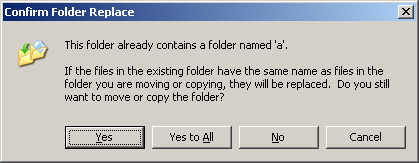
In Windows, when drag and drop a folder into another folder that contains a folder with the same name, Windows asks you the following:

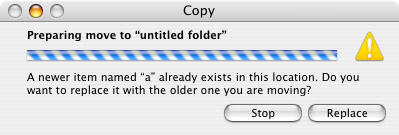
If you do the same thing on Mac OSX, you are prompted with a similar warning and question:

Notice the title of the Windows dialog box? It says "Confirm Folder Replace". See the OSX dialog box? It says "Copy". Now, you'd think that answering "Yes" in Windows and "Replace" in OSX would do the same thing, right? Well they don't!

In OSX, the folder is "Replaced" by the contents of the folder you are moving. So lets say you have a folder called "My Photos". Inside there you have a folder called "2006 Pictures". You also created a folder on your Desktop called "2006 Pictures" and you just finished moving pictures from your digital camera to the folder on your Desktop. When you're finished deciding which pictures to keep and which to throw away, you drag the "2006 Pictures" folder into your "My Photos" folder. Since there's already a "2006 Pictures" folder in there with all the other pictures from that year, you are asked what to do.

In Windows, if you choose "Yes" or "Yes to All", your pictures are simply added to the existing "2006 Pictures" folder; any pictures that were already in there will remain there (assuming they don't have the same name as the files you're moving). In Mac OSX however, choosing replace would remove the current "2006 Pictures" folder and replace it with the one you're moving! You would lose all your other pictures from that year and the "2006 Pictures" folder would only contain the images you just got off your camera!

It took me about an hour to figure this out. I was installing Eclipse on my MacMini and then adding the PHPEclipse plugin. To add the plugin, you simply have to copy two folders into your Eclipse installation folder. On my Windows PC's, I just dragged and dropped, so when I did the same on the Mac, I expected the same result. Every time I tried launching Eclipse after installing the plugin, I would receive all kinds of errors. I finally figured out it was because all the default plugins that are required for Eclipse to run, were being replaced by a plugins folder that contained nothing but the PHPEclipse plugin!

North Korea's Nuclear Test

I believe North Korea's actions can be explained and I understand where they're coming from.

The United States is already heavily invested in the Middle East, with a huge military presence. Many threats of sanctions have been made towards Iran due to their nuclear program, which Iran has repeatedly stated is for peaceful purposes only and has even gone through many diplomatic talks with the UN and with many of the current nuclear nations. I can understand why North Korea, who has made no talks of peace and kept much of their nuclear program secret, would fear the US and feel that they need to keep on their toes with their own nuclear technology.

I'm not saying that North Korea should be left alone and do as they please. North Korea has a communist government lead by Kim Jong-il, and we know what history shows us about communism.

The big issue that this situation raises is the possibility of a Middle East arms race between the smaller nations of Iran, North Korea, South Korea, and Japan. An arms race between these countries would obviously be very bad for everyone.

I'm wondering if I'll live through the same kind of daily fear and lingering air of danger my parents lived through with the previous nuclear arms race.

PHP & MSSQL Difficulties

I managed to finish a couple of small programming tasks this week that have been on my "todo" list for quite some time. I finally got around to updating the Victoria's Garden Registration Request pages so that they now automatically send email notifications to the customers with their login and password, a task which previously had to be done manually. I took a peek at the victoriasgardenonline.com database today and I was surprised to find a total of over 5,000 records across three different tables.

Now I need to figure out how I can write a couple of utilities using PHP to connect to the MSSQL database on the server. This should be simple. Install PHP on the server, which is already running an IIS web server, and when write the PHP to connect to the local MSSQL database. Well, I was unable to successfully install PHP on the Windows 2000 server, and I am limited in how much I can do because it's a production server and I don't want to screw around with it too much. I would much rather run a second web server using Apache on my Linux box, which is running on the same LAN. I would then need to setup a connection between the Linux server and the MSSQL database on the Win2k Server. Again, I tried this but ran into a few problems. I'll hopefully be able to tackle it again this weekend.

The MacBookPro is growing on me

I've recently fallen in love with feel and stability of Apples MacOSX operating system. I would really love an Apple MacBookPro in place of my IBM Thinkpad T41. I've been doing a bunch of computer work for Heidi at Life Alive, a vegan restaurant here in Lowell. She has a MacBook and I've had to use it quite a bit recently to configure remote access to her office (which isn't working by the way, hah).

I checked eBay to see how much Thinkpad T41's were selling for and I was shocked with what I found. $700! Holy crap, laptop prices have come down. Not more than 8 months ago the T41's were sellin' for $1600 on eBay! I bought it for $1800 brand new on eBay, when the retail price in stores was $2600. Oh well, maybe I'll hold onto it for another year or two and get a MacBookPro later.

I tried installing a Gnome MacOSX-like theme on my laptop (Ubuntu Linux) and that actually turned out pretty nice. Theres a lot of tweaking required to make it look and feel the way I want and I don't have time to do that right now, but it's nice to know it can be done. I also upgraded the Gnome Display Manager (gdm) and amazingly, everything worked much faster. Applications loaded faster, web browsing was faster, even scrolling was faster. I had no idea how slow things were running until I felt the faster speed. I'm not sure why upgrading gdm would make things run faster, but it did.

.Mac and WebDAV

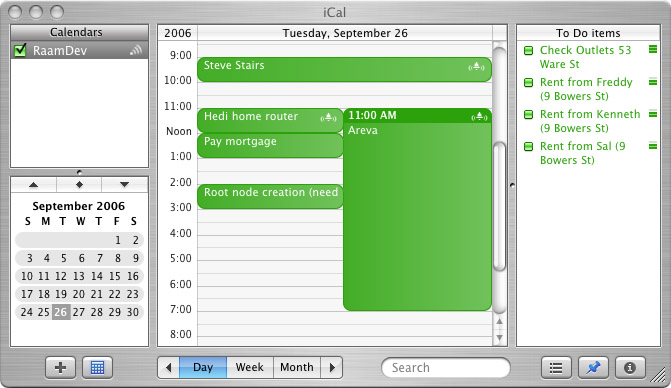
Last night I decided to register for a .Mac account to use with my Mac Mini. The main reason I decided to sign up was to test the iCal publishing features. I discovered that I can sync my Blackberry with my iCal Calendar on the Mac using PocketMac, then publish the calendar to .Mac and view/subscribe/edit the calendar from my Windows and Linux computers. This would be enormously useful as I'm constantly managing my calendar on a day-to-day basis.

The .Mac registration process was painless and smooth, much simpler than Microsoft's Passport crap, which is even difficult to grasp the concept of. The only thing I didn't like about the .Mac sign-up process is that they don't send you any kind of confirmation email to your "other email address" and instead only send an email to your new .Mac address. Having a confirmation email sent to your other email address containing the mail server information for your new .Mac email account would be very useful.

After signing up, I entered my username and password in the .Mac section of the Preferences. After that, the email application was automatically configured for my .Mac account; nice. I then opened PocketMac and after setting a few options, I synced my Blackberry. All my contacts and all my Calendar entries magically appeared in the beautiful iCal Calendar. Very nice.

OK, so this is all well and nice but for this to be really useful, I need access to the calendar from multiple computers. This is supposed work by simply publishing the calendar to my .Mac account and then subscribing to the calendar from another application that supports WebDAV. I tried Mozilla Sunbird, which is still in it's alpha stages of development (comon guys! finish this!) and sometimes it worked, sometimes it didn't. I was able to subscribe to a previously published calendar, however I wasn't able to publish one. And then when I tried subscribing to the calendar which was exported from the Blackberry, I received weird errors, even when trying to view the calendar on Apple's website.

Well, during my research on "other" applications that support WebDAV, I discovered that WebDAV is open source and that it's possible to simply setup your own WebDAV server to which you can publish calendars using iCal and even imitate the iDisk feature of the Mac OS (a remote disk feature that allows you to store and access files from a central location). Wow, this is awesome! I can setup my own WebDAV server, sync my Blackberry with my Mac, publish and have access to my Calendar from anywhere. I'm glad I didn't take the plunge and pay for a subscription to .Mac, which by the way is $100 per year. I like having an @mac.com address, but I'm not sure it's worth the $8.60 per month.

So last night, I tried setting up a WebDAV server. Yes, thats right, I "tried". I spent hours trying to configure it properly, but kept running into weird problems. Not only problems with WebDAV, but with Debian's packaging system as well. So, I've put that aside for now. I have 59 days remaining on my .Mac trial account, so as long as I get a working WebDAV server running before then, I should be all set.

Monarch Butterflies

I've been seeing a lot of Monarch Butterflies outside my office window. That wouldn't be strange if not for the fact that I'm in the city, on the 8th floor. Sometimes I'll see three of four of them at once, flying around outside the window. I've even seen them on the highway, flying just above the cars.

Maybe it is normal, I don't know. I've never had to make regular trips into Boston before, so I can't say that it's something unusual for this time of the year. I've read that Monarch's migrate between August and October, so it may very well be normal. I've also heard that insects are the first species to feel the effects in changes to the weather and climate.

Tomorrow is supposed to be 78 degrees; October 4th, two weeks into Autumn and we have 78 degree weather.

Having Fun with SQL (not)

I was up until 6:00am yesterday morning working on a project for Aerva. I wrote the longest SQL query I've ever written. Here's what it looks like:
[sql]
SELECT ac_users.*, ac_users2customers.*, ac_users2users.*,
customers.*, users.user_id, users.username
FROM ac_users, ac_users2customers, ac_users2users, customers, users
WHERE ac_users2customers.customer_id = '$this->custid'
AND ac_users2users.user_id = '$this->userid'
AND ac_users2customers.ac_user_id = ac_users2users.ac_user_id
AND customers.customer_id = ac_users2customers.customer_id
AND users.user_id = ac_users2users.user_id
AND customers.login_id = users.username
OR ac_users2users.user_id = '$this->userid'
AND ac_users2users.ac_user_id = ac_users.ac_user_id
AND ac_users2customers.ac_user_id = ac_users.ac_user_id
AND customers.customer_id = ac_users2customers.customer_id
AND users.user_id = ac_users2users.user_id
OR ac_users2customers.customer_id = '$this->custid'
AND customers.customer_id = '$this->custid'
AND ac_users2users.ac_user_id = ac_users2customers.ac_user_id
AND ac_users.ac_user_id = ac_users2users.ac_user_id
AND users.user_id = ac_users2users.user_id
AND users.username = customers.login_id
ORDER BY ac_users.first_name;
[/sql]
Those of you who are familiar with SQL might notice some of this is redundant and unnecessary. I know. Right now I don't care; I just need it to work. What does this SQL query do? It selects all users from the ac_users table, with a few conditions. I will attempt (at least partly) to explain what it does in English:

ac_users should only be seen by users who have the ac_user assigned to them (in ac_users2users) or if the company the user belongs to has a login_id that matches the username of another user who has been assigned to the ac_user (again, in ac_users2users).